AE2 Pattern Archive
🟡 Updated this year⚠️ Install Order · 2 steps
Install in this order, then this mod last — most mods fail to load without their framework and dependencies in place.
🖼️ Gallery (6 images)

🔍 Analysis
- 👍 0.0% endorsement rate
- 🏆 #27 of 335 forge mods in this game by downloads
📋 About This Mod
# AE2 Pattern Archive 📦 **For Minecraft 1.20.1 | Forge** *Please scroll down for the Chinese description. / 中文介绍请向下滑动查看。* --- ## 🇬🇧 English Description ### 📖 What is this mod? AE2 Pattern Archive is a highly practical utility add-on for **Applied Energistics 2 (AE2)**. Have you ever dreaded the tedious process of manually encoding hundreds of patterns when starting a new world or joining a new server? This mod solves that problem by allowing you to easily export your AE2 pattern library into a file and import it anywhere. Encode your patterns once, and use them forever. You can seamlessly bring your automated crafting setups across different modpacks, single-player saves, and servers. You can even import archive files given to you by your friends and use their patterns directly. Beyond simply transferring data, this mod provides a complete pattern logistics system. It allows you to centrally store your imported patterns, organize them into custom groups, and quickly distribute them to specific Pattern Providers in your factory. ### ✨ Key Features * **Cross-World Pattern Sharing**: Export all patterns in your network into an `.nbt` file. You can save it to your local computer, upload it to the server's private cloud, or create a public archive for everyone on the server to share. * **Pattern Logistics & Management**: The Hub serves as a central manager. Inside, you can sort your patterns, create custom routing groups, and filter them based on target machines or Mod IDs. * **Smart Distribution System**: Distributes patterns based on their type. **Crafting Patterns** can be globally dispatched to your network via the Execution button in the Routing Hub GUI. For **Processing Patterns**, use the Pattern Addresser tool and hit `V` to physically distribute them into matching Pattern Providers based on your active groups. * **Easy Recipe Fixing**: Playing a different modpack where the target machines have changed? You can easily fix and re-map broken patterns directly via JEI integration without having to encode them from scratch. * **Whitelist System**: Easily share your Pattern Routing Hub with your friends by adding their usernames to the whitelist, allowing safe and cooperative base building. ### 🧱 Blocks & Items * **Pattern Exporter**: Connects to your AE2 network. Click to scan and export all your encoded patterns into an archive file. * **Pattern Importer**: Reads an archive file from your computer or the server, and physically loads the patterns into an adjacent Routing Hub. * **Pattern Routing Hub**: A massive virtual pattern storage terminal. You can group patterns, rename routes, fix broken recipes, and execute the distribution of Crafting Patterns to your network from here. * **Pattern Addresser**: A portable logistics tool for Processing Patterns. Shift+right-click the Hub to bind it. Right-click a Pattern Provider to scan the provider array and register them. Hold the tool and press `V` to distribute processing patterns into them. ### ⚙️ Basic Workflow 1. Place a **Pattern Exporter** to save your current AE2 patterns into a local or server archive. 2. In your new base, place a **Pattern Routing Hub** and a **Pattern Importer**. Use the Importer to load your saved archive. 3. Open the Routing Hub to review and arrange your patterns into groups. If some machines are mismatched due to changing modpacks, click to fix them using JEI. 4. **To distribute Crafting Patterns**: Open the Pattern Routing Hub GUI and click the "Execute/Start" button in the top right corner. You will be prompted to manually filter and select the specific patterns you want to transfer (or simply click "Select All"). The system features an **anti-duplication check**: during the transfer, it will actively scan your network and deliberately skip any crafting patterns that already exist in your Pattern Providers, preventing wasteful duplicates! 5. **To distribute Processing Patterns**: Bind a **Pattern Addresser** to the Hub (Shift + Right-click), then right-click the **Pattern Providers** adjacent to your target physical machines (like crushers or inscribers) to scan and record the provider array. While holding the Addresser, press `V` (default) to automatically distribute the matching processing patterns into them. ### 📦 Dependencies & Compatibility * Requires Minecraft 1.20.1, Forge 47.4.16+, and Applied Energistics 2. * **JEI** is highly recommended for unlocking the recipe fixing features. * **Jade** is supported for quickly viewing equipment online status. * Broadly compatible with most AE2 add-on pattern providers (e.g., Advanced AE). ### 📜 License **All Rights Reserved (ARR)** © 2026 Sakurain. All Rights Reserved. * **Players & Modpack Creators**: You are entirely free to download, play, and include this mod in any publicly distributed (free) modpacks without the need to ask for permission. * **Developers & Reposters**: This is a closed-source project. Under the "All Rights
# AE2 Pattern Archive 📦
For Minecraft 1. 20. 1 | Forge
Please scroll down for the Chinese description. / 中文介绍请向下滑动查看。
## 🇬🇧 English Description
### 📖 What is this mod?
AE2 Pattern Archive is a highly practical utility add-on for Applied Energistics 2 (AE2). Have you ever dreaded the tedious process of manually encoding hundreds of patterns when starting a new world or joining a new server? This mod solves that problem by allowing you to easily export your AE2 pattern library into a file and import it anywhere.
Encode your patterns once, and use them forever. You can seamlessly bring your automated crafting setups across different modpacks, single-player saves, and servers. You can even import archive files given to you by your friends and use their patterns directly.
Beyond simply transferring data, this mod provides a complete pattern logistics system. It allows you to centrally store your imported patterns, organize them into custom groups, and quickly distribute them to specific Pattern Providers in your factory.
### ✨ Key Features
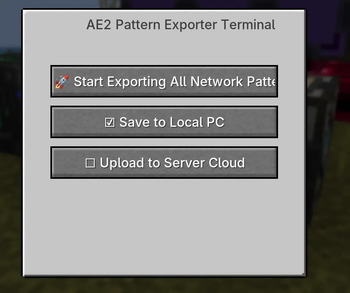
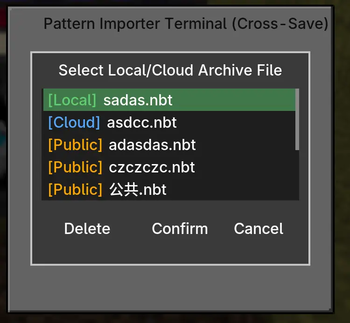
Cross-World Pattern Sharing: Export all patterns in your network into an `.nbt` file. You can save it to your local computer, upload it to the server's private cloud, or create a public archive for everyone on the server to share. Pattern Logistics & Management: The Hub serves as a central manager. Inside, you can sort your patterns, create custom routing groups, and filter them based on target machines or Mod IDs. Smart Distribution System: Distributes patterns based on their type. Crafting Patterns can be globally dispatched to your network via the Execution button in the Routing Hub GUI. For Processing Patterns, use the Pattern Addresser tool and hit `V` to physically distribute them into matching Pattern Providers based on your active groups. Easy Recipe Fixing: Playing a different modpack where the target machines have changed? You can easily fix and re-map broken patterns directly via JEI integration without having to encode them from scratch. Whitelist System: Easily share your Pattern Routing Hub with your friends by adding their usernames to the whitelist, allowing safe and cooperative base building.
### 🧱 Blocks & Items
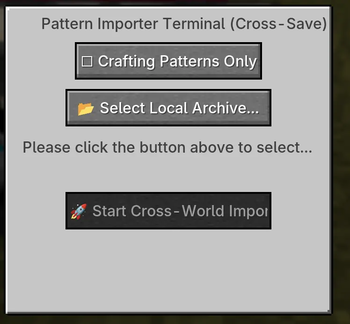
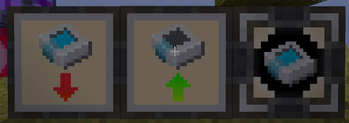
Pattern Exporter: Connects to your AE2 network. Click to scan and export all your encoded patterns into an archive file. Pattern Importer: Reads an archive file from your computer or the server, and physically loads the patterns into an adjacent Routing Hub. Pattern Routing Hub: A massive virtual pattern storage terminal. You can group patterns, rename routes, fix broken recipes, and execute the distribution of Crafting Patterns to your network from here. Pattern Addresser: A portable logistics tool for Processing Patterns. Shift+right-click the Hub to bind it. Right-click a Pattern Provider to scan the provider array and register them. Hold the tool and press `V` to distribute processing patterns into them.
### ⚙️ Basic Workflow
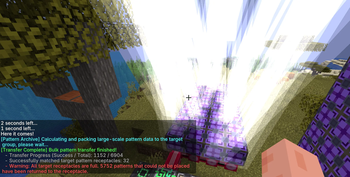
1. Place a Pattern Exporter to save your current AE2 patterns into a local or server archive. 2. In your new base, place a Pattern Routing Hub and a Pattern Importer. Use the Importer to load your saved archive. 3. Open the Routing Hub to review and arrange your patterns into groups. If some machines are mismatched due to changing modpacks, click to fix them using JEI. 4. To distribute Crafting Patterns: Open the Pattern Routing Hub GUI and click the "Execute/Start" button in the top right corner. You will be prompted to manually filter and select the specific patterns you want to transfer (or simply click "Select All"). The system features an anti-duplication check: during the transfer, it will actively scan your network and deliberately skip any crafting patterns that already exist in your Pattern Providers, preventing wasteful duplicates! 5. To distribute Processing Patterns: Bind a Pattern Addresser to the Hub (Shift + Right-click), then right-click the Pattern Providers adjacent to your target physical machines (like crushers or inscribers) to scan and record the provider array. While holding the Addresser, press `V` (default) to automatically distribute the matching processing patterns into them.
### 📦 Dependencies & Compatibility
Requires Minecraft 1. 20. 1, Forge 47. 4. 16+, and Applied Energistics 2. JEI is highly recommended for unlocking the recipe fixing features. Jade is supported for quickly viewing equipment online status. Broadly compatible with most AE2 add-on pattern providers (e.g., Advanced AE).
### 📜 License
All Rights Reserved (ARR) © 2026 Sakurain. All Rights Reserved. Players & Modpack Creators: You are entirely free to download, play, and include this mod in any publicly distributed (free) modpacks without the need to ask for permission. * Developers & Reposters: This is a closed-source project. Under the "All Rights
📊 Mod Details
- Game
- Minecraft Mods
- Author
- Saku_rain
- Version
- 1.0.10-Forge-1.20.1
- Downloads
- 33,428
- Endorsements
- 5
- Category
- forge
- Created
- 3/29/2026
- Updated
- 7/8/2026
- Game Versions
- 1.20.1
- Tags
- management, optimization, technology
🔧 How to Install Minecraft Mods Mods
Download from Modrinth. Use Prism Launcher or drop into your mods folder.
📖 Full step-by-step install guide for Minecraft Mods →
Visit the official mod page for specific installation instructions for this mod.
🎮 Need cheat codes or console commands? Check ur gaming wiki for Minecraft Mods commands, item IDs, and more.
❓ Frequently Asked Questions
Which Minecraft Mods versions does AE2 Pattern Archive support?
The author lists 1.20.1. Other versions may work but are untested by the author.
What is the latest version of AE2 Pattern Archive?
Version 1.0.10-Forge-1.20.1, published 2026-07-08 with 33,428 downloads recorded at the source.
Keep browsing — more Minecraft Mods mods await