Painting Table (Craft Player Heads)
🟡 Updated this year🖼️ Gallery (3 images)
🔍 Analysis
- 👍 1.2% endorsement rate — high engagement, a strong quality signal
- 🏆 #1015 of 1805 datapack mods in this game by downloads
📋 About This Mod
<iframe width="560" height="315" src="https://www.youtube-nocookie.com/embed/kEVrVrcZB7o" title="YouTube video player" frameborder="0" allow="accelerometer; autoplay; clipboard-write; encrypted-media; gyroscope; picture-in-picture; web-share" allowfullscreen></iframe> # **Painting Table** **Craft custom Players Heads!** A crafting station that allows you to craft custom player heads. A survival-friendly way to decorate your world with little blocks! # 🪄Introduction ## What is Painting Table ? Painting Table introduces a survival and multiplayer-friendly way to craft custom player heads, with any kind of textures. Players heads are appreciated to mimic custom small blocks, like small logs, small stones, food, animals, chests, pile of books, bags, etc. ## How to craft and use a painting table? **Painting tables** can be crafted using: - 2 **brushes** - 2 **Planks** of any wood (oak, dark oak, spruce, bamboo, cherry, warped, etc.) The recipe is the following: !(https://cdn.modrinth.com/data/cached_images/dbaedd81aa0e8545cc34f8a585ce81c28fb788f7.jpeg) After you crafted it, you can simply place down your **painting table**. The block has its own UI that shows its requirements. In order to craft custom **players heads**, the painting table except **blue**, **red** and **yellow dyes**, along with **blocks of quartz** that will be consumed as soon as you take the output items. The last item to put is a **book** (either a writable or a written one), that won't be consumed. In this same book, you need to paste the value of the desired player heads textures. In this example below, I set a (https://minecraft-heads.com/custom-heads/head/51324-cake) in the writable book. !(https://cdn.modrinth.com/data/cached_images/076cbb1554d44a2b742f11924d3d74b5683a8d5d.png) You can find many players heads textures on the (https://minecraft-heads.com/) website. In the "Custom Heads" section, search for a head you like, and click on it to open its relative full page. Then, scroll to the `For developers` > `Value` field, and click the `Copy` button. Paste the result in your writable book in the game. If you're using Fabric, you may also be interested in the client-side (https://modrinth.com/mod/headbrowser) mod created by (https://modrinth.com/user/TheVoidBlock) in order to get player heads value. I recommend you to watch the tutorial for more direct explanation and examples. ## Misc. information about painting tables - **Painting tables** can be oriented depending on the player's facing direction. As the block uses display entities, I don't recommend to spam it so much. But you can use a few of them as decoration if you wish. - Like for other crafting station, painting tables return input items the player set in it when it closes it. - For technical reasons, you can't put a hopper, dropper, crafter adjenctly to a painting table, or a hopper minecart below it. These blocks will also be rotated automatically to not face it. # ⚙️Settings <details> <summary>Tick GUI items clear (security for non-vanilla servers)</summary> External versions such as Paper sometimes involve weird behavior with containers. In order to avoid potential items dupe issues with them, you can tick the system that kill items entities players may have managed to drop from a painting table's GUI using this setting. You can **enable**, **disable** or **get** the current state of this setting using these following commands respectively: ``` /function pk_pa_ta:settings/tick_clear_gui_items/true /function pk_pa_ta:settings/tick_clear_gui_items/false /function pk_pa_ta:settings/tick_clear_gui_items/get ``` </details> <details> <summary>Open Container Delay (compatibility for Paper)</summary> This setting allows you to adjust the minimal delay before a waystone trigger its "open" event when opened. This has been introduced to bypass (https://github.com/PaperMC/Paper/issues/13839) on Paper since its 26.1.2 build #17 version. By default, a value of `2` ticks is set if it detects a Paper server. You can **set** a delay (in ticks) with the following command: ``` /function pk_pa_ta:settings/open_container_delay/set {value:<value>} ``` _Example - Set a delay of 2 ticks:_ ``` /function pk_pa_ta:settings/open_container_delay/set {value:2} ``` Or **get** the current delay using the following command: ``` /function pk_pa_ta:settings/open_container_delay/get ``` </details> # 🧰 Other Commands <details> <summary>Give yourself a painting table</summary> If you are an operator of your server or if cheats are enabled in your single-player world, you can give yourself a painting table using these following commands: ``` /function pk_pa_ta:cmd/give/painting_table ``` </details> <details> <summary>Troubleshooting: Recreate all painting tables from the database</summary> If ever painting tables have been broken accidentally (using a
# Painting Table
Craft custom Players Heads!
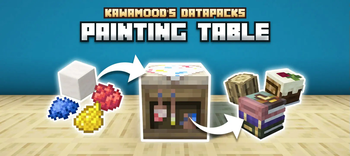
A crafting station that allows you to craft custom player heads. A survival-friendly way to decorate your world with little blocks!
# 🪄Introduction ## What is Painting Table ?
Painting Table introduces a survival and multiplayer-friendly way to craft custom player heads, with any kind of textures. Players heads are appreciated to mimic custom small blocks, like small logs, small stones, food, animals, chests, pile of books, bags, etc.
## How to craft and use a painting table?
Painting tables can be crafted using: - 2 brushes - 2 Planks of any wood (oak, dark oak, spruce, bamboo, cherry, warped, etc.)
The recipe is the following:
!(https://cdn.modrinth.com/data/cached_images/dbaedd81aa0e8545cc34f8a585ce81c28fb788f7.jpeg)
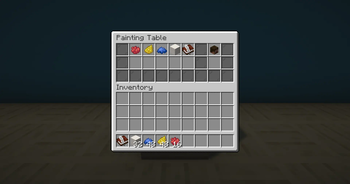
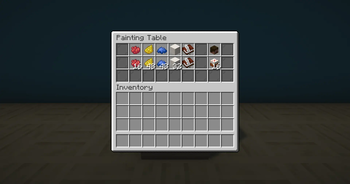
After you crafted it, you can simply place down your painting table. The block has its own UI that shows its requirements.
In order to craft custom players heads, the painting table except blue, red and yellow dyes, along with blocks of quartz that will be consumed as soon as you take the output items.
The last item to put is a book (either a writable or a written one), that won't be consumed. In this same book, you need to paste the value of the desired player heads textures. In this example below, I set a (https://minecraft-heads.com/custom-heads/head/51324-cake) in the writable book.
!(https://cdn.modrinth.com/data/cached_images/076cbb1554d44a2b742f11924d3d74b5683a8d5d.png)
You can find many players heads textures on the (https://minecraft-heads.com/) website. In the "Custom Heads" section, search for a head you like, and click on it to open its relative full page. Then, scroll to the `For developers` > `Value` field, and click the `Copy` button. Paste the result in your writable book in the game.
If you're using Fabric, you may also be interested in the client-side (https://modrinth.com/mod/headbrowser) mod created by (https://modrinth.com/user/TheVoidBlock) in order to get player heads value.
I recommend you to watch the tutorial for more direct explanation and examples.
## Misc. information about painting tables
- Painting tables can be oriented depending on the player's facing direction. As the block uses display entities, I don't recommend to spam it so much. But you can use a few of them as decoration if you wish.
- Like for other crafting station, painting tables return input items the player set in it when it closes it.
- For technical reasons, you can't put a hopper, dropper, crafter adjenctly to a painting table, or a hopper minecart below it. These blocks will also be rotated automatically to not face it.
# ⚙️Settings
Tick GUI items clear (security for non-vanilla servers)
External versions such as Paper sometimes involve weird behavior with containers. In order to avoid potential items dupe issues with them, you can tick the system that kill items entities players may have managed to drop from a painting table's GUI using this setting.
You can enable, disable or get the current state of this setting using these following commands respectively:
``` /function pk_pa_ta:settings/tick_clear_gui_items/true /function pk_pa_ta:settings/tick_clear_gui_items/false /function pk_pa_ta:settings/tick_clear_gui_items/get ```
Open Container Delay (compatibility for Paper)
This setting allows you to adjust the minimal delay before a waystone trigger its "open" event when opened. This has been introduced to bypass (https://github.com/PaperMC/Paper/issues/13839) on Paper since its 26. 1. 2 build #17 version.
By default, a value of `2` ticks is set if it detects a Paper server.
You can set a delay (in ticks) with the following command:
```
/function pk_pa_ta:settings/open_container_delay/set {value:
_Example - Set a delay of 2 ticks:_
``` /function pk_pa_ta:settings/open_container_delay/set {value:2} ```
Or get the current delay using the following command:
``` /function pk_pa_ta:settings/open_container_delay/get ```
# 🧰 Other Commands
Give yourself a painting table
If you are an operator of your server or if cheats are enabled in your single-player world, you can give yourself a painting table using these following commands:
```
/function pk_pa_ta:cmd/give/painting_table
```
Troubleshooting: Recreate all painting tables from the database
If ever painting tables have been broken accidentally (using a
📊 Mod Details
- Game
- Minecraft Data Packs
- Author
- KawaMood
- Version
- V.3.0.9
- Downloads
- 9,612
- Endorsements
- 113
- Category
- datapack
- Created
- 8/19/2024
- Updated
- 6/18/2026
- Game Versions
- 26.2
- Tags
- decoration, game-mechanics
🔧 How to Install Minecraft Data Packs Mods
Download from Modrinth. Use Prism Launcher or drop into your mods folder.
📖 Full step-by-step install guide for Minecraft Data Packs →
Visit the official mod page for specific installation instructions for this mod.
🎮 Need cheat codes or console commands? Check ur gaming wiki for Minecraft Data Packs commands, item IDs, and more.
❓ Frequently Asked Questions
Which Minecraft Data Packs versions does Painting Table (Craft Player Heads) support?
The author lists 26.2. Other versions may work but are untested by the author.
What is the latest version of Painting Table (Craft Player Heads)?
Version V.3.0.9, published 2026-06-18 with 9,612 downloads recorded at the source.
Keep browsing — more Minecraft Data Packs mods await