Items Filter
🟡 Updated this year🖼️ Gallery (2 images)
🔍 Analysis
- 👍 1.1% endorsement rate — high engagement, a strong quality signal
- 🏆 #804 of 1805 datapack mods in this game by downloads
📋 About This Mod
<iframe width="560" height="315" src="https://www.youtube-nocookie.com/embed/5zq956SOhTI" title="YouTube video player" frameborder="0" allow="accelerometer; autoplay; clipboard-write; encrypted-media; gyroscope; picture-in-picture; web-share" allowfullscreen></iframe> # **Items Filter** **Set up easy and automatic sorting systems.** No longer need for laggy and bulky redstone contraptions. The Items Filter provides a better alternative to automatically sort your storage room! # 🪄Introduction ## What is Items Filter? Items Filters allow you to you to filter several types of items from a container placed **above** it to another container placed **below** it. You can choose what items the filter let pass by presetting them in an adjacent **reference** container. Items Filters can also directly drop their sorted items if you there is a fluid block below them (air, water or lava). If you used to use V.2, you may have noticed that the data pack changed its name. This is due to the fact it doesn't strictly rely on hoppers anymore: you can directly pass an item from a chest or a shulker box to another one if you want to. ## How to craft and use an Item Filter? Items Filters can be crafted using: - 6x **Cobbled Deeplsate** - 1x **Hopper** - 1x **Observer** - 1x **Dropper** The recipe is the following: !(https://cdn.modrinth.com/data/cached_images/5d5585b60858ff43245b5dce1241686ee3e3f379.png) When you place an items filter, the side facing your player will show a **tiny grey button**. This is the one you can right-click to toggle mode, that we will explain later. The opposite face shows a **tiny observer icon**. This is where you need to place a **compatible containers** (_all containers having a direct_ `Items` _entry like chests, hoppers, barrels, shulker boxes, dropper, dispenser, etc._). This one need to contain all **reference items**, meaning the one you want to let pass through the relative filter. Other items that don't match those ones will remain in the container above, or continue their path to your system if it is an hopper connected to another. In order to make it work, Items Filters then needs to have : - A compatible container placed above them. - A compatible container placed on their tiny observer icon, and containing items to filter. - A compatible container placed below them to receive the filtered items, or a fluid block (air/lava/water) to directly drop them. !(https://cdn.modrinth.com/data/cached_images/17feaafb4a39efaceb195e168a57a944438eda13.png) I recommend you to see the tutorial video for better explanations and examples. # 🔖 Modes Item Filters have two modes: the **Lax** mode that is the one by default, and the **Strict** mode. Modes are toggleable by right-clicking the little grey button on one of its face. ## Lax mode The Lax mode is represented by the grey color of the button. When an Items Filter is set on Lax mode, it will only take items' `id` into account to filter them, and ignore all their potential **NBT**. Meaning for example, in Lax mode, if you set an enchanted Diamond Sword in the reference container, all Diamond Swords, no matter their enchantments, their damage or any other tag will pass the filter, because they still share the same `id` (`minecraft:diamond_sword`). ## Strict mode The Strict mode is represented by the yellow color of the button. When an Items Filter is set on Strict mode, it will consider the `id` but also **all (non-ignored) tags (before MC 1.20.5) or components (after MC 1.20.5)** of items. In this case, to take back the example above, only Diamond Swords which share the exact same data (enchantments, damage, etc.) will pass the filter. It is useful if you want to items like Enchanted Books, custom Player Heads, or custom items from other data packs. The Strict mode also has the ability of ignoring some tags or components if needed. See the **Settings** section below for explanations. # ⚙️Settings <details> <summary>Ignored components for Strict Mode (Since V.3.1.0)</summary> The Strict mode has the ability of ignoring some components during the filter's checks. By default, no ignored components are set. You can **add**, **remove** or get the **list** of currently ignored components using the following commands respectively: ``` /function pk_it_fi:settings/mode/strict/ignored_components/add {id:"<id>"} /function pk_it_fi:settings/mode/strict/ignored_components/remove {id:""<id>"} /function pk_it_fi:settings/mode/strict/ignored_components/list ``` Example - Ignoring the `"minecraft:repair_cost"` component: ``` /function pk_it_fi:settings/mode/strict/ignored_components/add {id:"minecraft:repair_cost"} ``` There is also a premade sample containing most common components we usually want to ignore: `"minecraft:custom_name"`, `"minecraft:lore"`, `"minecraft:enchantments"`, `"minecraft:damage"` and `"minecraft:repair_cost"`. You can activate it using the following command: ``` /function pk_it_fi:settings/mode/strict/ign
# Items Filter
Set up easy and automatic sorting systems.
No longer need for laggy and bulky redstone contraptions. The Items Filter provides a better alternative to automatically sort your storage room!
# 🪄Introduction ## What is Items Filter?
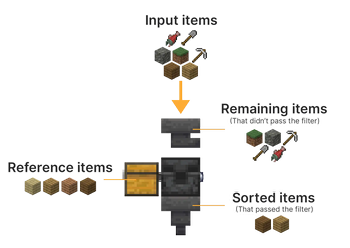
Items Filters allow you to you to filter several types of items from a container placed above it to another container placed below it. You can choose what items the filter let pass by presetting them in an adjacent reference container. Items Filters can also directly drop their sorted items if you there is a fluid block below them (air, water or lava).
If you used to use V. 2, you may have noticed that the data pack changed its name. This is due to the fact it doesn't strictly rely on hoppers anymore: you can directly pass an item from a chest or a shulker box to another one if you want to.
## How to craft and use an Item Filter?
Items Filters can be crafted using: - 6x Cobbled Deeplsate - 1x Hopper - 1x Observer - 1x Dropper The recipe is the following:
!(https://cdn.modrinth.com/data/cached_images/5d5585b60858ff43245b5dce1241686ee3e3f379.png)
When you place an items filter, the side facing your player will show a tiny grey button. This is the one you can right-click to toggle mode, that we will explain later.
The opposite face shows a tiny observer icon. This is where you need to place a compatible containers (_all containers having a direct_ `Items` _entry like chests, hoppers, barrels, shulker boxes, dropper, dispenser, etc._). This one need to contain all reference items, meaning the one you want to let pass through the relative filter. Other items that don't match those ones will remain in the container above, or continue their path to your system if it is an hopper connected to another.
In order to make it work, Items Filters then needs to have : - A compatible container placed above them. - A compatible container placed on their tiny observer icon, and containing items to filter. - A compatible container placed below them to receive the filtered items, or a fluid block (air/lava/water) to directly drop them.
!(https://cdn.modrinth.com/data/cached_images/17feaafb4a39efaceb195e168a57a944438eda13.png)
I recommend you to see the tutorial video for better explanations and examples.
Item Filters have two modes: the Lax mode that is the one by default, and the Strict mode. Modes are toggleable by right-clicking the little grey button on one of its face.
## Lax mode
The Lax mode is represented by the grey color of the button. When an Items Filter is set on Lax mode, it will only take items' `id` into account to filter them, and ignore all their potential NBT. Meaning for example, in Lax mode, if you set an enchanted Diamond Sword in the reference container, all Diamond Swords, no matter their enchantments, their damage or any other tag will pass the filter, because they still share the same `id` (`minecraft:diamond_sword`).
## Strict mode
The Strict mode is represented by the yellow color of the button. When an Items Filter is set on Strict mode, it will consider the `id` but also all (non-ignored) tags (before MC 1. 20. 5) or components (after MC 1. 20. 5) of items. In this case, to take back the example above, only Diamond Swords which share the exact same data (enchantments, damage, etc.) will pass the filter. It is useful if you want to items like Enchanted Books, custom Player Heads, or custom items from other data packs.
The Strict mode also has the ability of ignoring some tags or components if needed. See the Settings section below for explanations.
# ⚙️Settings
Ignored components for Strict Mode (Since V. 3. 1. 0)
The Strict mode has the ability of ignoring some components during the filter's checks.
By default, no ignored components are set.
You can add, remove or get the list of currently ignored components using the following commands respectively:
```
/function pk_it_fi:settings/mode/strict/ignored_components/add {id:"
There is also a premade sample containing most common components we usually want to ignore: `"minecraft:custom_name"`, `"minecraft:lore"`, `"minecraft:enchantments"`, `"minecraft:damage"` and `"minecraft:repair_cost"`. You can activate it using the following command: ``` /function pk_it_fi:settings/mode/strict/ign
📊 Mod Details
- Game
- Minecraft Data Packs
- Author
- KawaMood
- Version
- V.3.3.1
- Downloads
- 14,661
- Endorsements
- 165
- Category
- datapack
- Created
- 2/29/2024
- Updated
- 6/18/2026
- Game Versions
- 26.2
- Tags
- game-mechanics, storage, utility
🔧 How to Install Minecraft Data Packs Mods
Download from Modrinth. Use Prism Launcher or drop into your mods folder.
📖 Full step-by-step install guide for Minecraft Data Packs →
Visit the official mod page for specific installation instructions for this mod.
🎮 Need cheat codes or console commands? Check ur gaming wiki for Minecraft Data Packs commands, item IDs, and more.
❓ Frequently Asked Questions
Which Minecraft Data Packs versions does Items Filter support?
The author lists 26.2. Other versions may work but are untested by the author.
What is the latest version of Items Filter?
Version V.3.3.1, published 2026-06-18 with 14,661 downloads recorded at the source.
Keep browsing — more Minecraft Data Packs mods await