Racks
🟡 Updated this year🖼️ Gallery (5 images)
🔍 Analysis
- 👍 0.6% endorsement rate
- 🏆 #352 of 1805 datapack mods in this game by downloads
📋 About This Mod
<iframe width="560" height="315" src="https://www.youtube-nocookie.com/embed/MYsFuppijPA" title="YouTube video player" frameborder="0" allow="accelerometer; autoplay; clipboard-write; encrypted-media; gyroscope; picture-in-picture; web-share" allowfullscreen></iframe> # **Racks** **Showcase your tools!** Your tools and weapons will no longer envy the armor stands. From now on, they will also have their own exhibition space! **This presentation concerns the latest version of the data pack** For older ones, you can check them on Github: - (https://github.com/KawaMood/racks/tree/for_1.20_to_1.20.4) # 🪄Introduction ## What is Racks ? Racks allow you to showcase your tool and weapons, so you don't need to hide them in your chests anymore. This data pack brings a complementary support to armor stands that only support armors (without using commands) on the Java Edition. ## How to craft and use a rack? Racks can be crafted using: - 2 **Sticks** - 3 **Planks** of any wood (oak, dark oak, spruce, bamboo, cherry, warped, etc.) The recipe is the following: !(https://cdn.modrinth.com/data/cached_images/a42be276bdc7cb0a9b9deab6abb47bdd4b0c8fce.gif) After you crafted it, you can simply place down your rack. You can either place it on the ground, allowing you to set up to two tools in it. Or on a wall, allowing you to showcase a single tool. In order to set a tool in it, you need to **right click** the rack while holding the item you want to place, **whithout sneaking**. To take the item back, **right click** it the same way having your mainhand empty. Racks placed on the ground can handle: axes, hoes, pickaxes, shovels, swords, fishing rod, carrot on a stick, warped fungus on a stick, mace and spears. Racks placed on a wall can handle: axes, hoes, pickaxes, shovels, swords, bow, crossbow, trident, fishing rod, shield, shears, brush, spyglass, carrot on a stick, warped fungus on a stick, mace and spears. **Right clicking racks while sneaking** will change their **pose** (their items rotation and position). Ground racks have 6 different poses, and wall racks have 4 different poses. ## Misc. information about racks - Ground racks have separated interaction entities for both tools, meaning you can focus the tool slot you want to update without the need of removing or adding a tool in the first slot. - If you wonder, of course, racks support enchanted and custom items. They keep all their items components. For tools modified with a resource pack, I can't guarantee the exhibition will show an adequate render. This depends on whether the creator of the resource pack changed the item's model or the texture's orientation, or kept them like the vanilla item. # ⚙️Settings <details> <summary>Ignore Wall Rack Support</summary> If enabled, racks placed on wall **ignore** the fact their block support get broken or not, and won't break if it is the case. By default, wall racks break check if their support block is removed every 10 ticks and break if it is the case. This is almost the same behavior as for paintings for example. You can **enable**, **disable** or **get** the current state of the setting using these following commands respectively: ``` /function pk_racks:settings/ignore_wall_rack_support/true /function pk_racks:settings/ignore_wall_rack_support/false /function pk_racks:settings/ignore_wall_rack_support/get ``` </details> # 🧰 Other Commands <details> <summary>Give yourself a rack</summary> If you are an operator of your server or if cheats are enabled in your single-player world, you can give yourself a rack of any variant using these following commands: ``` /function pk_racks:cmd/give/rack/<variant> ``` Where `<variant>` is any type of wood, among: acacia, bamboo, birch, cherry, crimson, dark_oak, jungle, mangrove, oak, spruce and warped. For example, the command to give yourself an oak rack: ``` /function pk_racks:cmd/give/rack/oak ``` </details> <details> <summary>Troubleshooting: Recreate all racks from the database</summary> If ever racks have been broken accidentally (using a `kill @e` command for example) you can run the following command to recreate all racks from the database: ``` /function pk_racks:cmd/debug/recreate_all_racks ``` The process will automatically remove all remaining entities and blocks of broken racks before placing fresh ones. All data (id, owner, type, items, variant...) will be preserved. It may take some time for it to complete, so be sure to get the message telling the process ended successfully before interacting with or placing a rack. </details> # 🔧 Update from V.2 The data pack provides a process to convert all existing racks from **V.2** to **V.3**. In order to do so, follow the steps written below. _I would also advice you to create a backup of your world using V.2, in case another data pack / plugin / mod accidentally breaks the updating process._ 1. Remove the Racks V.2 data pack from the `/datapack
# Racks
Showcase your tools!
Your tools and weapons will no longer envy the armor stands. From now on, they will also have their own exhibition space!
This presentation concerns the latest version of the data pack For older ones, you can check them on Github: - [V. 2. 2. 0 for 1. 20 to 1. 20. 4](https://github.com/KawaMood/racks/tree/for_1. 20_to_1. 20. 4)
# 🪄Introduction ## What is Racks ?
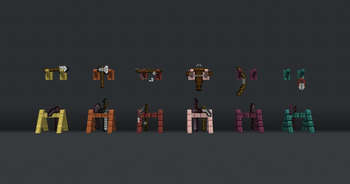
Racks allow you to showcase your tool and weapons, so you don't need to hide them in your chests anymore. This data pack brings a complementary support to armor stands that only support armors (without using commands) on the Java Edition.
## How to craft and use a rack?
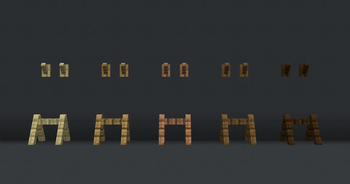
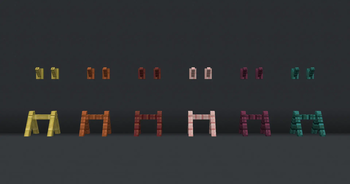
Racks can be crafted using: - 2 Sticks - 3 Planks of any wood (oak, dark oak, spruce, bamboo, cherry, warped, etc.)
The recipe is the following:
!(https://cdn.modrinth.com/data/cached_images/a42be276bdc7cb0a9b9deab6abb47bdd4b0c8fce.gif)
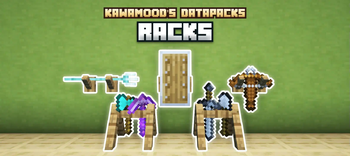
After you crafted it, you can simply place down your rack. You can either place it on the ground, allowing you to set up to two tools in it. Or on a wall, allowing you to showcase a single tool.
In order to set a tool in it, you need to right click the rack while holding the item you want to place, whithout sneaking. To take the item back, right click it the same way having your mainhand empty.
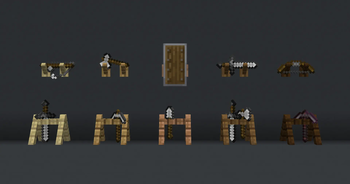
Racks placed on the ground can handle: axes, hoes, pickaxes, shovels, swords, fishing rod, carrot on a stick, warped fungus on a stick, mace and spears. Racks placed on a wall can handle: axes, hoes, pickaxes, shovels, swords, bow, crossbow, trident, fishing rod, shield, shears, brush, spyglass, carrot on a stick, warped fungus on a stick, mace and spears.
Right clicking racks while sneaking will change their pose (their items rotation and position). Ground racks have 6 different poses, and wall racks have 4 different poses.
## Misc. information about racks
- Ground racks have separated interaction entities for both tools, meaning you can focus the tool slot you want to update without the need of removing or adding a tool in the first slot.
- If you wonder, of course, racks support enchanted and custom items. They keep all their items components. For tools modified with a resource pack, I can't guarantee the exhibition will show an adequate render. This depends on whether the creator of the resource pack changed the item's model or the texture's orientation, or kept them like the vanilla item.
# ⚙️Settings
Ignore Wall Rack Support
If enabled, racks placed on wall ignore the fact their block support get broken or not, and won't break if it is the case. By default, wall racks break check if their support block is removed every 10 ticks and break if it is the case. This is almost the same behavior as for paintings for example.
You can enable, disable or get the current state of the setting using these following commands respectively: ``` /function pk_racks:settings/ignore_wall_rack_support/true /function pk_racks:settings/ignore_wall_rack_support/false /function pk_racks:settings/ignore_wall_rack_support/get ```
# 🧰 Other Commands
Give yourself a rack
If you are an operator of your server or if cheats are enabled in your single-player world, you can give yourself a rack of any variant using these following commands:
```
/function pk_racks:cmd/give/rack/Troubleshooting: Recreate all racks from the database
If ever racks have been broken accidentally (using a `kill @e` command for example) you can run the following command to recreate all racks from the database: ``` /function pk_racks:cmd/debug/recreate_all_racks ``` The process will automatically remove all remaining entities and blocks of broken racks before placing fresh ones. All data (id, owner, type, items, variant...) will be preserved. It may take some time for it to complete, so be sure to get the message telling the process ended successfully before interacting with or placing a rack.
# 🔧 Update from V. 2
The data pack provides a process to convert all existing racks from V. 2 to V. 3. In order to do so, follow the steps written below. _I would also advice you to create a backup of your world using V. 2, in case another data pack / plugin / mod accidentally breaks the updating process._
1. Remove the Racks V. 2 data pack from the `/datapack
📊 Mod Details
- Game
- Minecraft Data Packs
- Author
- KawaMood
- Version
- V.3.2.3
- Downloads
- 63,835
- Endorsements
- 367
- Category
- datapack
- Created
- 5/29/2024
- Updated
- 6/18/2026
- Game Versions
- 26.2
- Tags
- decoration, game-mechanics, utility
🔧 How to Install Minecraft Data Packs Mods
Download from Modrinth. Use Prism Launcher or drop into your mods folder.
📖 Full step-by-step install guide for Minecraft Data Packs →
Visit the official mod page for specific installation instructions for this mod.
🎮 Need cheat codes or console commands? Check ur gaming wiki for Minecraft Data Packs commands, item IDs, and more.
❓ Frequently Asked Questions
Which Minecraft Data Packs versions does Racks support?
The author lists 26.2. Other versions may work but are untested by the author.
What is the latest version of Racks?
Version V.3.2.3, published 2026-06-18 with 63,835 downloads recorded at the source.
Keep browsing — more Minecraft Data Packs mods await