TTRulez_ImmersiveHUD
⚪ Last updated 2022Preview
🔍 Analysis
- 👍 3.9% endorsement rate — high engagement, a strong quality signal
- 🏆 #15 of 107 User Interface mods in this game by downloads
📋 About This Mod
IMMERSIVE HUD: Updated for DLC2 and MercTech
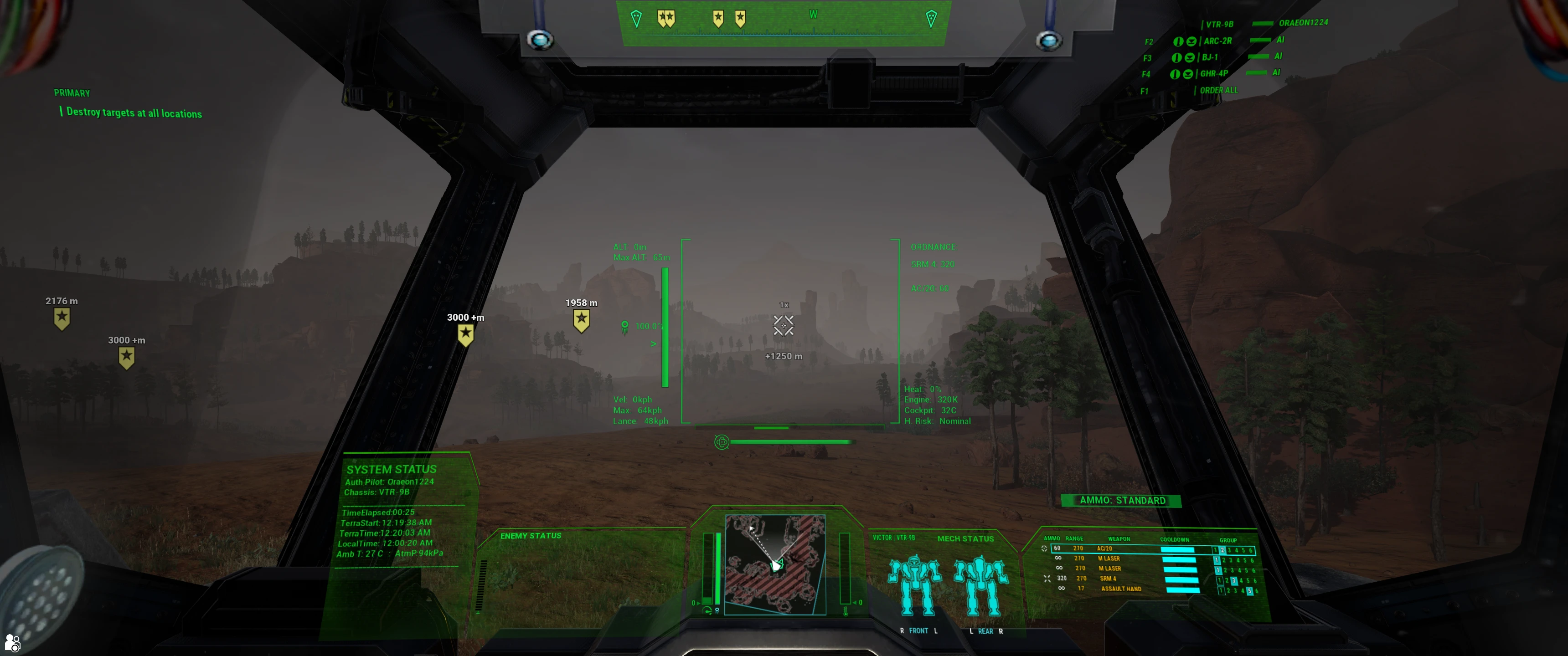
Overall design: I wanted to recreate a more realistic military feel for this Battletech game. Neurohelmets are hard to come by and are kept for years as functional equipment. It felt too gamelike in the vanilla game with a perfectly clean display with no signs of an actual helmet. Even though extremely well done some of the HUD mods that have been created felt more high sci-fi to me and less the dirty lived in world of battletech. To that end I built a HUD and neurohelmet that have a used lived in minimalist feel to them. My aesthetic was to increase the military style functionality and color uses that real world militaries use in HUD, and that I feel would likely persist in the future. So this cockpit may not be everyone's cup of tea. For those who played the mod before I have learned alot and it is much more optimized this time.
The HUD is markedly different. I rearranged it to display your weapons and mech in the RLower MFD and the enemy mech in the LLower MFD. Coms are now in the RUpper MFP and mission info is in the LUpper MFD. The compass is still at the top and the map is at the bottom. The panels are also labeled now. Finally I have added several new function:
1. Targeting Bracket: The targeting zone now has a green bracket. It also provides attachment for the following new data points:
--L. upper: Jump jet feedback. This provides Current altitude, Max jump height, vanishes if no JJ
--L. middle: Jumpjet bar showing remaining burn, % fuel next to the bar. The carrot shows when you are at risk of fall damage if you don't save fuel.
--L. lower: current speed in KPH and max speed settings, Lancespeed shows the speed you should move at if you want lancemates to stay in formation
--R. upper: Ammo count, provides the weapon name and ammo count so you don't have to glance down during a firefight
--R. lower: Heat % (100% is overheating), also provides engine temperature in K and cockpit temperature C for immersion, finally has heat risk of ammo explosion color coded for MercTech users (or immersion if not using MercTech).
--Gyro display below the bracket works with Merctech only
--Torso twist is displayed below the bracket for easy reference with degrees off forward vector
2. Target Status Display with Enemy heat bar, LOS, and FocuFireFeedback:
--Enemy heat bar: Next to the enemy mech display it now shows their estimated current heat. This uses infrared sensors of the enemy mech (pretend of course) and helps guide your use of inferno missiles and flamers.
--Missile LOS Icon: Missile icon is green if your missiles have LOS (MercTech) or red if no LOS (Indirect fire)
TTRulez_ImmersiveHUD overhauls the game's HUD with a military aesthetic, featuring glass panes with scratches and smudges. It adds graphical feedback for overheating and cockpit damage, plus new data and feedback functionality. A UI overhaul with 493 endorsements, last updated in May 2022.
✨ Key Features
📊 Pros & Cons
✅ Pros
- Community-approved with 493 endorsements and over 12k downloads.
- Immersive military aesthetic with detailed glass effects that stand out.
- Adds practical feedback for overheating and damage, not just cosmetic.
⚠️ Cons
- Last updated in May 2022 — may be outdated for current game versions.
- Requires manual installation; no mod manager support mentioned.
For players who want a more immersive, military-style HUD with visual feedback for damage and overheating. Ideal for those who enjoy UI overhauls that add both style and function. Skip if you prefer a clean, minimalist HUD.
💡 Beginner Tips
- Check the mod's file structure and place files in the correct game directory.
- If the game has an anti-cheat, ensure the mod is compatible with your setup.
- Test the HUD in a low-stakes mission to see the new feedback elements.
📊 Mod Details
- Game
- Mechwarrior5mercenaries Mods
- Author
- Oraeon1224
- Version
- 2.6
- Downloads
- 12,491
- Endorsements
- 493
- Category
- User Interface
- Created
- 11/6/2020
- Updated
- 5/17/2022
🔧 How to Install MechWarrior 5: Mercenarie Mods
Download from Nexus Mods.
📖 Full step-by-step install guide for MechWarrior 5: Mercenarie →
Visit the official mod page for specific installation instructions for this mod.
🎮 Need cheat codes or console commands? Check ur gaming wiki for MechWarrior 5: Mercenarie commands, item IDs, and more.
Keep browsing — more MechWarrior 5: Mercenarie mods await