Mass Effect HDR and Realism ME 1 2 and 3
⚪ Last updated 2021⚠️ Install Order · 1 step
Install in this order, then this mod last — most mods fail to load without their framework and dependencies in place.
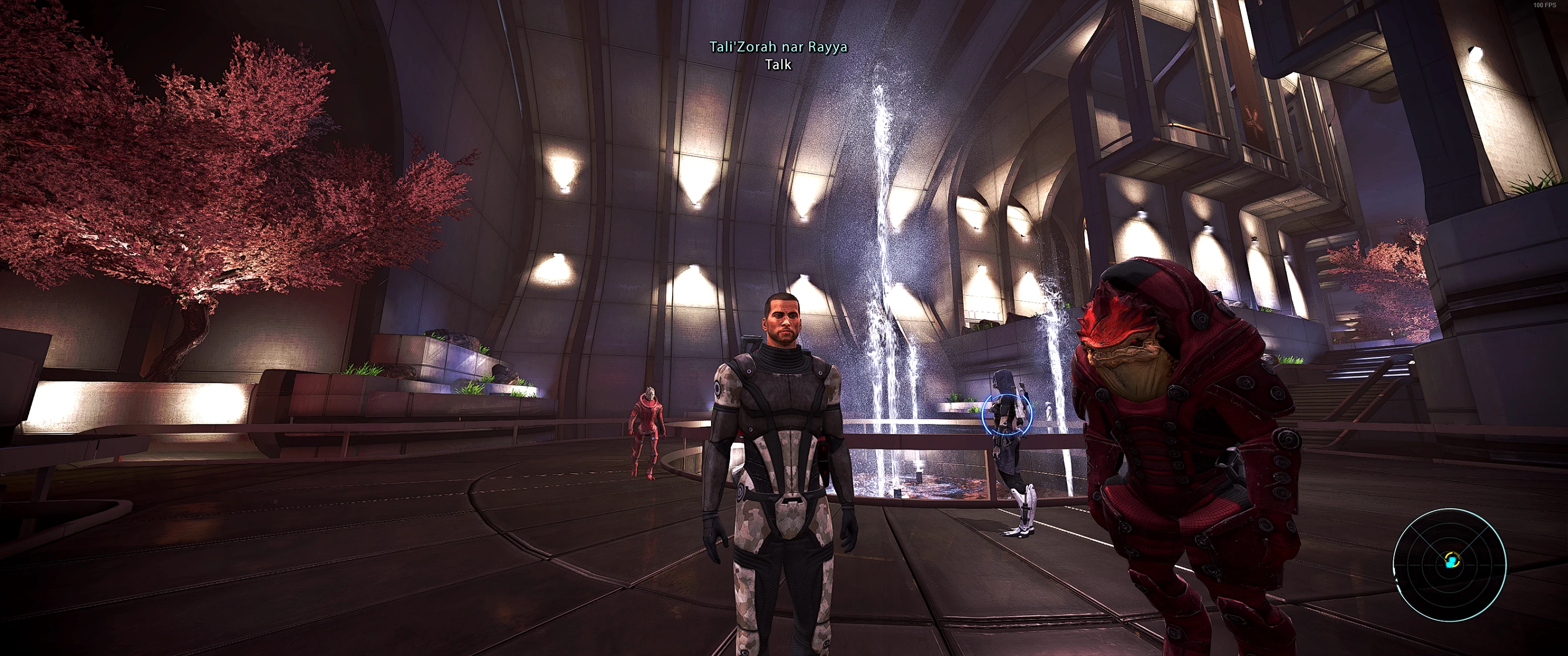
Preview
🔍 Analysis
- 👍 4.0% endorsement rate — high engagement, a strong quality signal
- 🏆 #28 of 173 Visuals mods in this game by downloads
📋 About This Mod
This preset works well for all 3 Mass Effect games. ME3 I felt needed a bit more tuning, so there is a version specifically for ME3 now.
I tuned this on my Acer Predator X34P ultrawide IPS display at 3440x1440 with Motion Blur and Film Grain off, as well as 0. 5 sharpen and 0. 17 Ignore film grain and 70% Digital Vibrance enabled in the NVIDIA control panel. I am also using Flawless Widescreen to customize my Field of View.
You can disable DoF with my other mod, located here: https://www.nexusmods.com/masseffectlegendaryedition/mods/50?tab=description&BH=2 . I highly recommend using the Anti-Aliased version of this preset if you choose to disable DoF, as that also breaks the game's in-engine AA.
Your results will likely vary if you are on a different panel type, lower resolution, etc....
Performance Impact
Due to how easy the game is to run on modern hardware, I did not experience any performance loss with this reshade preset. That said, the Clarity shader can be fairly heavy, so if you were already experiencing performance issues it will likely drop you a few FPS. If you are having performance issues, I recommend going into the options for the clarity shader and dropping the radius from 4 to 2, this should be the first option listed under clarity. SMAA is also fairly heavy, and makes a very small change to image quality, so just outright disable it if you are having any FPS issues at all.
1. Install the latest version of ReShade: https://reshade.me/
2. Unzip the .zip file to your bin\Win64 folder. Ex. "C:\SteamLibrary\steamapps\common\Mass Effect Legendary Edition\Game\ME1\Binaries\Win64". You may be asked to overwrite files if you already installed shader packages when you installed ReShade.
3. Boot up the game and press Home. Select HDR + Denoise.ini from the drop down at the top.
4. As you were, Commander Shephard.
This video also has a quick walkthrough showing you how to install the reshade courtesy of nerdedness !. The instructions for this install start at 2:50.
1KKtlq_m66A
Known Issues
1. At lower resolutions you will probably get UI oversharpening. Just disable the DELC_Sharpen in the menu.
2. In the AA version, SMAA helps with fine edges, but it can make text look blurry. You may want to disable SMAA as it is only really there for very fine details. FXAA will still slightly blur text, but with SMAA off this is not too noticible.
To see any of these in original resolution, just right click the image and select "Open image in new tab".
ME1 No Shaders:
ME1 Shaders:
ME2 Shaders:
ME3 No Shaders:
ME3 Shaders:
A Reshade preset for Mass Effect Legendary Edition that enhances colors and sharpness across all three games. It addresses the low-resolution textures in ME1 by avoiding excessive sharpening. With 387 endorsements and nearly 10k downloads, it's a community-trusted visual upgrade for players wanting improved visuals without texture mods.
✨ Key Features
📊 Pros & Cons
✅ Pros
- Community-approved with 387 endorsements and nearly 10k downloads
- One preset covers all three games in the Legendary Edition
- Smart approach to sharpening that respects ME1's texture limitations
⚠️ Cons
- Last updated in 2021 — may not be compatible with the latest Reshade versions
- Requires Reshade to be installed separately, which isn't included
- No screenshots or detailed installation instructions in the description
For Mass Effect Legendary Edition players who want richer colors and crisper visuals without overhauling textures. Perfect if you're new to Reshade and want a tested preset. Skip if you prefer vanilla visuals or want texture replacements instead.
💡 Beginner Tips
- Install Reshade first, then drop this preset into the game's main folder and select it in the Reshade in-game menu.
- If ME1 textures look too soft, try lowering the sharpening strength in the preset settings to your taste.
- Make sure to run the game with DirectX 11 for Reshade to work properly.
📊 Mod Details
- Game
- Mass Effect Mods
- Author
- Metzli
- Version
- 1.1
- Downloads
- 9,719
- Endorsements
- 387
- Category
- Visuals
- Created
- 5/15/2021
- Updated
- 5/23/2021
🔧 How to Install Mass Effect Mods
Download from Nexus.
📖 Full step-by-step install guide for Mass Effect →
Visit the official mod page for specific installation instructions for this mod.
🎮 Need cheat codes or console commands? Check ur gaming wiki for Mass Effect commands, item IDs, and more.
Keep browsing — more Mass Effect mods await