LEME2 - Allow All Weapons - SCR - FOV - Toggle HUD
⬇ Download on Nexus ModsPreview
About This Mod
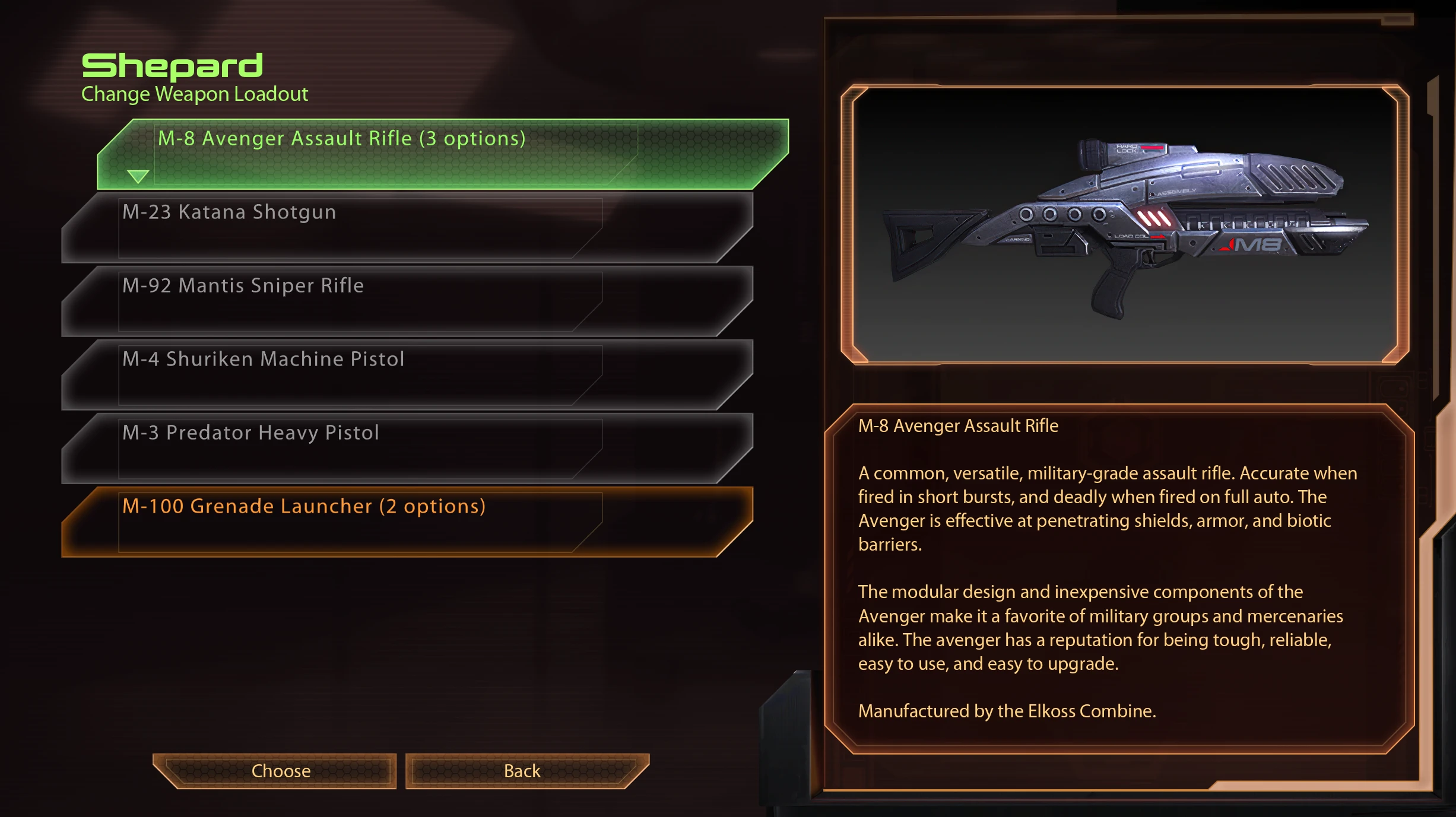
This Mass Effect 2 (LE Edition) edit allows you to use all weapons on your Shepard, no matter the class you pick! Update: now with merged files for SCR, FOV and NO HUD!
Mod for Mass Effect 2 - Legendary Edition
Extra:
Check https://www.nexusmods.com/masseffectlegendaryedition/mods... rel="nofollow noopener" target="_blank">Manual - Coalesced.bin on how you can make edits yourself!
Latest Update:
Added a german MELE2 version (Coalesced_DEU.bin)
#0 Initial Release:
Just a small Coalesced.bin edit which allows you to use (almost) all weapons on every Shepard class.
Pick 5 out of 6 weapon types you want!
You can change this during a playthrough by just using an other Coalesced_INT.bin from the archive.
#1 Update 16/05: Shepard Can Run
As mentioned in the comment section, ME2 has a limit on the amount of weapon types active at the same time.
Which is 5.
ME2 has a total of 6 weapon types, meaning one would never be usable... facepalm
To solve this for now, I've remade the mod so that you can choose which weapon type your Shepard doesn't need (I'm giving the power to the people).
Just pick the Coalesced_INT.bin file you want from the archive.
Also added a merged version with https://www.nexusmods.com/masseffectlegendaryedition/mods... rel="nofollow noopener" target="_blank">Shepard Can Run.
#2 Update 17/05: FOV
I've uploaded a merged version of both Allow All Weapons, https://www.nexusmods.com/masseffectlegendaryedition/mods... rel="nofollow noopener" target="_blank">Shepard Can Run and a FOV Edit.
- Thanks to old Mass Effect 2 Eugene Homyakov for documenting the FOV edits.
Each version has 4 shortcuts:
Numpad 7 = FOV 70
Numpad 8 = FOV 80
Numpad 9 = FOV 90
Numpad 0 = FOV 100
#3 Update 17/05: Hide HUD
The AAW - SCR - FOV- NO HUD version allows you to hide the HUD by pressing F11.
Standalone version will get it's own mod page.
Install instructions:
1. Create a back-up of the Coalesced_INT.bin file
This file is found in:
<install directory>\Mass Effect Legendary Edition\Game\ME2\BioGame\CookedPCConsole\
Always make back-ups, it's just a safe practice.
2. Choose (!) one of the files you want from the archive and move that Coalesced_INT.bin file to:
<install directory>\Mass Effect Legendary Edition\Game\ME2\BioGame\CookedPCConsole\
and choose "replace".
3. Delete the BIOGame.ini found in:
<install directory>\Mass Effect Legendary Edition\Game\ME2\BioGame\Config\
Don't worry, every time you launch and close the game this BIOGAME.ini file gets created or updated.
In essence, it's a copy of the data found in the Coalesced_INT.bin > BIOGame_Config_BIOGame.ini file.
4. In case you use the FOV or NO HUD merged Version:
Delete the BIOInput.ini found in:
<install directory>\Mass Effect Legendary Edition\Game\ME2\BioGame\Config\
--> Why delete these 2 files?
Every time you close ME2 these files get updated / created.
If they already exist and you replace the Coalesced_INT.bin file, the two don't match up when booting the game after installing the mod.
This will result in ME2 closing on first launch and updating the .ini.
The second launch the .ini files match the .bin file and everything works again as intended.
If you delete the 2 .ini files, you don't need to boot the game 2 times for the mod to take effect.
In the end, it doesn't really matter (Metallica).
Delete the .ini files and play or don't delete and launch the game 2 times.
FOV version shortcuts:
Numpad 7 = FOV 70
Numpad 8 = FOV 80
Numpad 9 = FOV 90
Numpad 0 = FOV 100
HUD Hotkey:
If you are playing in Italian, German or Polish, this edit will do nothing for you unless you change your game language to English.
As remaking all takes quite a lot of time, I'll do them on request.
> German Coalesced_DEU.bin is coming 18/05 around 19pm CET
Compatibility:
As you probably figured out, this edit is not compatible with other mods which edit the Coalesced.bin file.
Allow All Weapons + Shepard Can Run:
This one combines both Coalesced_INT.bin edits.
See the https://www.nexusmods.com/masseffectlegendaryedition/mods... rel="nofollow noopener" target="_blank">Shepard Can Run page for more details.
TL;DR: allows Shepard to run 3x-4x as long plus give him quick Stamina regen.
AAW + SCR + FOV:
This one combines Allow All Weapons with Shepard Can Run and adds my own take on the FOV changes.
AAW + SCR + FOV + HUD:
Added the option to toggle HUD on and off by clicking F11.
Scanning and Normandy Tweaks:
A merge with various Normandy Tweaks can be found at Skellin's https://www.nexusmods.com/masseffectlegendaryedition/mods... rel="nofollow noopener" target="_blank">LEME2: Scanning - Normandy page!
Or make one yourself by following:
https://www.nexusmods.com/masseffectlegendaryedition/mods... rel="nofollow noopener" target="_blank">Manual - Coalesced.bin
If you want to use this along side other Coalesced.bin mods:
By using d00telemental's LECoal tool https://github.com/d00telemental/LECoal/releases/tag/v1.0... rel="nofollow noopener" target="_blank">LECoal you can unpack and repack the Coalesced_INT.bin file.
Once you've unpacked the other mod's .bin, look for "-_-_BIOGame_Config_BIOGame.ini" and open it with Notepad.
Look for the following line (without the quotation marks):
"PlayerLoadoutInfo="
And simply replace everything after "WeaponClasses =" with (LoadoutWeapons_AssaultRifles,LoadoutWeapons_HeavyPistols,LoadoutWeapons_AutoPistols,LoadoutWeapons_HeavyWeapons,LoadoutWeapons_SniperRifles,LoadoutWeapons_Shotguns))
And this for all the player loadouts.
Afterwards you repack with the same tool and place the edited Coalesced.bin back in your game directory.
See https://www.nexusmods.com/masseffectlegendaryedition/mods... rel="nofollow noopener" target="_blank">Manual - Coalesced.bin for a full manual.
Mod Details
- Game
- Mass Effect Legendary Edition
- Author
- DukeOfKiewit
- Version
- 1.1
- Downloads
- 33,013
- Endorsements
- 1,405
- Category
- Gameplay
- Last Updated
- 5/25/2021
How to Install Mass Effect Mods
Use ME3Tweaks Mod Manager. Texture mods via MEM.
Visit the Nexus Mods page for specific installation instructions for this mod.
⭐ Rate & Review
FAQ
Is LEME2 - Allow All Weapons - SCR - FOV - Toggle HUD safe to download?
Linked from Nexus Mods which scans all files for viruses. Always download from the official source.
Does this mod work with the latest game update?
Last updated 5/25/2021. Check the official download page for version compatibility.
Where can I learn more about Mass Effect modding?
Check our complete Mass Effect modding tools guide for step-by-step setup instructions.