Juicy and Juicier ReShades for the Whole Ass Trilogy (JJRWAT)
⚪ Last updated 2022⚠️ Install Order · 1 step
Install in this order, then this mod last — most mods fail to load without their framework and dependencies in place.
Preview
🔍 Analysis
- 👍 2.3% endorsement rate — high engagement, a strong quality signal
- 🏆 #16 of 173 Visuals mods in this game by downloads
📋 About This Mod
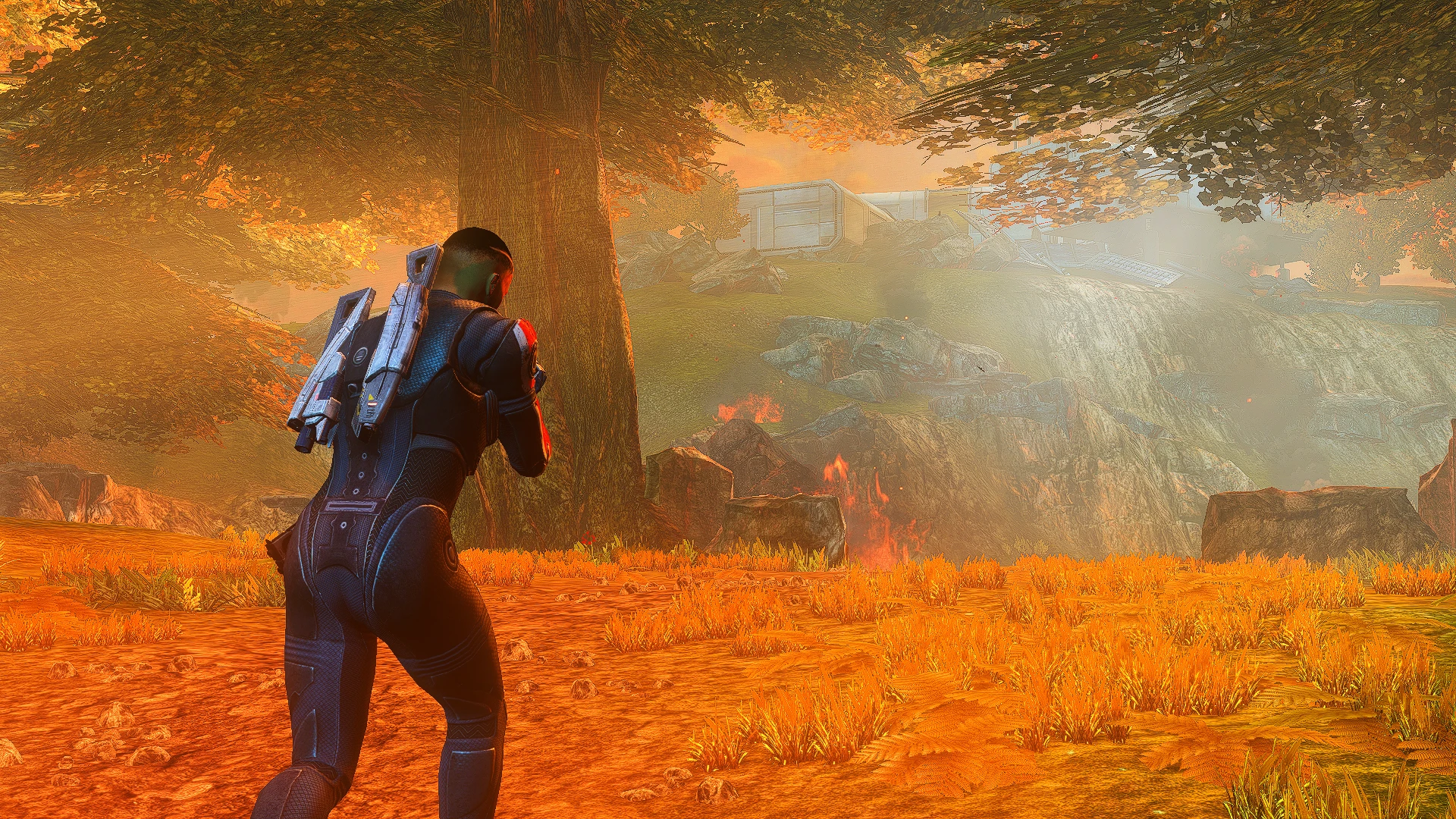
Mass Effects 1, 2 and 3 were released at a time where it was hip and cool to release games with as bleak a color palette as possible. Yuck.
I expected the remaster to fix this, but they only really tried with Mass Effect 1. So I did it myself.
Juicy is more-or-less a general enhancement with no real goal in mind. It makes the games brighter, a bit more bloomy, and not much else. It's the safer option.
Juicier does everything Juicy does, but with more on top. It's twice as colorful, adds some ambient effects, and bumps the HDR to allow the the sort of contrast you'd see in games released after the dark age that was 2009-2012. If you use the game's built-in HDR, I suggest turning it off. I can't use it, so I didn't make the presets with it in mind. Apparently, it looks awful. Juicier is the better of the two. Juicy was made first and originally uploaded by itself. That's the only reason it's here lol
You can install both of these presets simultaneously, and swap between them in realtime via the ReShade menu. Just hit one of the lil arrows at the top to flip back and forth. To pull said menu up, hit one of the Home keys. Either 7 on the NumPad, or End on the top right of your keyboard. This works even if you're on a controller. If one doesn't work, try the other. If neither works, try again while holding Shift. It's a weird menu.
ME1 is a separate download because it was a late addition, and needed tinkering. I think it's perfect now, though.
I play on a mid-tier laptop and haven't experienced any frame dips other than on the Citadel sometimes. Doubt you will, either. If you do, try either turning off the Origin overlay or deleting/renaming igo64.dll from your Origin folder (C:\Program Files (x86)\Origin). This is slated to improve performance across the board. I'd recommend that literally everyone do it.
Instructions (primarily for those who haven't used ReShade before):
0. Download my config files. Alternatively, you can find your GamerSettings.ini in Mass Effect Legendary Edition/Game/ME?/BioGame/Config and add "DepthOfField=False" under . This removes the hideous vignette effect (the darkened corners). This completely changes how the presets look, oddly enough. They look awful with the vignette.
Even if you decide to not use the presets, this is a nice improvement on the games' appearance.
1. Download the program in the requirements tab. I recommend dragging it into the base of your Steam folder so that it's always easily accessible for future
A ReShade preset collection for the Mass Effect trilogy, replacing the default muted palette with vibrant, saturated colors. With 689 endorsements and 30,110 downloads, it's a popular choice for players who want a more colorful visual experience. Last updated in 2022, it remains a go-to for modernizing the trilogy's look.
✨ Key Features
📊 Pros & Cons
✅ Pros
- Community favorite with 689 endorsements and 30k downloads—clearly hits the spot for many players.
- Breathes new life into the trilogy's visuals, making colors pop without overhauling the game.
- One preset for all three games means you get a consistent look across the whole trilogy.
⚠️ Cons
- Requires ReShade installed separately—if you're new to that, there's a learning curve.
- Last updated in 2022, so it might not be tested with the latest game patches or ReShade versions.
- Color grading is subjective—if you prefer the original muted tone, this isn't for you.
For Mass Effect fans who want a fresh, vibrant look without changing gameplay. If you're tired of the gray-brown palette and want colors to pop, this is for you. Skip if you're a purist who wants the original visual style.
💡 Beginner Tips
- Make sure ReShade is installed and working in one of the trilogy games before adding these presets.
- Use the ReShade in-game overlay to tweak the preset's intensity to your liking—you can adjust saturation and contrast on the fly.
- If you're playing on PC, check that your graphics drivers are up to date to avoid any shader compilation issues.
📊 Mod Details
- Game
- Mass Effect Mods
- Author
- Flambingo
- Version
- 2022
- Downloads
- 30,110
- Endorsements
- 689
- Category
- Visuals
- Created
- 5/23/2021
- Updated
- 7/19/2022
🔧 How to Install Mass Effect Mods
Download from Nexus.
📖 Full step-by-step install guide for Mass Effect →
Visit the official mod page for specific installation instructions for this mod.
🎮 Need cheat codes or console commands? Check ur gaming wiki for Mass Effect commands, item IDs, and more.
Keep browsing — more Mass Effect mods await