ColourFun Reshade (Vanilla Vibrancy LE1.LE2.LE3)
⚪ Last updated 2021⚠️ Install Order · 1 step
Install in this order, then this mod last — most mods fail to load without their framework and dependencies in place.
Preview
🔍 Analysis
- 👍 7.6% endorsement rate — high engagement, a strong quality signal
- 🏆 #104 of 173 Visuals mods in this game by downloads
📋 About This Mod
Instructions:
-
[]Download ReShade
[
]Run ReShade and select MassEffect1.exe (steam/steamapps/common/Mass Effect Legendary Edition/Game/ME1/Binaries/Win64 if it does not appear)[]Select Direct 3D 10/11/12 as your Rendering API
[]Check every box until ReShade completes it's setup
[]Download, unzip and drag all the files from the downloaded ColourFun folder into the same folder where MassEffect1.exe is located (steam/steamapps/common/Mass Effect Legendary Edition/Game/ME1/Binaries/Win64)
[]Accept replacement of all files
[]Open Mass Effect 1 and once in game, press the "Home" key and ensure "ColourFun" is selected from the dropdown menu in the top left under the "Home" section
[]Repeat from step 2 in your Mass Effect 2 and Mass Effect 3 folders
- Enjoy the new look!
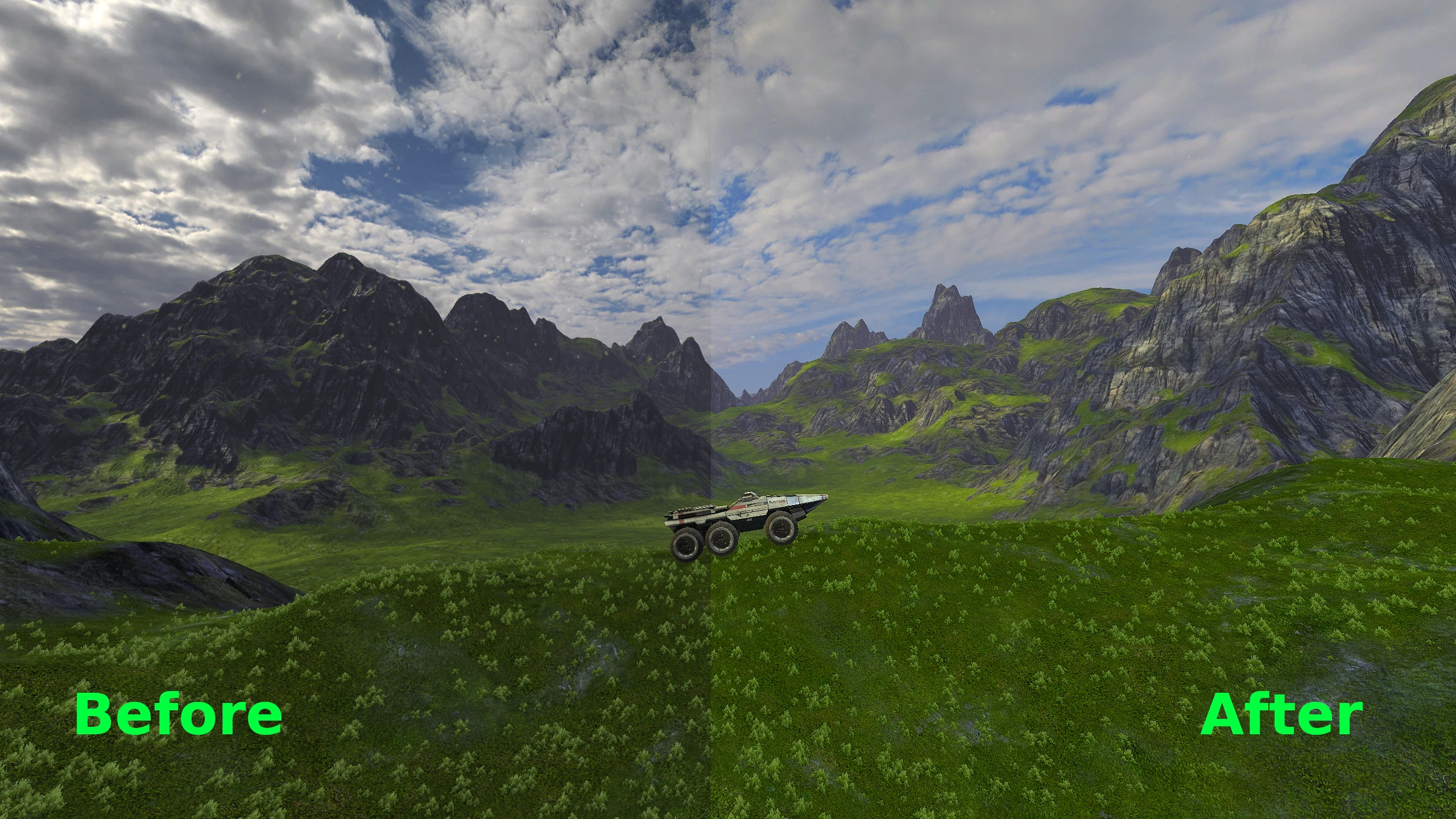
ColourFun is a light ReShade preset for Mass Effect Legendary Edition that boosts vibrancy and clarity while keeping the vanilla atmosphere intact. With 68 endorsements and 897 downloads, it's a modestly popular choice for players wanting a subtle visual upgrade without overhauling the game's look.
✨ Key Features
📊 Pros & Cons
✅ Pros
- Keeps the original vibe intact—no more washed-out colors, but still feels like Mass Effect
- One preset works across all three games, so you don't have to fiddle per game
- Small but solid community pick (68 endorsements) for a subtle visual boost
⚠️ Cons
- Last updated in 2021—might not play nice with the latest game patches or ReShade versions
- Requires ReShade, which isn't included—you'll need to grab that separately
For Mass Effect Legendary Edition players who want a subtle color and clarity boost without changing the game's feel. If you're after a dramatic overhaul or heavy effects, this isn't it—it's for purists who just want a bit more pop.
💡 Beginner Tips
- Make sure you download ReShade first and install it into the game's executable before adding this preset.
- After installing, tweak the preset's intensity in-game with the ReShade overlay to match your taste.
- If the preset doesn't show up, check that the .ini file is in the right folder—usually the game's root directory.
📊 Mod Details
- Game
- Mass Effect Mods
- Author
- SkyePredator
- Version
- 1.0
- Downloads
- 897
- Endorsements
- 68
- Category
- Visuals
- Created
- 9/4/2021
- Updated
- 9/4/2021
🔧 How to Install Mass Effect Mods
Download from Nexus.
📖 Full step-by-step install guide for Mass Effect →
Visit the official mod page for specific installation instructions for this mod.
🎮 Need cheat codes or console commands? Check ur gaming wiki for Mass Effect commands, item IDs, and more.
Keep browsing — more Mass Effect mods await