Cheat_Tool
⚪ Last updated 2019🖼️ Gallery (1 images)
🔍 Analysis
- 👍 3.8% endorsement rate — high engagement, a strong quality signal
- 🏆 #3 of 9 Utilities mods in this game by downloads
📋 About This Mod
if you have 1. 8. 2 + version of the game ignore Installation process use Copy-Paste version
Copy-Paste Version Setup
ADKvu04NPNE
Installation:
if you have diffrent version then 1. 8. 2 check How to update player.lua Script video
7p7AutIKnQE
Supported Language = English, Turkish
player.lua Script Current Game version support : 1. 8. 2
What is this mod:
this is inspired by KCD Lua Injector and Cheat mod
basicly use game functions like:
System. ExecuteCommand
QuestSystem.
QuestSystem. IsQuestStarted
QuestSystem. DeactivateQuest
QuestSystem. CancelQuest
QuestSystem. ResetQuest
QuestSystem. StartQuest
QuestSystem. StartObjective
QuestSystem. ActivateQuest
in the future or old game versions How to update player.lua Script
89bBO-LKYaE
Main Folder :steamapps\common\KingdomComeDeliverance
Purple = What Are you looking for Aqua = Starting Point Connect to Red = Next Point
Finding Item names:
Example from Items_en.txt : Legend of Melusine I|70f059e4-6e15-4b6b-b2a2-40b94482d2d4
\Data\Tables.pak\Libs\Tables\item\player_item.xml
<row icon_id="121" item_id="70f059e4-6e15-4b6b-b2a2-40b94482d2d4" ui_info="ui_in_meluzina_1" ui_name="ui_mn_meluzina_1" />
ui_name="ui_mn_meluzina_1" = Connect to Localization.pak File
Localization\English_xml.pak\text_ui_items.xml
<Row><Cell>ui_mn_meluzina_1</Cell><Cell>Legend of Melusine I</Cell><Cell>Legend of Melusine I</Cell></Row>
Finding Quest names:
Example from Quest_en.txt : Lost in Translation|q_capCum
Data\Tables.pak\Libs\Tables\quest\quest.xml
<row comment="" computer_name="JVANZURA-DT" counter="1" group="Side-Bud" is_activated="True" is_progress_visible="True" long_desc="" pos1="-930,80,0" pos2="3810,-130,0" pos3="" quest_id="5571166" quest_name="q_capCum" quest_type_id="2" smart_object="q_capCum" timestamp="27/03/2018 16:57" />
quest_id="5571166" Connect to quest2skald_subchapter.xml
Data\Tables.pak\Libs\Tables\quest\quest2skald_subchapter.xml
<row quest_id="5571166" quest_level="8" skald_subchapter_id="242" />
skald_subchapter_id="242" Connect to skald_quest_string.xml
Data\Tables.pak\Libs\Tables\skald\skald_quest_string.xml
<row skald_quest_string_type_id="1" skald_subchapter_id="242" string_name="subchapter_242_name" />
string_name="subchapter_242_name" Connect to Localization.pak File
Localization\English_xml.pak\text_ui_quest.xml
<Row><Cell>subchapter_242_name</Cell><Cell>Lost in Translation</Cell><Cell>Lost in Translation</Cell></Row>
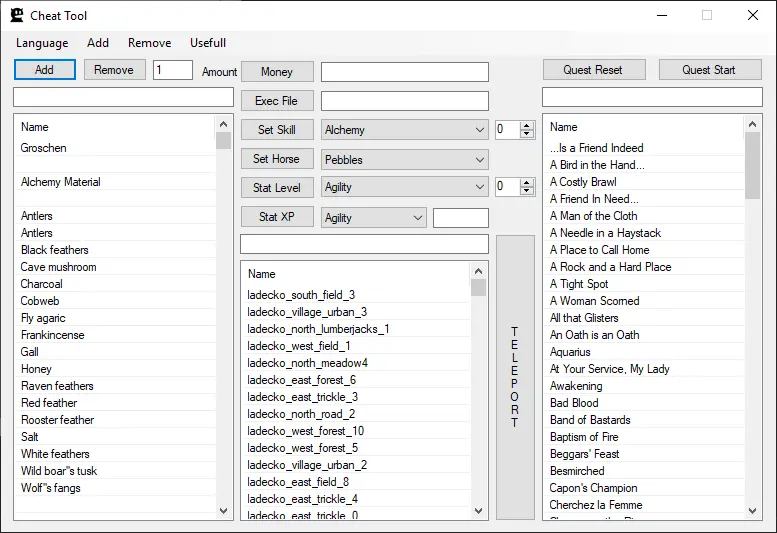
Cheat_Tool is a Lua-based cheat utility for Kingdom Come: Deliverance, inspired by KCD Lua Injector. It lets players execute game functions like System.ExecuteCommand and QuestSystem commands to manipulate quests. Supports game version 1.8.2 and languages English and Turkish. Includes installation videos and item/quest name lookup instructions.
✨ Key Features
📊 Pros & Cons
✅ Pros
- Solid community trust with 733 endorsements and nearly 20k downloads
- Detailed instructions for finding item and quest IDs, which is a huge time-saver
- Video guides included for installation and updating the script
⚠️ Cons
- Last updated in 2019 — likely outdated for current game versions
- Installation is manual and requires editing player.lua, which can be tricky
- Only supports English and Turkish, so non-speakers may struggle with the UI
For Kingdom Come: Deliverance players who want to cheat or debug quests and items. Perfect for modders or players stuck on a quest who want to skip ahead. Skip if you're on a newer game version or prefer simple mod manager installs.
💡 Beginner Tips
- Make sure your game version is exactly 1.8.2, otherwise the script may not work
- Follow the video tutorial for installation to avoid common mistakes
- Use the provided item and quest name lookup method to find the exact IDs you need
📊 Mod Details
- Game
- Kingdom Come Mods
- Author
- esthecat
- Version
- 1.9.4-404-502
- Downloads
- 19,469
- Endorsements
- 733
- Category
- Utilities
- Created
- 3/7/2019
- Updated
- 12/21/2019
🔧 How to Install Kingdom Come Mods
Create /Mods/ folder in Data directory. Use Vortex for complex mods.
📖 Full step-by-step install guide for Kingdom Come →
Visit the official mod page for specific installation instructions for this mod.
🎮 Need cheat codes or console commands? Check ur gaming wiki for Kingdom Come commands, item IDs, and more.
Keep browsing — more Kingdom Come mods await