Vehicles Persistence
⚪ Last updated 2018⚠️ Install Order · 3 steps
Install in this order, then this mod last — most mods fail to load without their framework and dependencies in place.
🖼️ Gallery (6 images)


🔍 Analysis
- 👍 0.5% endorsement rate
- 🏆 #176 of 196 scripts mods in this game by downloads
📋 About This Mod
Version 2. 0 is on the making... stay tunned !
Version 1. 3 ========= Changelog in Version 1. 3: ------------------------- - fix for non-saved trailer attached to saved truck - trailer attachement and detachement monitoring algorithm upgrade - bugs related to character switch fixed.
Installation Instructions ------------------------- IMPORTANT: ---------- ### IF YOU ALREADY HAVE THE VERSION 1. 2 INSTALLED, JUST COPY THE "GTA5_VEHICLES_PERSISTENCE 1. 3.dll" present in the "Vehicles Persistence 1. 3" folder in the zip file, inside your scripts folders in the GTA5 base directory.
## IF you install the mode for the first time, follow these steps :
1- Unzip the downloaded zip file 2- It will contain two folders and the actual Readme File : - one named "Vehicles Persistence 1. 3" - the other named "Vehicle Locator Beta 1. 3" 3- Copy all the content of the "Vehicles Persistence 1. 3" folder in your game's scripts folder 4- the folder "Vehicle Locator Beta 1. 2" can be copied at a location of your choice on your pc. 5- Important: - don't forget to set the path where you'd like your saved vehicles files to be saved in the ini file under SAVESDIR= or leave it blank and the vehicles will be saved in the mod folder
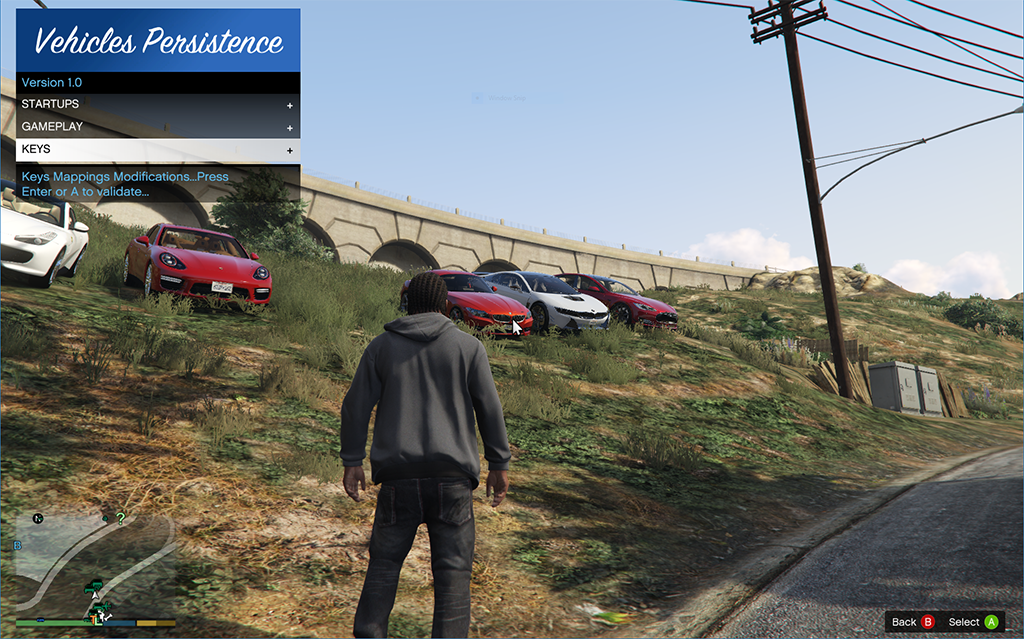
Usage: ------ Vehicles Persistence Mod: ------------------------- Default Keys: (can be changed in the mod menu) - F9 to save a vehicle - End to release a vehicle - F9+T to save a trailer only for vehicles with attached trailer - End+T to release the trailer only for vehicles with attached trailer - F12 to display the Mod Menu - L to display or hide the saved vehicles blips on the minimap - Delete, to clear locator marker on minimap
Gamepad Support for saving, releasing vehicles and opening of the Mod Menu: (cannot be changed...only disabled) - RB + A to save a vehicle - RB + B to release a vehicle - RB + D-Pad Right to open Mod Menu
Vehicle Locator: ---------------- It's purpose is to located a vehicle you've "lost"... a vehicle which location is forgotten - double click on the vehicle name or picture (by pressing the change view button) and a yellow marker will be placed on the minimap to indicate the location of the vehicle - right click on each vehicle name or image to rename the vehicle with a name you can remember
system Requirements : . NET 4. 7. 1
version 1. 2: ===========
Change Log: ========== - Many issues fixed... - correction of the process to remove duplicates. - upgrade of the vehicles locator utility - New key stroke to remove the marker of the selected vehicle to locate in case you change your mind... - change in the ini file. check the mod menu for details. Important: if you already have the mod version 1. 1, you have to completely overwrite your files with the new ones... that means you have to follow the installation procedure again...
System Requirements : .net framework 4. 7. 1
Install Instructions: ===================== 1- Unzip the downloaded zip file 2- It will contain two folders and the actual Readme File : - one named "Vehicles Persistence 1. 2" - the other named "Vehicle Locator Beta 1. 2" 3- Copy all the content of the "Vehicles Persistence 1. 2" folder in your game's scripts folder 4- the folder "Vehicle Locator Beta 1. 2" can be copied at a location of your choice on your pc. 5- Important: - don't forget to set the path where you'd like your saved vehicles files to be saved in the ini file under SAVESDIR= or leave it blank and the vehicles will be saved in the mod folder
Version 1. 1 ========= Change log: - Rework of the "No Vehicle Position Update Option"... allows you have the vehicle always respawned where it was saved for the first time even if you left it somewhere else in the last session. - another blip issue fixed.
Version 1. 0. 0. 2: ============ Changelog: - corrections in the ini file...
Version 1. 0. 0. 1 =========== changelog: - blip issue fixed - radio persistence at character switch fixed Important: - don't forget to set the path where you'd like your saved vehicles files to be saved in the ini file under
SAVESDIR= or leave it blank and the vehicles will be saved in the mod folder
Version 1. 0 ======== for full details, check the readme file in the downloaded zip... change log v1. 0: --------------------- - Gamepad support for showing the mod menu, saving and releasing a vehicle - radio persistence per vehicle... the radio station is persisted with the vehicle. - vehicles with trailers supported - choice between two options depending on the power of your machine : All characters vehicles available, if you want to have all the vehicles saved by the characters visible... demanding in resources, so suitable for powerful machines. single character vehicles available... only see the vehicles saved by the active character... suitable for any machine - an utility app to locate any saved vehicle that you lost... los santos is a big town... - option to make a vehicle respawn always where it was save by disabling the vehicle position update option.
N. B: Many thanks to DirtSpray for his tremendous help during the development of the mod...hope you'll enjoy!
Beta 2. 0. 2 Update 2(Beta 2. 0. 2. 2) ========================= - correction in the persistence of the tires - Addition of a keystroke to unsave a vehicle without destroying it("End" by default...can be changed in the ini file.
Beta 2. 0. 2 Update 1 ==================== - Random custom Tyres fixed.
Change Log Beta 2. 0. 2 ==================== -fixed crash with version 1. 0. 877. 1 -performances optimizations -correction of persistence at character switch
Contributors: ========== Many thanks to DirtSpray for helping with very smart ideas and to II337 for his valuable testing skills...really thank you guys...
Change Log in Beta 2. 0. 1 ==================== Two important corrections in the functioning of the mod: - correction of the ARGB colors...the A(alpha) was omitted in the previous version...it's now processed. - correction of the loss of persistence at character switch...this was a major issue that needed being fixed a.s.a.p...it's now done.
KNOWN ISSUE: - Don't switch character just after getting out of LSC...because when you return to the previous character, he will not be in his saved vehicle...but the saved vehicle will be at the last position when it was updated...just drive a little bit before switching...
Change Log in Beta 2. 0 ================== You have 2 variations of the same mod in the zip folder.
- the one WITHOUT DASHBOARDCOLOR & TRIMCOLOR
- the one WITH DASHBOARD COLOR & TRIMCOLOR that works with only ORIGINAL COPIES of GTA 5... IF USED WITH A NON-ORIGINAL GTA IT WILL CRASH THE GAME WHEN TRYING TO SAVE A VEHICLE...
!!! ONLY ONE OF THEM HAS TO BE INSTALLED... NEVER BOTH..
Newly persisted vehicles properties: - Ability to enable/disable the on-screen infos at startup in the ini file - Ability to enable/disable the minimap notifications at startup in the ini file - Ability to enable/disable the on-screen infos during the game with a keystroke - Ability to enable/disable the minimap notifications during the game with a keystroke - Neon Lights - Bulletproof tyres - Extras - Broken doors (good if you want to have a doorless vehicle...just break it...it will be saved) - Vehicle bulletproof - Vehicle collision proof - Vehicle explosion proof - Vehicle fireproof - Dashboard color and TrimColor (if you have a legitimate version of gta 5) - Saved cars clones created by game engine deleted...
VehiclesKeeper Beta 1. 0 By Calderon (DotNetDev) (c) October 2016 =================================================
...
Vehicles Persistence is a script mod for DayZ that ensures vehicles remain in the game world after server restarts, preventing loss of player-built bases and stored items. With 502 endorsements and over 100k downloads, it's a popular quality-of-life tool for server owners and players seeking persistent vehicle storage.
✨ Key Features
📊 Pros & Cons
✅ Pros
- 502 endorsements and 100k+ downloads prove it's trusted by the community.
- Saves your hard-earned vehicles and gear from vanishing on restart.
- Simple script mod—no heavy client-side impact.
⚠️ Cons
- Last major update was 2018, though a 2023 note exists—version compatibility may vary.
- Requires server-side setup; not for single-player.
- Potential conflicts with other vehicle or persistence mods.
DayZ server admins who want to keep vehicles persistent across restarts, and players tired of losing their rides and loot. Also great for roleplay servers where vehicle ownership matters.
💡 Beginner Tips
- Test on a private server first to ensure it works with your mod list.
- Check server logs after restart to confirm vehicles are saved.
- Coordinate with your admin if you're a player—this mod is server-side.
📊 Mod Details
- Game
- GTA V Mods
- Author
- Calderon
- Version
- 2.0
- Downloads
- 100,399
- Endorsements
- 502
- Category
- scripts
- Created
- 10/21/2016
- Updated
- 11/2/2018
🔧 How to Install GTA V Mods
Script Hook V + OpenIV. Never mod GTA Online.
📖 Full step-by-step install guide for GTA V →
Visit the official mod page for specific installation instructions for this mod.
🎮 Need cheat codes or console commands? Check ur gaming wiki for GTA V commands, item IDs, and more.
Keep browsing — more GTA V mods await