Map Editor
⚪ Last updated 2016⚠️ Install Order · 3 steps
Install in this order, then this mod last — most mods fail to load without their framework and dependencies in place.
🖼️ Gallery (6 images)


🔍 Analysis
- 👍 0.2% endorsement rate
- 🏆 #5 of 196 scripts mods in this game by downloads
📋 About This Mod
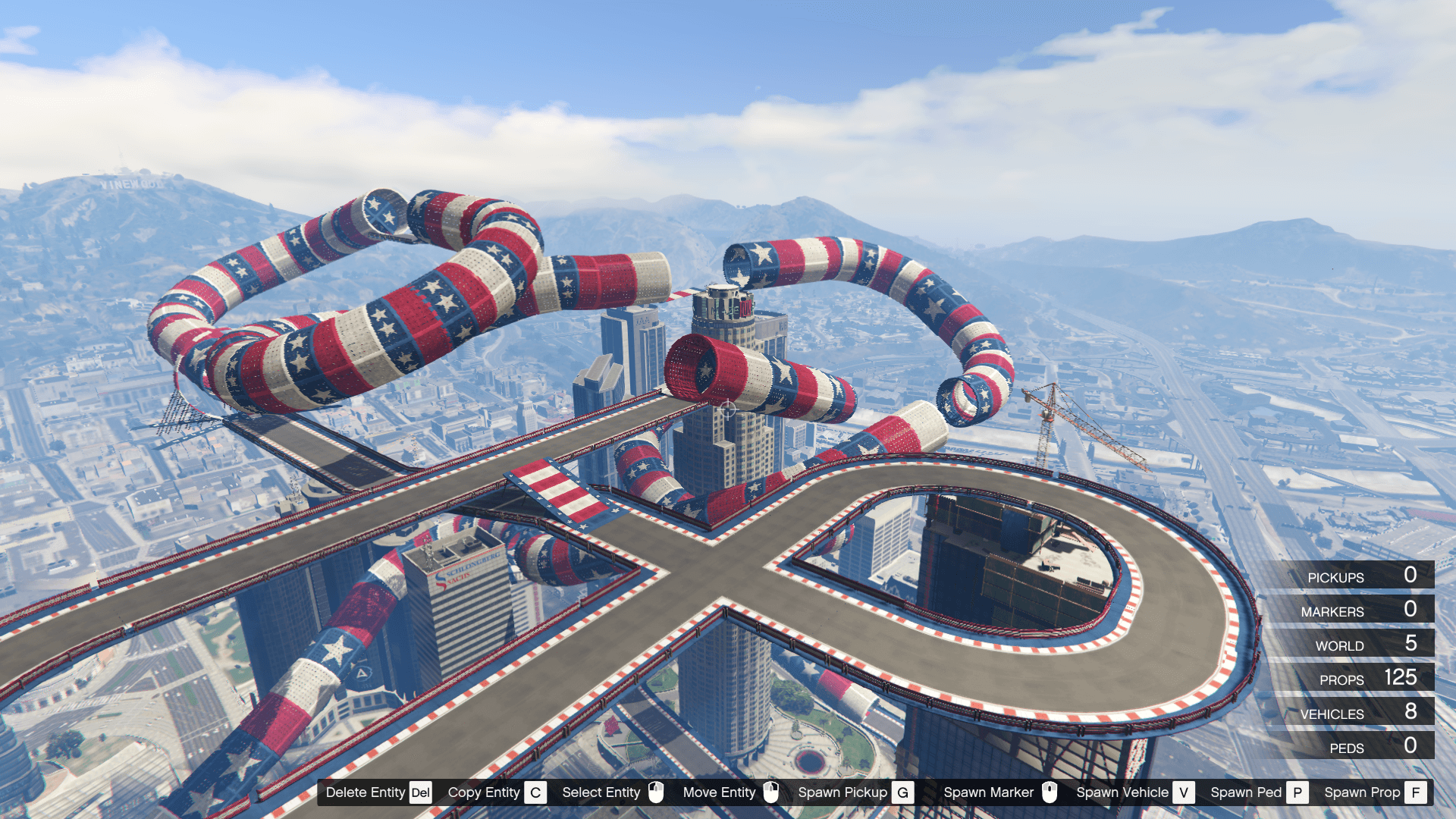
Map Editor 2. 13 2. 13 (current) 2,582,377 downloads , August 15, 2015 This file is safe " data-content=" This file has been scanned for viruses and is safe to download. " class="fa fa-shield vt-version"> More mods by Guadmaz : Ramps Map Editor Featured 4. 96 7,959 66 Maze Bank Ascent 1. 0 By Guadmaz Mission Mission Creator Rage Plugin Hook Featured 4. 63 24,744 387 Mission Creator 0. 4. 1 By Guadmaz Developers . Net 4. 65 29,167 252 Animation Viewer 1. 0 By Guadmaz Mission Emergency . Net 4. 72 34,512 462 Vigilante 0. 6 By Guadmaz Mission Emergency . Net 3. 95 157,397 534 Speed Radar 1. 1 By Guadmaz Expand to see all images and videos 2,582,675 Downloads 5,192 Likes 4. 31 / 5 stars (676 votes) Description This is a tool reminiscent of MTA:SA Map Editor days. You have a freecam to navigate around, and you can spawn objects (with preview!), move them around with your mouse or keys. Then you can save or load your map in various formats, currently supported are XML and Simple Trainer format (objects.ini). Controls F7 or R3 + LB - Open main menu. WASD or Left Stick - Fly around while inside map editor, or when having an object selected, move/rotate the object. Q/E or LB/RB - While having an object selected, move up/down the object, or rotate it. F or Controller Y - Open the object spawning menu. P or Controller Pause - Open the ped spawning menu. V or Controller Back - Open the vehicle spawning menu. Arrow Up or DPAD Up - Spawn a marker. Shift or Controller A - Fly/Move/Rotate objects faster. Alt or DPAD Down - Fly/Move/Rotate objects slower. Control or L3 - While having an object selected, switch from moving to rotating. The arrow above the object will switch colors. Yellow for moving and red for rotating. Mouse Left Click or RT - Select an object while looking at it. Mouse Right Click or LT - Move an object with the mouse while looking at it. Mouse Wheel or RB/LB - Rotate an object while having it snapped to your cursor. C or R3 - Copy an object while looking at it or having it selected. Del or Controller X - Delete an object while looking at it. Saving and Loading Maps You can load and save your maps as XML files or as object.ini files. When selecting load or save from the main menu, you will be prompted to enter a filename. Note that when loading maps, they stack, so use New Map to clean any objects. You can automatically load maps by creating a directory in the scripts folder named "AutoloadMaps". Any file ending with the .xml or .ini extension will be loaded on gamestart. These maps will save with you when you save your current map, so before creating a map, use New Map Installation 1. Install ScriptHookV 2. Download and install Visual C++ Redistributable for Visual Studio 2015 x64 , x86, Visual C++ Redistributable for Visual Studio 2013 x64, x86. 3. Install latest ScriptHookVDotNet, read the requirements. 4. Download last NativeUI version from here. 5. Move all contents of the .zip into your /scripts/ directory. If it doesn't exist, create one. Expanded Object
Map Editor is a popular script mod for GTA V that allows players to create and share custom maps. With over 2.5 million downloads and 5,192 endorsements, it's a well-established tool for modders, though it hasn't been updated since 2016.
✨ Key Features
📊 Pros & Cons
✅ Pros
- Huge download count (2.6M) shows it's a proven, widely-used tool
- 5,192 endorsements indicate strong community approval
- Part of a series of map-related mods, suggesting ongoing support from the author
⚠️ Cons
- Last updated in 2016, so it may not work with the latest game versions
- Potential conflicts with other script mods due to its age
- No detailed feature list provided, so you'll need to test it yourself
This is for GTA V players who want to build custom maps and share them with others. It's also for modders looking for a reliable map editor, but be aware of its age.
💡 Beginner Tips
- Check if your game version is compatible, as the mod hasn't been updated since 2016
- Look for tutorials on YouTube to learn the editing controls
- Start with simple maps to get used to the interface before creating complex ones
📊 Mod Details
- Game
- GTA V Mods
- Author
- Guadmaz
- Version
- 2.
- Downloads
- 2,582,675
- Endorsements
- 5,192
- Category
- scripts
- Created
- 8/15/2015
- Updated
- 7/16/2016
🔗 Required By 3 Mods
These mods list this mod as a dependency.
🔧 How to Install GTA V Mods
Script Hook V + OpenIV. Never mod GTA Online.
📖 Full step-by-step install guide for GTA V →
Visit the official mod page for specific installation instructions for this mod.
🎮 Need cheat codes or console commands? Check ur gaming wiki for GTA V commands, item IDs, and more.
Keep browsing — more GTA V mods await