True Color HDR10 (GTA V Enhanced ReShade)
🟠 Updated over a year ago⚠️ Install Order · 5 steps
Install in this order, then this mod last — most mods fail to load without their framework and dependencies in place.
Preview
🔍 Analysis
- 👍 1.3% endorsement rate — high engagement, a strong quality signal
- 🏆 #29 of 58 Miscellaneous mods in this game by downloads
📋 About This Mod
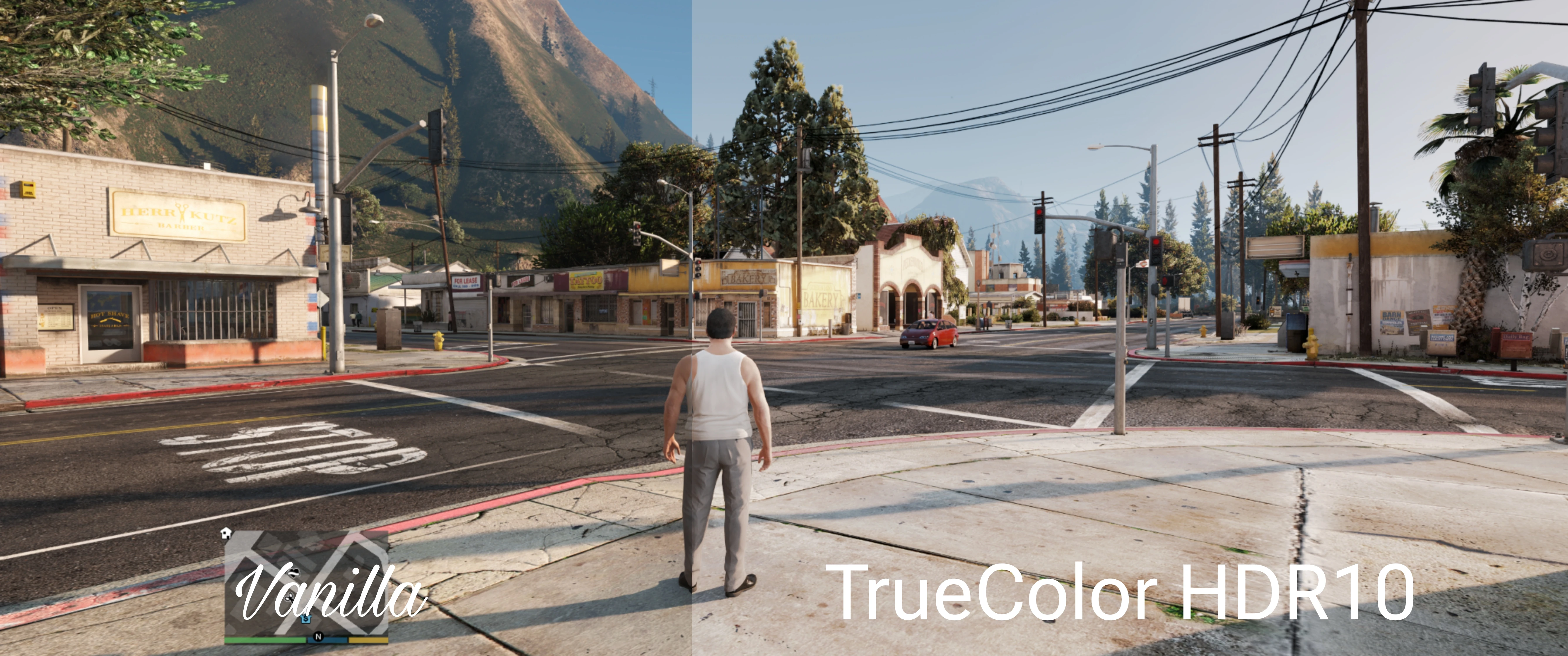
Welcome to the True Color HDR10 ReShade
- All photos are not captured in HDR format. (just Windows Snipping Tools lol)
- Photos might not up-to-date with the latest updates. Need to test to see the real picture.
- Contains various shaders. All credit to the owners. Thanks for the great work. GG!
- This ReShade preset is created by using HDR400 True Black OLED monitor from Alienware.
This ReShade is meant to be used with HDR turned on.
Recommended & Tested : RTX HDR
ReShade Installation
1 - Open ReShade installer and Select *game.exe then click next.
2 - Select DirectX 10/11/12 then click next.
3 - Click Uncheck All then click next. Wait until it successfully installed then click Finish.
Installation using Vortex
1 - Install latest ReShade (refer steps above)
2 - Download Vortex app in NexusMods page
3 - Select Mod Manager Download when downloading TrueColorHDR10 preset in NexusMods page
4 - Let Vortex automatically install it.
Manual Installation
1 - Install latest ReShade (refer steps above)
2 - Copy and paste the files and folders from RAR/Zip into the root folder and replace all
3 - Run game, hit Home key and select TrueColorHDR10 preset
Please let me know if you have any questions. Track, Endorse, Vote, Comment if you like it ;P
A ReShade preset for GTA V Enhanced that aims to deliver true HDR10 color on HDR displays, tested with RTX HDR. Includes various shaders and requires HDR enabled. With 26 endorsements and 2,034 downloads, it's a niche preset for HDR enthusiasts seeking improved visuals.
✨ Key Features
📊 Pros & Cons
✅ Pros
- Active author who responds to questions (26 endorsements)
- Clear installation instructions for ReShade, Vortex, and manual methods
- Designed for HDR displays, offering a specific visual enhancement
⚠️ Cons
- Low endorsement count (26) suggests limited community testing
- Photos may not reflect latest updates, so visual results can vary
- Requires HDR hardware and RTX HDR for best experience, limiting audience
For GTA V players with HDR monitors who want a ReShade preset tuned for HDR10 output, especially those using RTX HDR. Skip if you play on non-HDR displays or prefer vanilla visuals.
💡 Beginner Tips
- Ensure HDR is enabled in Windows and in-game before applying the preset.
- Use the ReShade installer to select the correct API (DirectX 10/11/12) for GTA V.
- After installation, press Home in-game to open ReShade and select the TrueColorHDR10 preset.
📊 Mod Details
- Game
- GTA V Mods
- Author
- MDXZFR
- Version
- 4.7.1
- Downloads
- 2,034
- Endorsements
- 26
- Category
- Miscellaneous
- Created
- 3/13/2025
- Updated
- 8/14/2025
🔧 How to Install GTA V Mods
Script Hook V + OpenIV. Never mod GTA Online.
📖 Full step-by-step install guide for GTA V →
Visit the official mod page for specific installation instructions for this mod.
🎮 Need cheat codes or console commands? Check ur gaming wiki for GTA V commands, item IDs, and more.
Keep browsing — more GTA V mods await