Field of View changer
⚪ Last updated 2017⚠️ Install Order · 4 steps
Install in this order, then this mod last — most mods fail to load without their framework and dependencies in place.
Preview
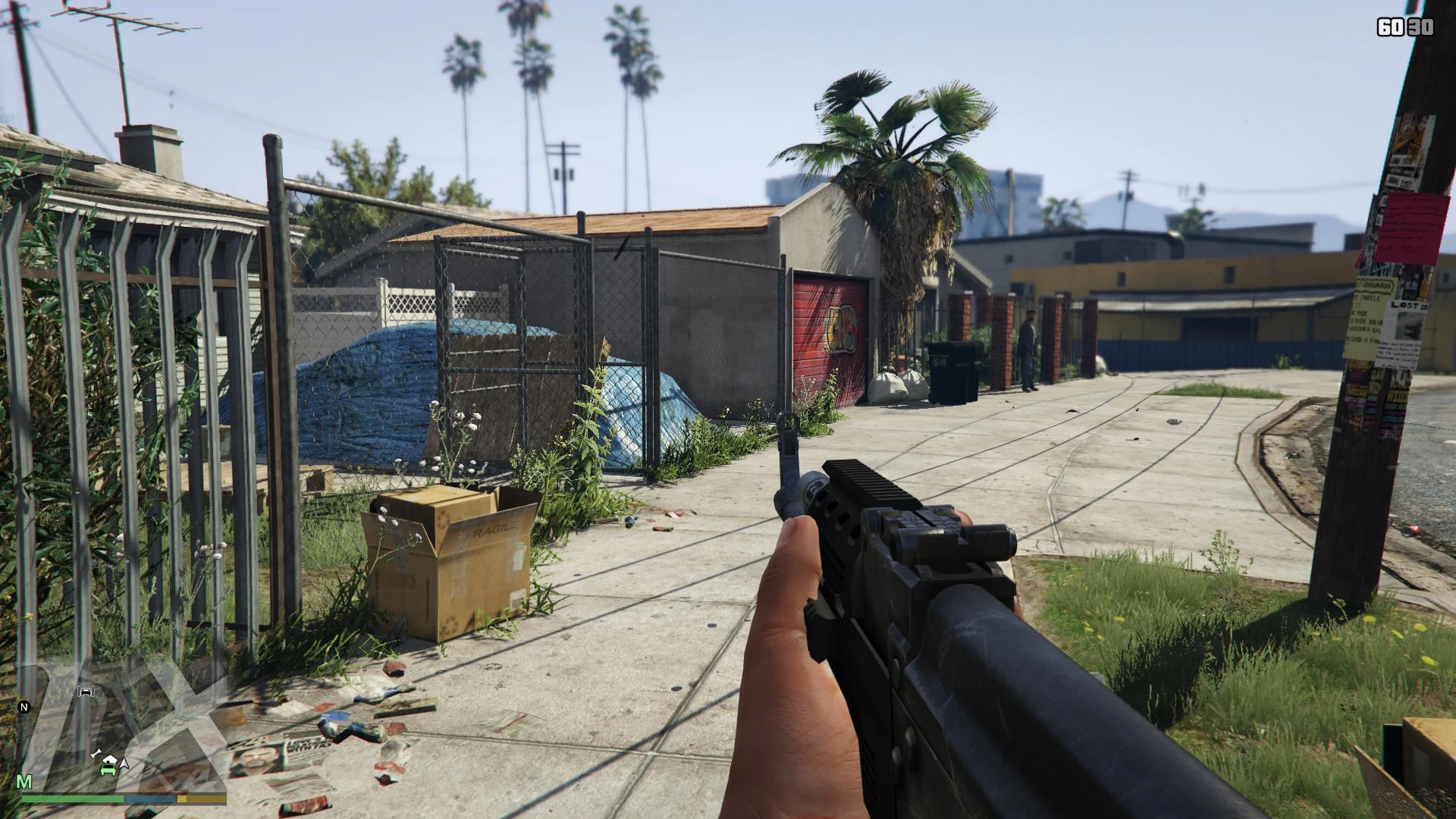
🔍 Analysis
- 👍 3.6% endorsement rate — high engagement, a strong quality signal
- 🏆 #8 of 58 Miscellaneous mods in this game by downloads
📋 About This Mod
You can now set your fields of view to whatever you want.
Edit: Now with source and the ability to change all fields of view - first-person walking, driving, aiming, ADS, crouching and third-person.
Edit: ...which can now be disabled in the .ini file.
Screenshots comparisons here: http://imgur.com/a/MrS69
Tested and working on the worldwide Steam and retail/Rockstar Warehouse version as of December 19, 2017 - there's no guarantee a future patch won't break it, but this mod will be updated for compatibility if necessary.
Be advised: We do not yet know the game's anti-cheating measures - use at your own risk. This mod modifies game memory and as such looks like a cheat, and may even be considered one in online multiplayer as having a higher field of view can put players at a competitive advantage.
Edit: I should probably point out that I consider the risk of getting banned for using this about as high as for things like SweetFX (which "look like a cheat" in the same way), and if you do get banned, it's most likely a mistake (though we have no idea whether Rockstar would unban you then either). I just felt the need to mention that it's not 100% risk free.
Installation instructions:
-
[]Find your GTA V installation folder (e.g. C:\Program Files (x86)\Steam\SteamApps\common\Grand Theft Auto V). It should have files such as GTAV.exe and bink2w64.dll in it.
[
]Extract fov.ini and dsound.dll into that folder.[]Install the Visual C++ 2015 Update 3(!) x64 runtime using vcredist_x64.exe if you haven't already.
[]Change the contents of fov.ini to your desired vertical(!) fields of view. If you only know the horizontal FoV you want, here's a handy calculator: http://www.rjdown.co.uk/projects/bfbc2/fovcalculator.php
[]All done! Launch the game as usual.
Anticipated questions / known issues:
Q: How do I use this with Alexander Blade's ASI loader?
This is not required for loaders that aren't themselves called dsound.dll.
-
[]Install the FoV mod as normal.
[]Install ASI loader's dsound.dll but rename it to, for example, asiloader.dll.
[]Open fov.ini
[]Uncomment the "ProxyLibrary" line (remove the semicolon at the start of it) and change "other_dsound.dll" to "asiloader.dll"
[]Save fov.ini
Q: I don't see any "dll".
A: Windows doesn't display known file extensions by default - if you just see a "bink2w64" file, that's okay, that's what I meant.
Q: Does this work on the Rockstar Warehouse version of the game too?
Q: The game refuses to launch when I have the mod installed.
A: Did you install vcredist_x64.exe? The version (2015 Update 3) is important! Microsoft names all their 64-bit packages, regardless of version, vcredist_x64.exe, so you may have installed one such file before which was older, so you'll still need to install this one.
Q: Okay, but I don't trust you to run a file from you as Administrator.
A: The official download is available ahttps://www.microsoft.com/en-us/download/details.aspx?id=53587
Q: Why doesn't the FoV slider in the camera menu work anymore?
A: The mod overrides it. If you want the default values back, you can uninstall it, or set them in fov.txt (they go from 45 to 55). If you want an ingame way of changing field of view, I might try utilising the cheat code prompt for that, but no guarantees.
Q: So how do I uninstall this?
A: Just delete dsound.dll from your GTA V installation folder again.
Q: I don't want the mod to change all fields of view, how do I disable only some changes?
A: Edit the fov.ini file and comment out the line (add a ; in front of it).
Q: I have a super fast PC and this doesn't seem to work.
A: The mod waits 30 seconds after the game starts (i.e. the program opens, not 30 seconds after you gain control of your character) to take effect, as it crashes if it tries to load immediately when the game does. I know there's bett
A memory-modifying tool that lets GTA V players set custom field of view values for first-person, driving, aiming, ADS, crouching, and third-person. Includes an .ini file for toggling each FoV type. Tested on Steam and retail versions as of December 2017, with a ban risk warning.
✨ Key Features
📊 Pros & Cons
✅ Pros
- Community favorite with 784 endorsements and over 22k downloads.
- Gives full control over all FoV modes, not just the default.
- Author actively notes compatibility and provides source code.
⚠️ Cons
- Last updated in 2017 — may not work with current GTA V patches.
- Modifies game memory, so it looks like a cheat and carries a ban risk in online play.
- Requires manual installation and a specific Visual C++ runtime (2015 Update 3).
For GTA V players who get motion sickness or want a wider view in first-person and vehicles. Also for those who want to tweak aiming and third-person perspectives. Skip if you're worried about online bans or play on a newer game version.
💡 Beginner Tips
- Disable your antivirus or add an exception for dsound.dll, as it may be flagged as a cheat.
- Use the provided FoV calculator to convert your desired horizontal FoV to vertical, since the .ini uses vertical values.
- Back up your original dsound.dll if you ever want to revert the mod.
📊 Mod Details
- Game
- GTA V Mods
- Author
- DrDaxxy
- Version
- 1.35
- Downloads
- 22,011
- Endorsements
- 784
- Category
- Miscellaneous
- Created
- 4/16/2015
- Updated
- 12/19/2017
🔧 How to Install GTA V Mods
Script Hook V + OpenIV. Never mod GTA Online.
📖 Full step-by-step install guide for GTA V →
Visit the official mod page for specific installation instructions for this mod.
🎮 Need cheat codes or console commands? Check ur gaming wiki for GTA V commands, item IDs, and more.
Keep browsing — more GTA V mods await