ComicToon Reshade - GTA V
⚪ Last updated 2021⚠️ Install Order · 5 steps
Install in this order, then this mod last — most mods fail to load without their framework and dependencies in place.
Preview
🔍 Analysis
- 👍 1.1% endorsement rate — high engagement, a strong quality signal
- 🏆 #36 of 82 Visuals and Graphics mods in this game by downloads
📋 About This Mod
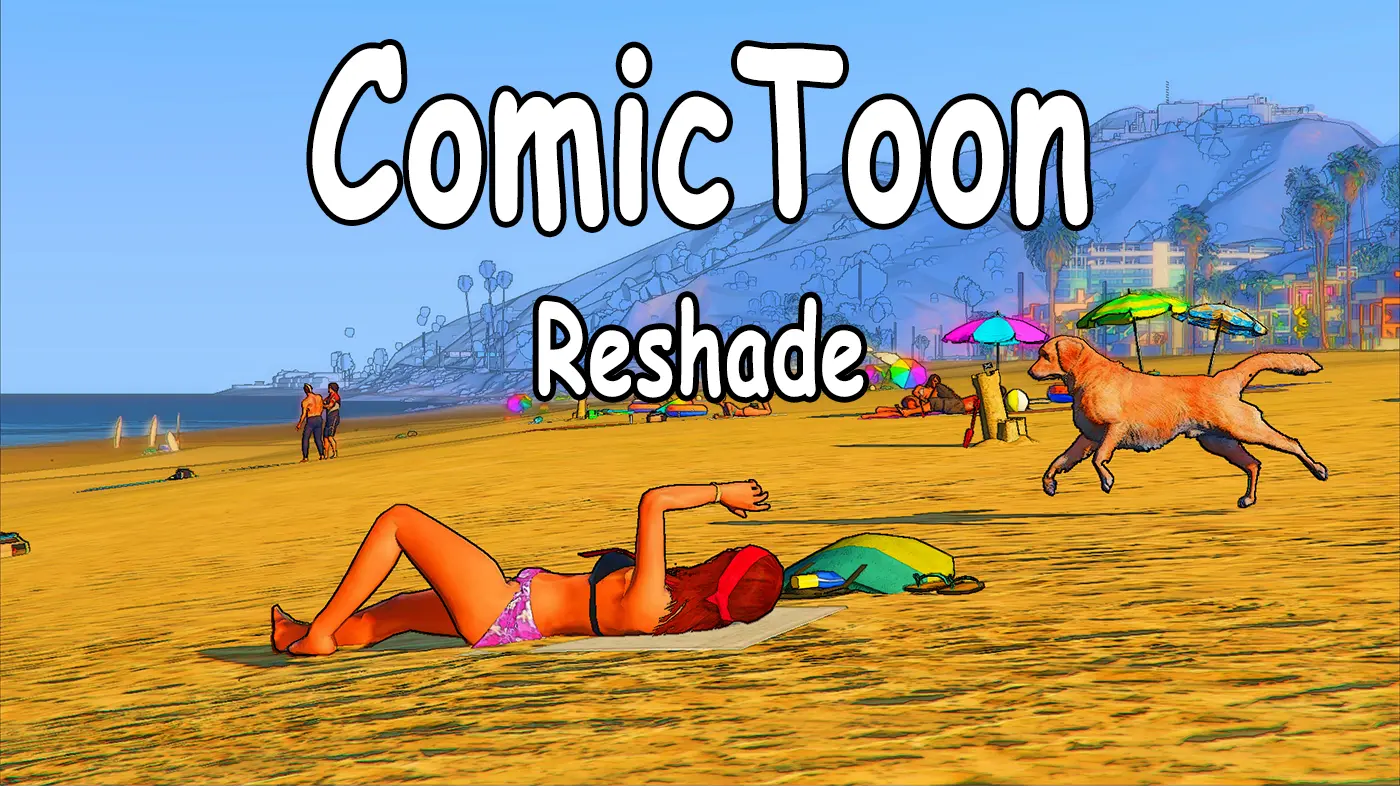
ComicToon Reshade
Comic Theft Auto V
This is a preset file created for ReShade.
The idea is to give your game a comic/cartoon-style look.
ComicToon Reshade https://i.imgur.com/jxSiSvH.png
About
ComicToon Reshade will give your game a comic/cartoon-style look.
It's just a visual filter, so there are no changes to the game files whatsoever.
If you like comics, cartoons or animes, or if you just want to play the game in a different look, then this is for you.
This is a light reshade, so there should not be any significant fps drops to the game.
menus clearly, then you can simply disable it by unchecking the
"Outlines.fx" box in the Reshade in-game settings.
Image - ComicToon Reshade Outlines check: https://i.imgur.com/PU6B7mk.jpg
Required Program (ReShade)
Official ReShade website:
https://reshade.me/
This mod was made using Reshade version 4. 9. 1
Install Instructions
If you already know how to use ReShade, then simply select the
"ComicToonReshade.ini" as a preset and copy the "Outlines.fx" and
"Comic.fx" effects on your ReShade "Shaders" folder.
Below, there are more detailed instructions on how to install ReShade and apply the "ComicToon Reshade" mod
(1) - Download ReShade: https://reshade.me/downloads/ReShade_Setup_4. 9. 1.exe
(2) - Download the official Shaders and Textures repository: https://github.com/crosire/reshade-shaders/archive/master.zip
Image - GitHub ReShade repository: https://i.imgur.com/K47w6Vi.jpg
This "master.zip" file has two folders "Shaders" and "Textures" and two .md files
(3) - Create a new folder where you want the ReShade program and presets to
be. You could name this folder to "RESHADE", to make things simpler.
(4) - Inside the "RESHADE" folder, create two new folders: "Presets" and "Screenshots"
(5) - Extract all "master.zip" content (step 2) into the new "RESHADE" folder you created on step 3.
(6) - Download the "ComicToon Reshade" mod
It's a .zip file containing two folders:
"Preset" folder with the "ComicToonReshade.ini" preset file and
"Shaders" folder with the "Outlines.fx" and "Comic.fx" effects
(7) - Extract all "ComicToon Reshade.zip" content (step 6) in the "RESHADE" folder
By know, your "RESHADE" folder should look like this:
Image - Reshade folder: https://i.imgur.com/XcOAMnV.jpg
D:\RESHADE\
\Presets
\Screenshots
\Shaders
\Textures
\README.md
\REFERENCE.md
\ReShade_Setup_4. 1. 9.exe
(8) - Launch ReShade. A small window will appear. Click on "Click to select a game and manage its ReShade installation"
Image - ReShade setup 1: https://i.imgur.com/XsjZ1PT.jpg
(9) - Select a game, in this case, select the "GTA5.exe" file that's within
the folder where you installed the game, usually the GOG Galaxy Games
folder, or the Steam folder.
Image - ReShade setup 2 (Select a game): https://i.imgur.com/PLuLUNN.jpg
(10) - Choose the rendering API. For Grand Theft Auto "GTA" V, it's the
ComicToon Reshade is a ReShade preset for GTA V that applies a comic/cartoon-style visual filter, including outlines and comic effects. It's a light preset with minimal FPS impact, requiring ReShade 4.9.1 and custom shaders. With 23 endorsements and 2,111 downloads, it's a niche cosmetic mod for players wanting a stylized look.
✨ Key Features
📊 Pros & Cons
✅ Pros
- Niche but dedicated following (23 endorsements, 2,111 downloads).
- Lightweight preset—author claims no significant FPS drops.
- Easy to toggle outlines off if they obscure menus.
⚠️ Cons
- Last updated in 2021—may not work with newer GTA V updates or ReShade versions.
- Requires manual installation of ReShade and shaders, which can be fiddly.
- Only 23 endorsements—community feedback is limited.
For GTA V players who want a fresh, comic-book aesthetic without heavy performance costs. If you're into cartoons or anime and want to see Los Santos in a new light, this is for you. Skip if you prefer realistic graphics or don't want to bother with ReShade setup.
💡 Beginner Tips
- Download ReShade 4.9.1 specifically, as the preset was made with that version—newer versions might change settings.
- When installing ReShade, select GTA V's executable and choose Direct3D 10/11/12 as the API.
- After copying the .ini and shader files, launch the game and press Shift+F2 to open ReShade's in-game menu to select the preset.
📊 Mod Details
- Game
- GTA V Mods
- Author
- highmacleod
- Version
- 1.0
- Downloads
- 2,111
- Endorsements
- 23
- Category
- Visuals and Graphics
- Created
- 8/31/2021
- Updated
- 8/31/2021
🔧 How to Install GTA V Mods
Script Hook V + OpenIV. Never mod GTA Online.
📖 Full step-by-step install guide for GTA V →
Visit the official mod page for specific installation instructions for this mod.
🎮 Need cheat codes or console commands? Check ur gaming wiki for GTA V commands, item IDs, and more.
Keep browsing — more GTA V mods await