Add-On Car Spawner Menu
⚪ Last updated 2017⚠️ Install Order · 7 steps
Install in this order, then this mod last — most mods fail to load without their framework and dependencies in place.
🖼️ Gallery (6 images)
🔍 Analysis
- 👍 0.2% endorsement rate
- 🏆 #17 of 196 scripts mods in this game by downloads
📋 About This Mod
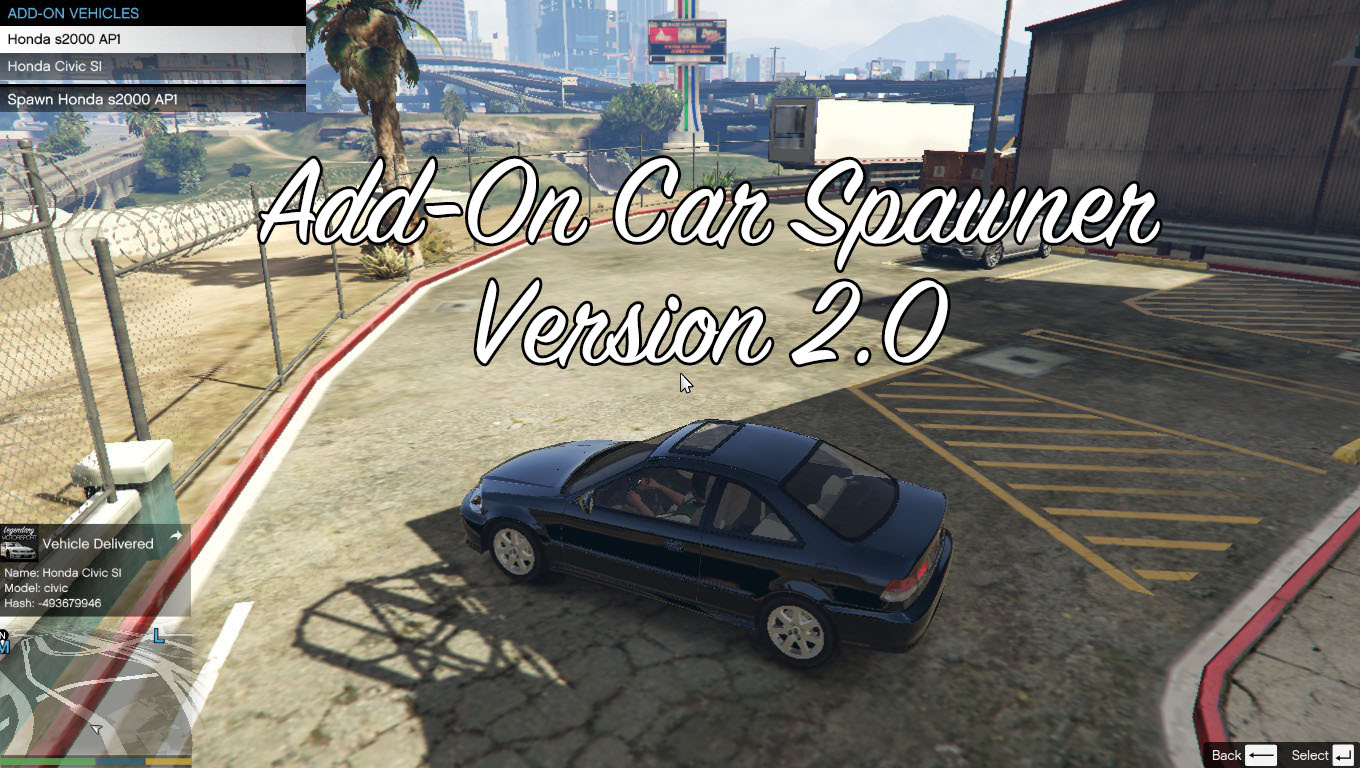
Thanks for downloading Add-On Car Spawner v2. 2. 3 by I'm Not MentaL Features: Spawn Add-On Cars, Save Add-On Cars. Requirements: - Latest ScriptHookV - Latest Community Script Hook V . NET - Visual C++ Redistributable for Visual Studio 2013 x64 - Microsoft . NET Framework 4. 5. 2 Install: Drag and Drop 'Scripts' folder into GTAV Main Directory. Setting: Open AddOnCarSpawner.ini ModEnableKey - Shortcut key SpawnInCar - True/False Persistance - True/False Tracker - True/False CurrentPosition - True/False Tutorial: I. Add Category 1. Open "AddOnCarSpawner" Folder 2. Create a New CFG file, rename it (eg: "Toyota.cfg" or "Sports Car.cfg" or "A-D.cfg" or "E-H.cfg" or "Batman Vehicles.cfg") 3. Open it with Notepad, then File > Save As 4. Change Encoding to "UTF-8" and click Save. 5. That is all. II. Add Vehicle 1. Open "AddOnCarSpawner" Folder, Choose a CFG file. 2. Open it with Notepad 3. Then Add "Car Name\Car Model" (eg: "Grotti Turismo R\turismor") 4. File > Save. 5. That is all. Changelog: v2. 2. 4 - Fixed Vehicle refuse to spawn problem. v2. 2. 3 - Fixed options not being save in AddOnCarSpawner.ini. - Fixed when player is in vehicle, spawn new vehicle on bottom of the previous vehicle. v2. 2. 2 - Added option to spawn in current position instead jump on nearest road. v2. 2. 1 - Removed Automatically get car name on menu. v2. 2 - Vehicle Persistence bug fixed. - New Search feature (search keywords name/model). - Automatically get car name on menu. - Automatically spawn boats on nearest water. v2. 1 - Added more options: Persistence & Tracker - Options can be change in game v2. 0. 1 - Fixed mod crash when saving vehicles to Saved Vehicles v2. 0 - Unlimited Category. - Save vehicle with modifications. - Improve spawn vehicle methods (Object reference not set to an instance of an object fixed.) v1. 1 - Display Vehicle Hash while Spawn - Bugs Fixed - Automatic Pop-up Headlights if nearby vehicles are Toyota AE86 by squatzandoats or Mazda RX-7 by erfet - 中文漢化 v1. 0 - Initial Release Known Bugs: None yet Credits: Rockstar Games, Alexander Blade, Crosire, Guadmaz
This script mod for GTA V lets you spawn add-on cars and save them, requiring ScriptHookV and .NET. With over 687k downloads and 1,317 endorsements, it's a popular tool for modders. However, it hasn't been updated since 2017, so compatibility with newer game versions is uncertain.
✨ Key Features
📊 Pros & Cons
✅ Pros
- Huge download count (687k+) shows it's widely used and trusted.
- Simple drag-and-drop install makes setup quick.
- Endorsements (1,317) indicate community approval.
⚠️ Cons
- Last updated in 2017, so it may not work with the latest game patches.
- Requires multiple dependencies (ScriptHookV, .NET, VC++ Redistributable, .NET Framework) to function.
- Limited features—only spawn and save, no advanced options like vehicle customization.
This is for GTA V modders who frequently use add-on vehicle packs and need a quick way to spawn them in-game. It's also useful for content creators testing custom cars. If you're on an older game version and already have the required tools, this is a solid pick.
💡 Beginner Tips
- Make sure you have the latest ScriptHookV and .NET versions installed, or the mod won't load.
- If you're using a cracked game version, ScriptHookV may not work, so stick to legitimate copies.
- After installing, launch the game and use the mod's menu (default key is usually F4) to spawn your add-on cars.
📊 Mod Details
- Game
- GTA V Mods
- Author
- I'm Not MentaL
- Version
- 1.2
- Downloads
- 687,789
- Endorsements
- 1,317
- Category
- scripts
- Created
- 10/4/2015
- Updated
- 9/20/2017
🔧 How to Install GTA V Mods
Script Hook V + OpenIV. Never mod GTA Online.
📖 Full step-by-step install guide for GTA V →
Visit the official mod page for specific installation instructions for this mod.
🎮 Need cheat codes or console commands? Check ur gaming wiki for GTA V commands, item IDs, and more.
Keep browsing — more GTA V mods await