Queue Everything
🟢 Updated this monthPreview
🔍 Analysis
- 👍 2.2% endorsement rate — high engagement, a strong quality signal
- 🏆 #11 of 129 Miscellaneous mods in this game by downloads
📋 About This Mod
Queue almost anything in the game, including the multi-quality items vanilla refuses to queue. Optional auto-mode keeps the station crafting until you stop it or run out of materials. Quality selection is preserved per item. Requires Rest
Support
Continued development, testing, & managing user reports all take time; any support is greatly appreciated! If you can't donate and enjoy the mod, please consider endorsing the mod (thumbs up 'Endorse' button up the top)!
Discord
https://discord.gg/Dy5ApMYYY8
Heads-up
The extra quick-craft buttons you can see in the screenshots and videos on this page aren't part of Queue Everything — they come from my other mod, Max Buttons Redux. Install it alongside if you want the same look.
What
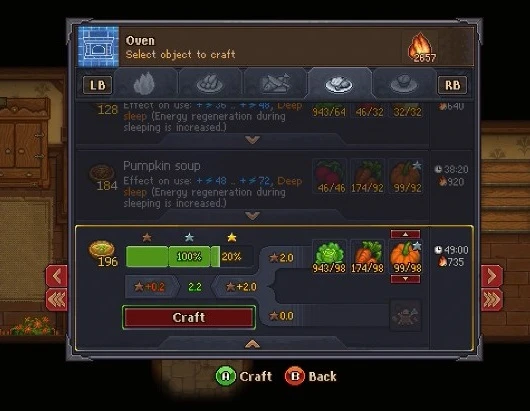
Turns the craft window into a proper queueing interface and (optionally) converts hand-crafts into idle auto-crafts you can walk away from.
Queueing
-
[]Queue almost any craft — if a craft can be run once, it can now be queued multiple times. Some built-in exclusions cover items known to break when queued (buildings, graves, one-off quest items).[/]
[]Live totals — when you change the queue quantity, the craft-time, fuel, and energy numbers update on-screen to reflect the real total, not the single-craft values.[/]
[]Auto-select highest quality — crafts that pick between multiple tiers of an ingredient (e.g. carrots i/ii/iii) default to the highest you have in stock. Exception: dinner recipes (vanilla handles those quirkily).[/]
[]Auto-max toggles — separate options for "multi-quality" and "normal" crafts to automatically fill the queue with as many as your materials allow when you open a craft.[/]
[]Controller focus — on controller, expanding a multi-craft auto-focuses the big "Craft Now" button so you can trigger it without fishing for the right input.[/]
Auto-craft (opt-in per workbench)
-
[]Convert hand crafts at specific workbenches into timer-based auto-crafts you can queue up and walk away from. The master toggle is on by default but every per-workbench toggle starts off — the mod does nothing to your crafting until you enable the benches you want. Toggles apply live, no restart.[/]
[]Supported workbenches (independent toggles):
- Alchemy — alchemy workbench, mortar, survey station
- Cooking — cooking table, tavern kitchen
- Study — study desks, book-writing table
- Metalwork — anvil, hammer station, jewelry bench
- Morgue — body prep, autopsy table, packing table
- Carpentry — sawhorse, chopping spot, carpenter's workbench, beam gantry
- Sermons — church pulpit (removes per-sermon energy cost)
- Printing — printing press, paper press
- Winemaking — vine press
- Pottery — potter's wheel
- Misc — any other hand crafts that don't fit the groups above (e.g. benches added by a future game update)[/]
[]Trade-off — auto-crafted recipes run on a longer timer than hand crafting and, by default, halve red/green/blue research-point outputs (blood, fat, skin, heart, intestine). It's convenience for a cost; turn off "Half Research Point Outputs" under Balance if you want full yields.[/]
Balance tweaks (optional)
-
[]Half Fire Requirements — halves the fuel each fire craft needs across the board. Independent of the research-point halving above.[/]
[]Force Multi Craft — makes almost any craft queue-able even if it isn't normally. A safety list still excludes buildings, graves, and other placements that would break.[/]
Other
-
[]Main menu update notice — flags when a newer version of this mod (or other mods in my collection) is on Nexus. Click an entry to open the mod's page. Opt-out via the "Check for Updates" setting.[/]
[]If a specific craft breaks when queued and you'd like it added to the safety list, grab the diagnostic log the mod writes and send it my way with a description of what went wrong.[/]
Other mods of mine you might like
[]Max Buttons Redux — the Min/Max buttons you see in this page's screenshots. Install alongside if you want one-click minimum or maximum fills.[/]
[*][url=https://www.ne
-
[]Main menu update notice — flags when a newer version of this mod (or other mods in my collection) is on Nexus. Click an entry to open the mod's page. Opt-out via the "Check for Updates" setting.[/]
-
[]Half Fire Requirements — halves the fuel each fire craft needs across the board. Independent of the research-point halving above.[/]
-
[]Convert hand crafts at specific workbenches into timer-based auto-crafts you can queue up and walk away from. The master toggle is on by default but every per-workbench toggle starts off — the mod does nothing to your crafting until you enable the benches you want. Toggles apply live, no restart.[/]
📊 Mod Details
- Game
- Graveyardkeeper Mods
- Author
- p1xel8ted
- Version
- 2.2.1
- Downloads
- 36,655
- Endorsements
- 808
- Category
- Miscellaneous
- Created
- 6/9/2022
- Updated
- 9/13/2026
- Tags
- Gameplay, Overhaul, Quality of Life
🔧 How to Install Graveyard Keeper Mods
Install via a mod manager (Vortex or Mod Organizer 2). Most mods drop into the game folder.
📖 Full step-by-step install guide for Graveyard Keeper →
Visit the official mod page for specific installation instructions for this mod.
🎮 Need cheat codes or console commands? Check ur gaming wiki for Graveyard Keeper commands, item IDs, and more.
Keep browsing — more Graveyard Keeper mods await