Wheres Ma Storage
🟢 Updated this monthPreview
🔍 Analysis
- 👍 2.0% endorsement rate — high engagement, a strong quality signal
- 🏆 #3 of 129 Miscellaneous mods in this game by downloads
📋 About This Mod
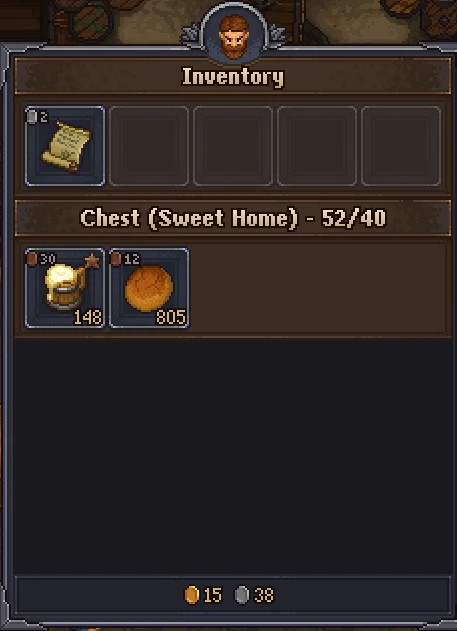
All-in-one storage and inventory overhaul. Sell to vendors from any storage box, hide useless widgets, hide invalid vendor options, see which zone each box is in and how full it is at a glance, plus a long list of smaller tweaks. Each
Support
Continued development, testing, & managing user reports all take time; any support is greatly appreciated! If you can't donate and enjoy the mod, please consider endorsing the mod (thumbs up 'Endorse' button up the top)!
Discord
https://discord.gg/Dy5ApMYYY8
What
Important — do not install alongside other inventory / storage / capacity mods. Where's Ma' Storage overrides inventory logic deeply. Mixing it with other mods that do the same (e.g. More Inventory Slots) produces duplicate entries, vanished piles, and empty vendor tabs. The mod detects More Inventory Slots specifically and disables it at the main menu with a warning, but other storage-modifying mods aren't guarded — uninstall them first.
One shared inventory across every crafting station, bigger chests, and bigger stacks. No more running between racks to find the one bit of ore you need.
Shared inventory
-
[]Every container you've built — chests, racks, stockpiles, church bookcases, alchemy racks, organ racks, the keeper's room rack, and more — is pooled into one virtual inventory that every workstation can draw from.[/]
[]Works across zones. Craft at the farm with materials stored at the morgue, the lighthouse, or the tavern.[/]
[]Can be turned off entirely via the master "Shared Inventory" toggle if you'd rather play vanilla-style with just the other features.[/]
Inventory size
-
[]Two independent sliders — one for your player inventory, one for chests/racks/other containers. Want a tight player carry but huge chests? Now you can. (Before 2. 1. 14 there was a single combined slider.)[/]
[]Each slider is 0–a lot — zero means no change vs vanilla. Raising them grows every existing container in the world, not just newly-built ones.[/]
[]Reducing a slider below what you currently have stored pops up a Yes/No confirmation showing exactly how many items would no longer fit. Answer "Yes" to drop the overflow at your feet (for your inventory) or next to the container (for chests). Answer "No" to roll the slider back so nothing is touched.[/]
[]Save compatibility with older versions: if an earlier version of this mod ever silently hid items when shrinking, those items are revealed the next time you open the affected container. Nothing stays lost.[/]
Stack sizes and stacking
-
[]Raises the default per-item stack cap (max 999) so you can hoard without clutter. Configurable.[/]
[]Optional stacking for tools, weapons, armour, grave items, prayers, chisels, and pen/paper/ink items. Each category has its own toggle so you can stack only the ones you want.[/]
[]Caveat on stacked tools/chisels/pens: when a durability-consuming item is stacked, the whole item gets spent in crafts instead of losing durability, and a damaged item placed on top of a fresh stack will "heal" to the fresh item's durability. If you're short on materials early game, leave these off. Late game when you're rich, turn them on. This is intentional and not a bug.[/]
UI options
[]Show only personal inventory — optionally suppress the big shared list during vendor trades, tavern cellar access, chest transfers, the soul box, and the writer's table. Useful if you want those UIs to behave like vanilla.[/]
[]Hide specific widget types — independently hide stockpiles, tavern containers, soul containers, and warehouse/shop widgets from the inventory list so the scroll is shorter. Refugee camp and pump/pallet widgets are always hidden (they'd add noise, not storage).[/]
[]Hide invalid selections during crafting and selling so you only see items that are actually valid for the current task. If an inventory has zero valid items, that row is hidden entirely.[/]
[]Hide empty rows in your inventory and chests — big performance boost with a lot of containers.[/]
[]Remove section separators for a tighter, denser list.[/]
[]Inventory dimming toggle — turn the vanilla grey-out of items outside your personal inventory on or off. Always off at vendors with the full shared list shown.[/]
[*]Show used/total slot count in e
-
[]Raises the default per-item stack cap (max 999) so you can hoard without clutter. Configurable.[/]
-
[]Two independent sliders — one for your player inventory, one for chests/racks/other containers. Want a tight player carry but huge chests? Now you can. (Before 2. 1. 14 there was a single combined slider.)[/]
📊 Mod Details
- Game
- Graveyardkeeper Mods
- Author
- p1xel8ted
- Version
- 2.2.2
- Downloads
- 67,866
- Endorsements
- 1,389
- Category
- Miscellaneous
- Created
- 7/9/2022
- Updated
- 10/2/2026
- Tags
- Fair and balanced, English, French, German, Italian, Japanese, Polish, Spanish, Russian, User Interface
🔧 How to Install Graveyard Keeper Mods
Install via a mod manager (Vortex or Mod Organizer 2). Most mods drop into the game folder.
📖 Full step-by-step install guide for Graveyard Keeper →
Visit the official mod page for specific installation instructions for this mod.
🎮 Need cheat codes or console commands? Check ur gaming wiki for Graveyard Keeper commands, item IDs, and more.
Keep browsing — more Graveyard Keeper mods await