Narod's FFXV Screenshot Grabber - V1.6.2.0
🟠 Updated over a year agoPreview
🔍 Analysis
- 🏆 #7 of 9 Utilities mods in this game by downloads
📋 About This Mod
Narod's FFXV Screenshot Grabber - V1. 6. 2. 0
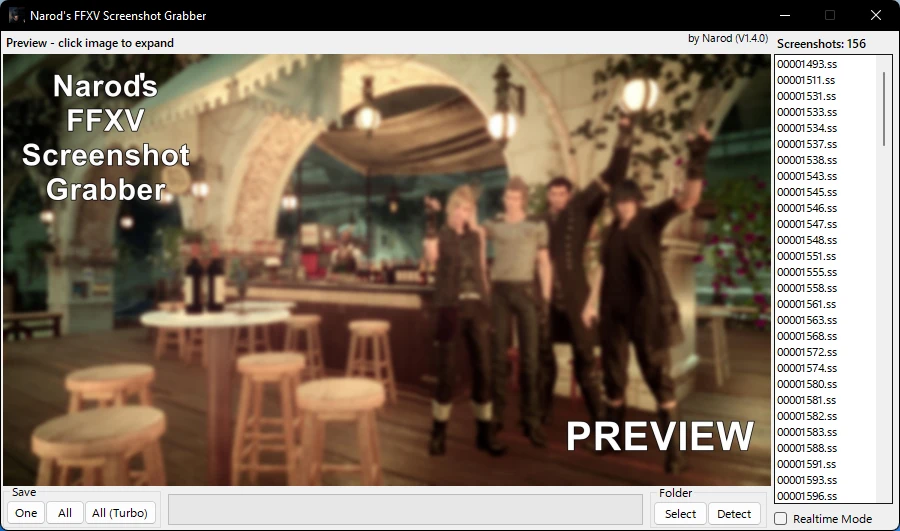
This utility is a fast and simple way of retrieving your screenshots (taken by Prompto in-game) in to .jpg files that can be used for anything you wish!
-
[]See a live preview of what the screenshot contains before exporting it
[
]Export a single photo, or an entire folder in one go (compared to the most popular screenshot utility, this one is much faster!)[]Automatic multi-platform detection of your screenshot folder, with an option to browse to a custom one
[]Realtime mode, which saves screenshots in to .jpg files as they are created by the game
[]Automatic version checker, which will notify you of future updates
[]Steam Deck & Linux support
[]macOS support
Windows 10+ instructions:
-
[]Download the utility, and extract it in to a folder
[]Open the utility, it should auto detect your screenshot folder, and if not you can browse to this location
[]Click through screenshots along the side, or opt to save one / all along the bottom!
Windows 7 - Windows 8. 1 instructions:
-
[]Download the utility, and extract it in to a folder.
[
]Open the utility.[]You will likely see an error message about needing a . NET 6. 0 runtime - if you do, press Yes, and proceed to download & install this.
[]Enjoy!
Steam Deck installation instructions:
-
[]Enter 'Desktop Mode'.
[
]Open your favourite browser, visit this NexusMods page and Download the utility.[]Extract the utility in to a new folder. NOTE For V1. 4. 0 And earlier, you need to manually rename the utility to FFXVSSGrabber.exe
[]Open Steam (right click in notification area -> Library)
[]In the bottom-left, click 'Add a game' and then 'Add a non-Steam game'
[]Click 'Browse' and find the utility as you extracted it. It will end in .exe.
[]Choose 'Add Selected Programs'.
[]Find it in Steam side-bar, right-click, go in to compatibility, tick the box at the top and then in the drop-down choose Proton-7. 0
[]Close the window, and click 'Play'
[]If you get an error about needing . NET 6, follow the download link here: https://dotnet.microsoft.com/en-us/download/dotnet/thank-you/runtime-6. 0. 35-windows-x86-installer
[]Find the utility in the Steam side-bar again, right-click, click 'Browse' and select the installer you just downloaded.
[]Close the window, and click 'Play'
[]Follow the installation instructions.
[]Once finished, right-click it in the Steam side-bar once more, click 'Browse', and go back to where you extracted the utility to.
- Click 'Play' - you only need to do this step again on subsequent runs!
For other Linux distros, you can use the Steam Deck in
-
[]Enter 'Desktop Mode'.
-
[]Download the utility, and extract it in to a folder.
-
[]Download the utility, and extract it in to a folder
Narod's FFXV Screenshot Grabber is a utility mod for Final Fantasy XV that extracts screenshots from the game. It is fast, simple, and feature-rich, with 28 endorsements and 405 downloads, last updated in May 2025.
✨ Key Features
📊 Pros & Cons
✅ Pros
- Does exactly what it says—gets your screenshots out without fuss.
- Recent update (May 2025) shows the author is still supporting it.
- Small but solid user base (28 endorsements) for a niche utility.
⚠️ Cons
- No detailed instructions or feature list provided, so you're on your own figuring out the specifics.
- Only 405 downloads—might be overlooked, but that's fine for a niche tool.
- Requires the game to be installed, obviously, but no mention of compatibility with different versions.
For FFXV players who take a lot of screenshots and want an easy way to pull them out of the game files. Skip if you're looking for gameplay tweaks—this is purely a utility.
💡 Beginner Tips
- Make sure you know where your game saves screenshots—this tool will pull from there.
- Check the mod's page for any update notes or user comments for troubleshooting.
- Since it's a standalone utility, you don't need a mod manager—just run the executable.
📊 Mod Details
- Game
- Finalfantasy15 Mods
- Author
- Narod
- Version
- V1.6.2.0
- Downloads
- 405
- Endorsements
- 28
- Category
- Utilities
- Created
- 11/17/2022
- Updated
- 5/2/2025
🔧 How to Install Final Fantasy XV Mods
Download from Nexus Mods.
📖 Full step-by-step install guide for Final Fantasy XV →
Visit the official mod page for specific installation instructions for this mod.
🎮 Need cheat codes or console commands? Check ur gaming wiki for Final Fantasy XV commands, item IDs, and more.
Keep browsing — more Final Fantasy XV mods await