Comrades and Avatara female hair mod shadow fix
⚪ Last updated 2018Preview
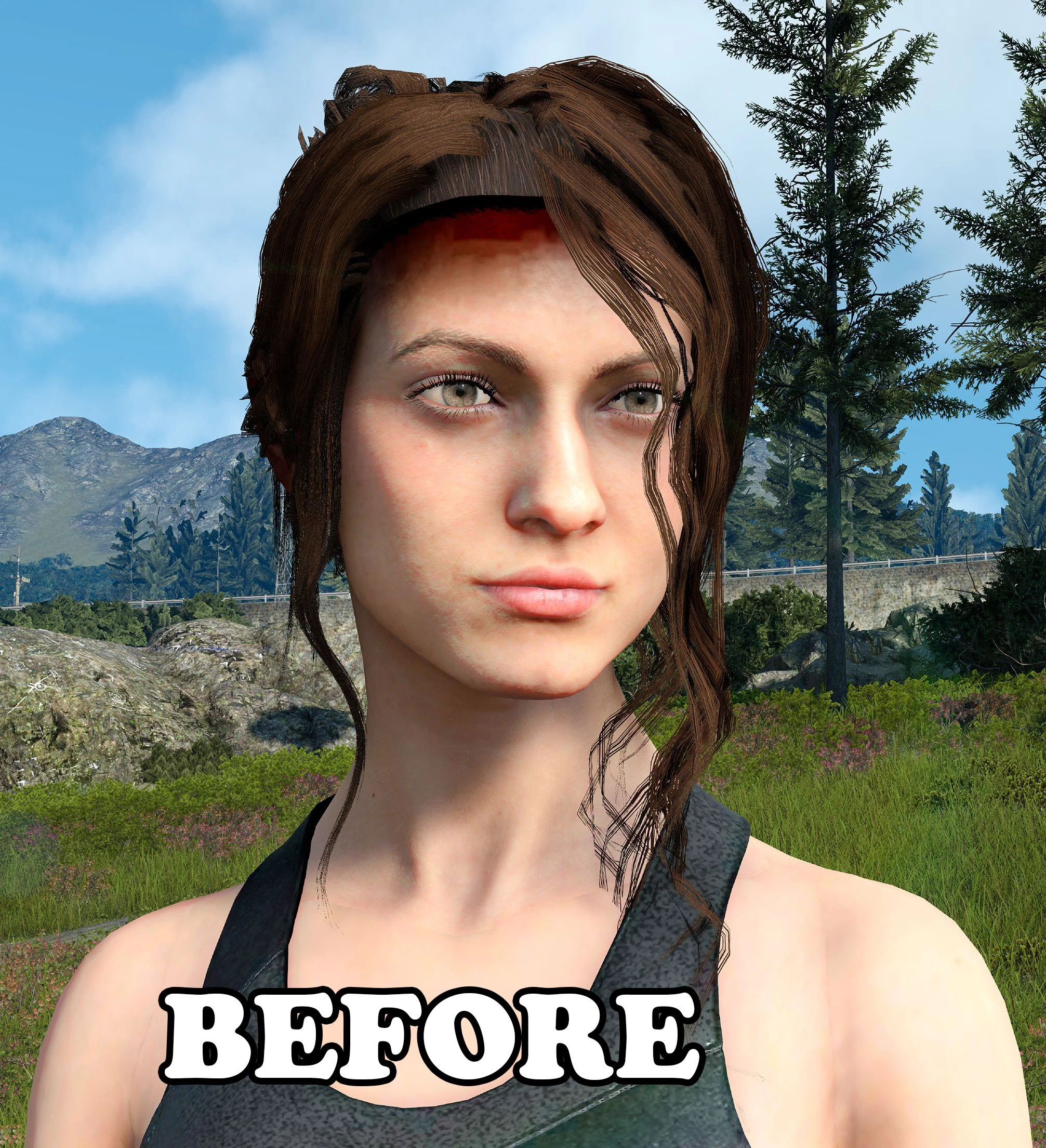
🔍 Analysis
- 👍 4.9% endorsement rate — high engagement, a strong quality signal
- 🏆 #24 of 60 Miscellaneous mods in this game by downloads
📋 About This Mod
Comrades Mod Hair Shadow Fix
by impatient-traveler / EratoTiaTuatha on Steam
Removes the shadow cast by all female modded hair in Comrades/Avatara.
1. Navigate to your FFXV installation folder.
2. Inside that go to: datas/character/aw/aw00/common/sourceimages
3. You will see an 'autoexternal.earc' file there. Rename it and keep it as backup.
4. Extract/copy the file provided in this package there, to replace the old autoexternal.earc
If you wish to uninstall, simply remove the mod file and rename your backup to how it was before.
HOW IT WORKS:
Comrades automatically loads a corresponding baked occlusion (shadow) map onto the head depending
on which hairstyle is chosen.
Unfortunately all mods are dependent on hairstyle 92, which happens to have most of the forehead shaded.
This mod replaces the hairstyle 92 occlusion file with a blank one, thus removing shadows from
all female hair mods.
KNOWN ISSUES:
As the hair mods pull their occlusion files straight from the stock hairstyle,
this mod will also remove the shading associated with hairstyle 92
(the shoulder length straight hair with bangs)
Uploaded on 14. 08. 2018
MALE VERSION: https://www.nexusmods.com/finalfantasy15/mods/103/
A small utility mod that removes the automatic shadow over ears and forehead applied to all female hair mods in Comrades and Avatara. With 72 endorsements and last updated in 2018, it's a niche fix for players bothered by that visual artifact.
✨ Key Features
📊 Pros & Cons
✅ Pros
- Fixes a common visual annoyance for female hair mods
- Simple and lightweight—no performance hit
- Community-tested with 72 endorsements
⚠️ Cons
- Last updated in 2018—may not work with the latest game version
- Niche fix—only useful if you use female hair mods and notice the shadow issue
For players who use female hair mods in Comrades and Avatara and are bothered by the automatic shadow on ears and forehead. If you don't use such mods or don't notice the shadow, you can skip this.
💡 Beginner Tips
- Make sure to place the mod files in the correct game directory as per the mod's folder structure.
- If you're using a mod manager, import the mod and activate it; otherwise, manually copy files.
- Test with a female character to see the shadow removal effect immediately.
📊 Mod Details
- Game
- Finalfantasy15 Mods
- Author
- impatient-traveler
- Version
- 1.0
- Downloads
- 1,476
- Endorsements
- 72
- Category
- Miscellaneous
- Created
- 8/13/2018
- Updated
- 8/13/2018
🔧 How to Install Final Fantasy XV Mods
Download from Nexus Mods.
📖 Full step-by-step install guide for Final Fantasy XV →
Visit the official mod page for specific installation instructions for this mod.
🎮 Need cheat codes or console commands? Check ur gaming wiki for Final Fantasy XV commands, item IDs, and more.
Keep browsing — more Final Fantasy XV mods await