FO76Edit
⚪ Last updated 2024Preview
🔍 Analysis
- 👍 4.9% endorsement rate — high engagement, a strong quality signal
- 🏆 #5 of 15 Tools and Utilities mods in this game by downloads
📋 About This Mod
xEdit 4. 1. 5 by ElminsterAU and the xEdit Team
Other xEdit variations:
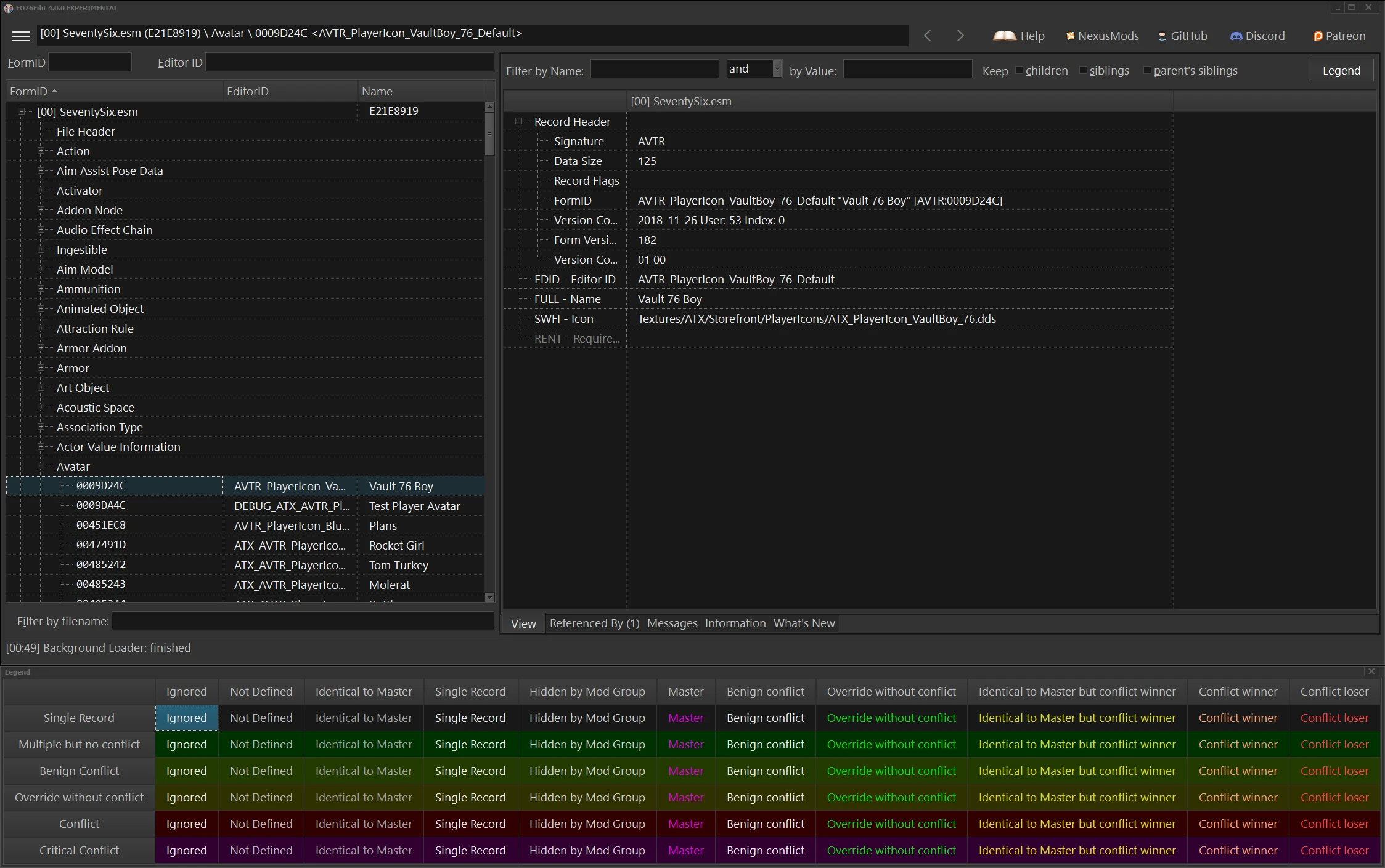
xEdit can be used to view, detect conflicts, and edit module files of various Bethesda Games. Other members of the xEdit family include TES4Edit, FO3Edit, FNVEdit, TES5Edit, EnderalEdit, SSEEdit, EnderalSEEdit, FO4Edit, FO76Edit
What's new in xEdit 4. 1. 5?:
This version includes significant changes since the last (4. 1. 4) release of FO76Edit. Those changes are
described in What's New (which shows at program start) and a document in rich text format that is included with xEdit for offline viewing.
Become a Patreon:
ElminsterAU's Patreon Page
ElminsterAU has created a Patreon Page for anyone who wants to support futher development of xEdit.
Current Documentation:
The What's New document shown when starting xEdit is the cannonical documentation of all new and changed functionallity in xEdit.
Beyond that, the Fallout 3 training manual was converted by EpFwip in 2013 to HTML format. This conversion has been updated as the official and current
documentation for all versions of xEdit.
Tome of xEdit
Change Log:
The changes have been moved to the What's New document.
FAQ:
Q: I have the following errors with one of my plugins what do I do?
Background Loader: Error: record ARMA contains unexpected (or out of order) subrecord MODL
Background Loader: Errors were found in: ShieldofYsgramorDraugrAA
Background Loader: Contained subrecords: EDID BODT RNAM DNAM MOD2 MO2T
MOD3 MO3T MOD4 MO4T MOD5 MO5T SNDD NAM0 NAM1 NAM2 NAM3 MODL MODL MODL
MODL MODL MODL MODL MODL MODL MODL MODL MODL MODL MODL MODL MODL MODL
MODL MODL MODL MODL MODL MODL MODL MODL
A: Occurs with plugins made with the ReProccer, NPC Editor or other 3rd party tools. These
cannot be corrected with xEdit. You can try using the official Bethesda
Editor but the official tool may not be able to correct the errors with
loss of data.
Q: The Font is too small, I have a 4K or Hi-Res monitor. I can't read the text how do I increase the size?
A: There is some support for font scaling for Large Size, Hi-Res, or 4K
monitors. This will help readability but in some situations there is no
control for popup boxes that expect input from the user.
xEdit Team Members:
ElminsterAU
Hlp
Zilav
Sharlikran
Community members who have contributed in some way:
Listed in alphabetical order
AndalayBay: Without her help getting me in touch with Elminster we would all still
be waiting for confirmed record definitions, and even longer for a
working TES5Edit.
Divstator: for his work on Improved NavMesh Decoding
Eckserah: for tirelessly keeping the FO76 record definitions up to date with new patches
fireundubh: for all his record decoding suggestions for FO4Edit
Jonathan Ostrus: For his significant contributions to the FO76 record definitions
jonwd7: for his work on Improved NavMesh Decoding
shad0wshayd3: for his work on Enderal support and a number of UI tweaks
FO76Edit is a plugin editor for Fallout 76, part of the xEdit family, used to view, detect conflicts, and edit module files. It has 553 endorsements and 11,188 downloads, last updated in April 2024. This version includes significant changes documented in the What's New file.
✨ Key Features
📊 Pros & Cons
✅ Pros
- Trusted tool from the xEdit team, with 553 endorsements from the community.
- Essential for modders who need to clean and edit plugins for Fallout 76.
- Regularly updated, last updated April 2024, ensuring compatibility with recent game patches.
⚠️ Cons
- Steep learning curve for beginners unfamiliar with xEdit's interface and workflow.
For Fallout 76 modders who need to inspect, clean, or edit plugin files. It's a must-have for anyone creating or maintaining mods. Skip if you're a casual player looking for gameplay tweaks—this is a technical tool.
💡 Beginner Tips
- Run FO76Edit with the game closed to avoid file locks.
- Use the 'What's New' document at startup to learn about recent changes.
- Check the FAQ for common errors like unexpected subrecords, often caused by third-party tools.
📊 Mod Details
- Game
- Fallout 76 Mods
- Author
- ElminsterAU and the xEdit Team
- Version
- 4.1.5f
- Downloads
- 11,188
- Endorsements
- 553
- Category
- Tools and Utilities
- Created
- 12/11/2018
- Updated
- 4/28/2024
🔧 How to Install Fallout 76 Mods
Use Vortex. Place .ba2 files in Data folder. Use cautiously online.
📖 Full step-by-step install guide for Fallout 76 →
Visit the official mod page for specific installation instructions for this mod.
🎮 Need cheat codes or console commands? Check ur gaming wiki for Fallout 76 commands, item IDs, and more.
Keep browsing — more Fallout 76 mods await