Cloudy01's Fallout 76 Mod Manager
⚪ Last updated 2019This mod may not work until the author updates it. Check for an update, or see the rollback guide.
Preview
🔍 Analysis
- 👍 4.2% endorsement rate — high engagement, a strong quality signal
- 🏆 #3 of 15 Tools and Utilities mods in this game by downloads
📋 About This Mod
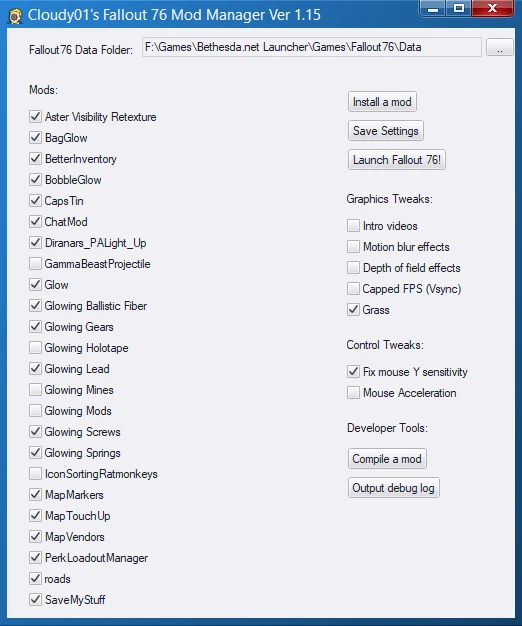
This tool makes it a snap to install new mods and manage existing ones. It also makes it easy to quickly enable/disable various tweaks.
No need to fumble around with the Fallout76Custom.ini file anymore, this takes care of it all for you, and even creates one for you if you haven't made one yet already.
The mod manager will automatically detect what kind of mod you've enabled (by scanning its contents), and assign it to the correct load order.
It will also combine multiple mods into just a few .ba2 files, so you can run as many mods as you like.
- Quickly install and uninstall mods
- Quickly enable/disable mods.
- Auto combines multiple mods into just a few .ba2 files. So you can have tons of mods enabled at once.
- Compile mods into .ba2 files.
- Quickly turn on/off various tweaks.
- Detects mods that have been updated since it was last ran.
This project is open-source and programmed in AutoHotKey. View the source and collaborate via Github
Initial Setup
1. Download the .exe file and run it.
2. It will attempt to detect where your game is currently installed. If it does not find your game, you will be prompted to provide the path to your Fallout76's Data folder (This is typically in a path such as: C:\Program Files\Bethesda.net Launcher\Games\Fallout76\Data)
3. It will then attempt to auto-detect where your current Fallout76Custom.ini is, if the file doesn't already exist yet, it will create a blank one for you.
Installing mods
1. Find a mod you like, and drag it onto the Mod Manager, or click "Install a mod" and pick your file. It can be a .ba2 file, a zipped .ba2 file, or a zipped loose-file mod.
2. Simply check or un-check the mods you want to use.
4. Click the "Save Settings" button.
5. Click the "Launch Fallout 76!" button.
Uninstalling mods
1. Right-click the mod you want to uninstall and then click the button "Uninstall" which is followed by the name of the mod. Eg "Uninstall Bag.ba2"
Nuclear winter mode
- Before you play Nuclear Winter, just click the "Enable Nuclear Winter Mode" button. Your customini file will be disabled, and the following dll files will also be disabled: x3daudio1_7.dll, dxgi.dll, d3d11.dll. When you're done, just press the "Disable Nuclear Winter Mode" button.
No tweaks you've manually set in the .ini file will be overwritten, unless specifically changed within the Mod Manager, such as enabling/disabling tweaks.
- bsab tool by AlexxEG: https://github.com/AlexxEG/BSA_Browser
- The cool people at PCGW for providing tweak commands: https://pcgamingwiki.com/wiki/Fallout_76
- Archive2 tool (c) Bethesda
- 7z tool (c) Igor Pavlov: https://www. 7-zip.org/
Cloudy01's Fallout 76 Mod Manager is a tool that simplifies mod installation and management for Fallout 76. It auto-detects mod types, combines them into .ba2 files, and handles the Fallout76Custom.ini file. With 3,117 endorsements and 73,807 downloads, it's a popular utility for modders.
✨ Key Features
📊 Pros & Cons
✅ Pros
- Community favorite with 3,117 endorsements and 73,807 downloads
- Handles the Fallout76Custom.ini file automatically, even creating it if missing
- Auto-detects mod type and assigns correct load order, plus combines mods into .ba2 files
⚠️ Cons
- Last updated in 2019, so may not support newer mod formats or game updates
- Requires manual download and running an .exe, which may trigger antivirus warnings
For Fallout 76 modders who want a simple way to manage multiple mods without editing INI files. Also for those who want to combine mods into .ba2 files to avoid performance issues. Skip if you prefer manual mod management or use a different mod manager.
💡 Beginner Tips
- Run the .exe as administrator to avoid permission issues when accessing game folders.
- If the manager doesn't detect your game, manually point it to your Fallout76 Data folder.
- Use the 'Save Settings' button after enabling mods, then launch the game from the manager to ensure changes apply.
📊 Mod Details
- Game
- Fallout 76 Mods
- Author
- Cloudy01
- Version
- 1.161
- Downloads
- 73,807
- Endorsements
- 3,117
- Category
- Tools and Utilities
- Created
- 1/27/2019
- Updated
- 7/23/2019
🔧 How to Install Fallout 76 Mods
Use Vortex. Place .ba2 files in Data folder. Use cautiously online.
📖 Full step-by-step install guide for Fallout 76 →
Visit the official mod page for specific installation instructions for this mod.
🎮 Need cheat codes or console commands? Check ur gaming wiki for Fallout 76 commands, item IDs, and more.
Keep browsing — more Fallout 76 mods await