Visible Weapons - 3rd Person Holster
⚪ Last updated 2016⚠️ Install Order · 2 steps
Install in this order, then this mod last — most mods fail to load without their framework and dependencies in place.
Preview
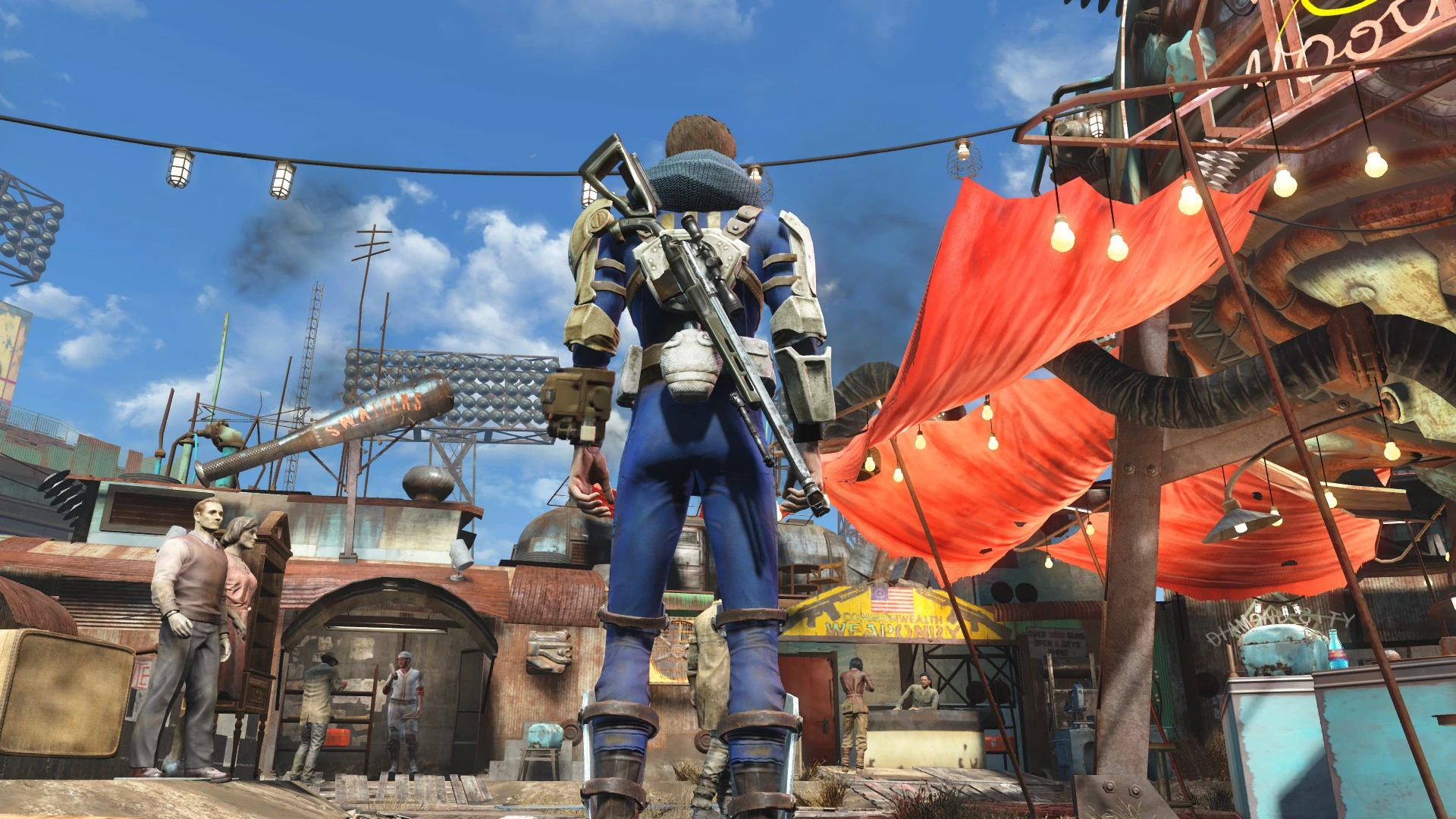
🔍 Analysis
- 👍 2.2% endorsement rate — high engagement, a strong quality signal
- 🏆 #11 of 187 Gameplay mods in this game by downloads
📋 About This Mod
Visible Weapons You. Keep your weapons where I can see 'em.
First things first - I want to be upfront on a few things.
This mod won't work alone.
You need weapon models as apparel items for the weapons that you want to see on your back / hip / holster.
Where can you get them?
Just Holstered Weapons by friffy
(for many vanilla weapons!)Armorsmith Extended Nanosuit Accessories
WOBA - Weapons on Back Addon (for the combat shotgun)
These are a small selection of mods that I've personally used. There may certainly be more that I've missed!
If your mod provides weapon models / holsters as apparel items, let me know - I'm happy to link to them.
Works great with Armorsmith Extended's Sniper Rifle on Back, Katana Belt, and Pistol Harness. Nanosuit Accessories' Pistol Holster is also compatible.
Weaponsmith Extended (coming soon) will soon include wearable weapons for all included mods!
Can also be used with Outfit Switcher to change your loadout when drawing or holstering your weapon.
MOD AUTHORS:
You can now have your weapons visible out-of-the-box without adding any external dependencies. See the Mod Authors' section below.There hasn't been much incentive before for mod authors to have a weapon model in apparel form, but now that you can actually use them, this might change.
If you have a beautiful custom weapon that you'd like to see on you, make a request to your favorite mod author to include the weapon model as an apparel item!
About
Weapons as apparel on your back and in holsters have been around for a while now. But so far, they've been mostly useful for screenshots because they aren't actually usable! They stay on your back all the time, and nothing kills immersion more than seeing them stay static on your back when you draw that exact weapon. They clutter up your inventory too.
Visible Weapons lets you link up weapon and weapon model. Once linked, they function as one item. When inactive, weapon models won't show in your Apparel inventory.
That's right! Once you equip a linked weapon it shows up on your body!
Usage
Once installed, you will receive Visible Weapons Config in the Aid section of your
Visible Weapons - 3rd Person Holster is a gameplay mod for Fallout 4 that lets you holster your weapon on your back, hip, or holster. With over 33,000 endorsements and 1.5 million downloads, it's a highly popular quality-of-life improvement for players who want more immersive third-person visuals.
✨ Key Features
📊 Pros & Cons
✅ Pros
- Massive community approval (33,435 endorsements) — this is a must-have for many.
- Simple concept, huge impact: no more floating weapons on your back.
- Three holster options give you control over your character's look.
⚠️ Cons
- Last updated in 2016 — may have compatibility issues with newer game patches or DLC.
- Requires a mod manager for proper installation, which might be a hurdle for beginners.
For Fallout 4 players who spend time in third-person view and want their weapons to actually appear holstered. If you're into immersion and visual polish, this is a no-brainer. Skip if you never play in third-person or don't care about cosmetic details.
💡 Beginner Tips
- Use a mod manager like Nexus Mod Manager or Vortex to install this mod — it's the easiest way to avoid conflicts.
- Check your load order: place this mod after any weapon or animation mods to ensure it works correctly.
- If you're on PC, make sure you have the latest game patch installed, as the mod is old and may need compatibility patches.
📊 Mod Details
- Game
- Fallout 4 Mods
- Author
- registrator2000
- Version
- 1.3
- Downloads
- 1,549,319
- Endorsements
- 33,435
- Category
- Gameplay
- Created
- 2/27/2016
- Updated
- 5/21/2016
🔧 How to Install Fallout 4 Mods
Download from Nexus.
📖 Full step-by-step install guide for Fallout 4 →
Visit the official mod page for specific installation instructions for this mod.
🎮 Need cheat codes or console commands? Check ur gaming wiki for Fallout 4 commands, item IDs, and more.
Keep browsing — more Fallout 4 mods await