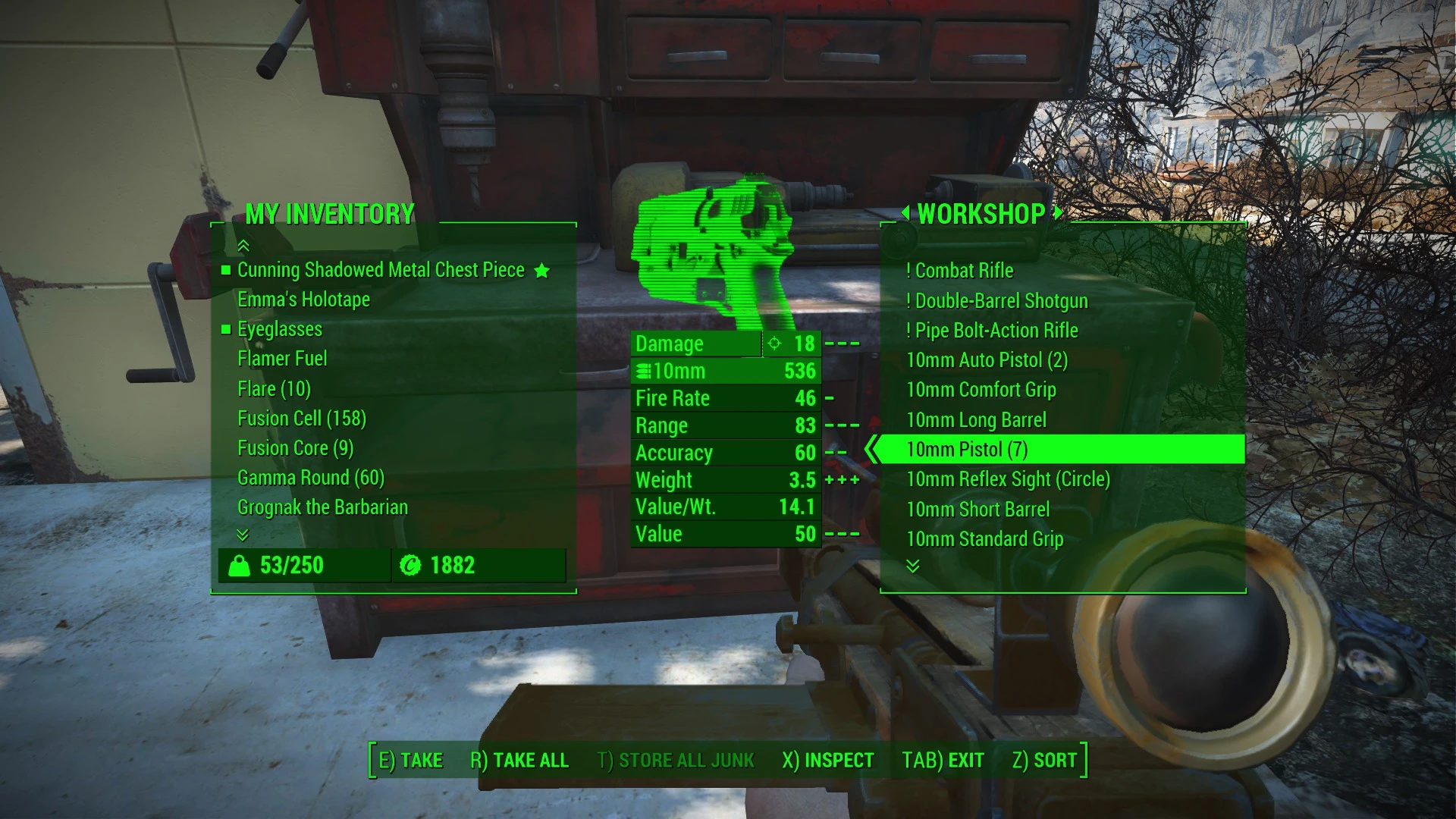
Value per Weight indicator for container UI
⚪ Last updated 2015⚠️ Install Order · 2 steps
Install in this order, then this mod last — most mods fail to load without their framework and dependencies in place.
Preview
🔍 Analysis
- 👍 6.4% endorsement rate — high engagement, a strong quality signal
- 🏆 #75 of 110 User Interface mods in this game by downloads
📋 About This Mod
Adds an additional information row displaying the value divided by weight to the container and Pip-Boy items page UI.
Helps decide which items are useful to scavenge.
Installation
- []Unpack ZIP file directly to your Fallout 4 directory.
[
]Edit your Fallout4.ini ("C:\Users\%USERNAME%\Documents\My Games\Fallout4\Fallout4.ini") and change the line:sResourceDataDirsFinal=STRINGS\
sResourceDataDirsFinal=STRINGS\, INTERFACE\
Frequently Asked Questions
Q: Can you add a sorting mode, to sort by the Value/Weight ratio? A: Unfortunately, I believe this is only possible with the help of a script extender.
Q: Can you add a display for other values, such as AP cost? A: Unfortunately, such UI mods can only work with the information that the game provides to the SWF file. Information such as AP cost is not sent to the SWF files, as such this is probably only possible with a script extender.
Q: How do I use this together with PipWare UI or other UI-editing mods? A: Check out SWFMerge: http://www.nexusmods.com/fallout4/mods/3752
Q: I installed this mod, but it doesn't work! A: Make sure the files are placed in the correct location. In some cases, you may also need to edit falloutcustom.ini - check if you have a sResourceDataDirsFinal setting in there.
Q: How did you make this mod? A: I extracted the SWF files from "Fallout4 - Interface.ba2", then edited them with RABCDAsm.
Q: Can you help me make a similar mod? A: Unfortunately no, unless it is specifically related to editing UI (SWF) files.
v0. 1 (2015-11-12):
- []Initial release
v0. 2 (2015-11-13):
- []Work around rounding errors (gratuitous trailing 9s)
- Added to Pip-Boy inventory page
Adds a value-per-weight ratio row to container UIs in Fallout 4, helping players quickly assess item efficiency. With 17,042 endorsements and 266,417 downloads, this lightweight UI tweak is a community staple for loot management.
✨ Key Features
📊 Pros & Cons
✅ Pros
- Huge community trust (17,042 endorsements) — this is a must-have for loot hoarders.
- Solves a real problem: no more mental math when deciding what to haul.
- Tiny footprint, so it won't bloat your load order or cause conflicts.
⚠️ Cons
- Last updated in 2015 — might not be compatible with the latest Fallout 4 patches or DLC.
- Only adds a single row of info; no sorting or filtering options.
- No documentation or screenshots provided, so you're flying blind on the exact look.
For Fallout 4 players who hate leaving valuable loot behind but can't be bothered to calculate value-per-weight on the fly. Perfect for survival mode junkies and completionists. Skip if you want a full UI overhaul — this is a single-purpose tweak.
💡 Beginner Tips
- Since it's an older mod, check the mod's comments section for any compatibility patches or user fixes.
- Use a mod manager like Vortex or Mod Organizer 2 to install and manage this mod, making it easy to disable if issues arise.
- If you're on the latest game version and it doesn't work, try using the mod with the Fallout 4 Script Extender (F4SE) for better compatibility.
📊 Mod Details
- Game
- Fallout 4 Mods
- Author
- CyberShadow
- Version
- 0.2
- Downloads
- 266,417
- Endorsements
- 17,042
- Category
- User Interface
- Created
- 11/13/2015
- Updated
- 11/13/2015
🔧 How to Install Fallout 4 Mods
Download from Nexus.
📖 Full step-by-step install guide for Fallout 4 →
Visit the official mod page for specific installation instructions for this mod.
🎮 Need cheat codes or console commands? Check ur gaming wiki for Fallout 4 commands, item IDs, and more.
Keep browsing — more Fallout 4 mods await