The Good the Bad and the Ugly - Power Armor and Pip-Boy targeting HUD
⚪ Last updated 2019⚠️ Install Order · 2 steps
Install in this order, then this mod last — most mods fail to load without their framework and dependencies in place.
Preview
🔍 Analysis
- 👍 5.8% endorsement rate — high engagement, a strong quality signal
- 🏆 #65 of 153 Gameplay mods in this game by downloads
📋 About This Mod
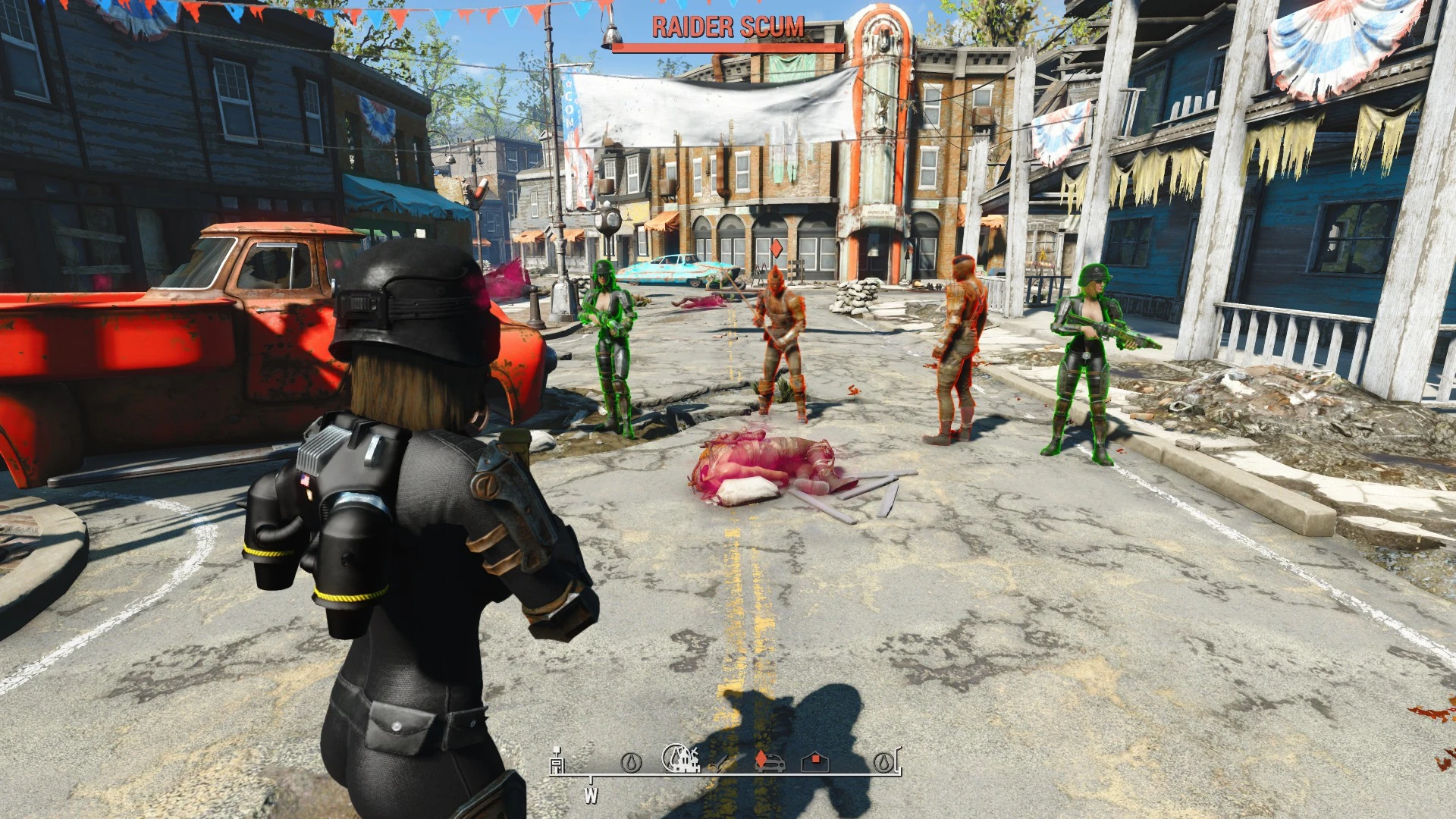
Pip-Boy and Power Armor attachments that highlight friendly, enemy and corpses. Controllable with weapon drawn or holstered. Also includes Mentats that highlight corpses.
All unique records. Does not add new scripts. Is ESL plugin. V3. 0 Requires AUTOMATRON, optional version that does not require it.
Craftable at the Chemistry station in Drugs.
Mentats: Corpse Highlight
Mentats: Corpse Highlight - Range 150, Lasts for Four minutes. Addiction rate . 01 and magnitude 5
Craftable at the Chemistry station in Vault-Tec Equipment
(Vault-tec) Pip-Boy Highlighting HUD - Modular
After crafting it will be placed in the apparel section of the PB. It uses no body slots, but needs to be equipped.
Change the setting at the armor workbench, default setting are off.
Craftable at the Chemistry station in Vault-Tec Equipment
(Vault-tec) Power Armor Highlighting HUD - Modular
After crafting it will be placed in the apparel section of the PB. It uses no body slots.
Change the setting at the Power Armor station (also equip it there), default setting are off. Works with any Power Armor!
Highlighting Versions - Range 750 (living), 400 (dead). eXtended versions - Range 500 (living), 150 (dead). Highlighting eXtended versions include a "Heat cloud" around the target making it "visible" though walls.
Pip-Boy versions are disabled while in Power Armor.
Active friendly highlighting temporarily turns off during conversations.
Setting are
Good (Green), Bad (Red) and Deceased (Blue)
Weapon drawn - on
Weapon holstered - on
Sneaking - on
Sneaking and Weapon drawn - on
Sneaking or Weapon drawn - on
X Always on
X Weapon drawn - on
X Weapon holstered - on
X Sneaking - on
X Sneaking and Weapon drawn - on
X Sneaking or Weapon drawn - on
Cone-of-fire Mult
Reduces the magnitude of weapons Cone-of-fire by a quarter. - ON
Reduces the magnitude of weapons Cone-of-fire by half. - ON
Reduces the magnitude of weapons Cone-of-fire by three quarters. - ON
Reduces the magnitude of weapons Cone-of-fire to 0. - ON
Less Stagger
Less Stagger - on
No Stagger - on
Stabilize - Affect
Stabilize - Affect 0. 5 - on
Stabilize - Affect 1. 0 - on
Stabilize - Affect 1. 5 - on
Stabilize - Affect 2. 0 - on
Craftable at the Chemistry station in Vault-Tec Equipment
(Vault-tec) Pip-Boy Highlighting HUD - IF
After crafting it will be placed in the apparel section of the PB. It uses no body slots, but needs to be equipped.
Change the setting at the armor workbench, default setting are off.
This Fallout 4 mod adds Pip-Boy and Power Armor attachments that highlight friendly, enemy, and corpse targets, plus Mentats that highlight corpses. It uses unique records to avoid conflicts. With 655 endorsements and over 11,000 downloads, it's a popular gameplay utility for players who want clearer target identification.
✨ Key Features
📊 Pros & Cons
✅ Pros
- Community-approved with 655 endorsements and over 11,000 downloads.
- Unique records mean less chance of overwriting other mods' data.
- Useful for spotting enemies and loot in dark or cluttered areas.
⚠️ Cons
- Last updated in 2019, so it may not be fully compatible with the latest game patches or DLC.
- Only highlights targets; no other gameplay changes, so if you want more, this won't deliver.
- Potential conflicts with other HUD or targeting mods that modify the same Pip-Boy or Power Armor records.
For Fallout 4 players who want a simple, effective way to spot friendlies, enemies, and corpses without relying on VATS. Great for stealth builds or anyone who hates missing loot. Skip if you're looking for major gameplay overhauls—this is a focused utility mod.
💡 Beginner Tips
- Use a mod manager like Vortex or Mod Organizer 2 to install and manage this mod easily.
- Check the mod's load order—place it after other HUD mods to ensure its records take priority.
- Test the highlights in a dark area like a subway to see the effect clearly.
📊 Mod Details
- Game
- Fallout 4 Mods
- Author
- MrTroubleMaker
- Version
- 3.2
- Downloads
- 11,201
- Endorsements
- 655
- Category
- Gameplay
- Created
- 3/24/2017
- Updated
- 12/24/2019
🔧 How to Install Fallout 4 Mods
Download from Nexus.
📖 Full step-by-step install guide for Fallout 4 →
Visit the official mod page for specific installation instructions for this mod.
🎮 Need cheat codes or console commands? Check ur gaming wiki for Fallout 4 commands, item IDs, and more.
Keep browsing — more Fallout 4 mods await