Useful Combinations - Fallout4Custom.ini
⚪ Last updated 2022⚠️ Install Order · 2 steps
Install in this order, then this mod last — most mods fail to load without their framework and dependencies in place.
Preview
🔍 Analysis
- 👍 7.2% endorsement rate — high engagement, a strong quality signal
- 🏆 #50 of 153 Gameplay mods in this game by downloads
📋 About This Mod
Useful Combinations - Fallout4Custom.ini
Useful Combinations is a collection of common game setting tweaks combined in a Fallout4Custom.ini file.
This mod is made with the intention that, "You will customize it to your liking."
Get the ESL flagged.esp version of this mod here: Useful Combinations ESL Pack - Redux
Page Updated 16/10/2022
~~Information~~
Fallout4Custom.ini(s) are used to run console commands and change game settings at start up without editing the games default ini(s), or using mods. A Fallout4Custom.ini can be installed, edited or removed at any time without harming your save games.
I am including 3 versions of this file, "Basic", "Full", and "Builders and Mod Authors".
The "Basic" version only contains the edits required to use most mods.
Having these edits in a Fallout4Custom.ini will cause no harm even if you already have these edits in your default Fallout4.ini.
The "Full" version contains all of the options needed by most users.
Edit this version to suit your needs using notepad.
The "Builders and Mod Authors" version contains all options listed below.
------------Fallout4Custom.ini Includes---------------
bInvalidateOlderFiles=1
sResourceDataDirsFinal=
(These two edits are required for most mods to work in Fallout 4.)
fPlayerDisableSprintingLoadingCellDistance=0
Fixes an old bug that prevented the player from being able to sprint after fast traveling or when moving into some cells.
This is an older tweak that is not needed if your game is up to date, but since having this active causes no harm I am leaving this in the options.
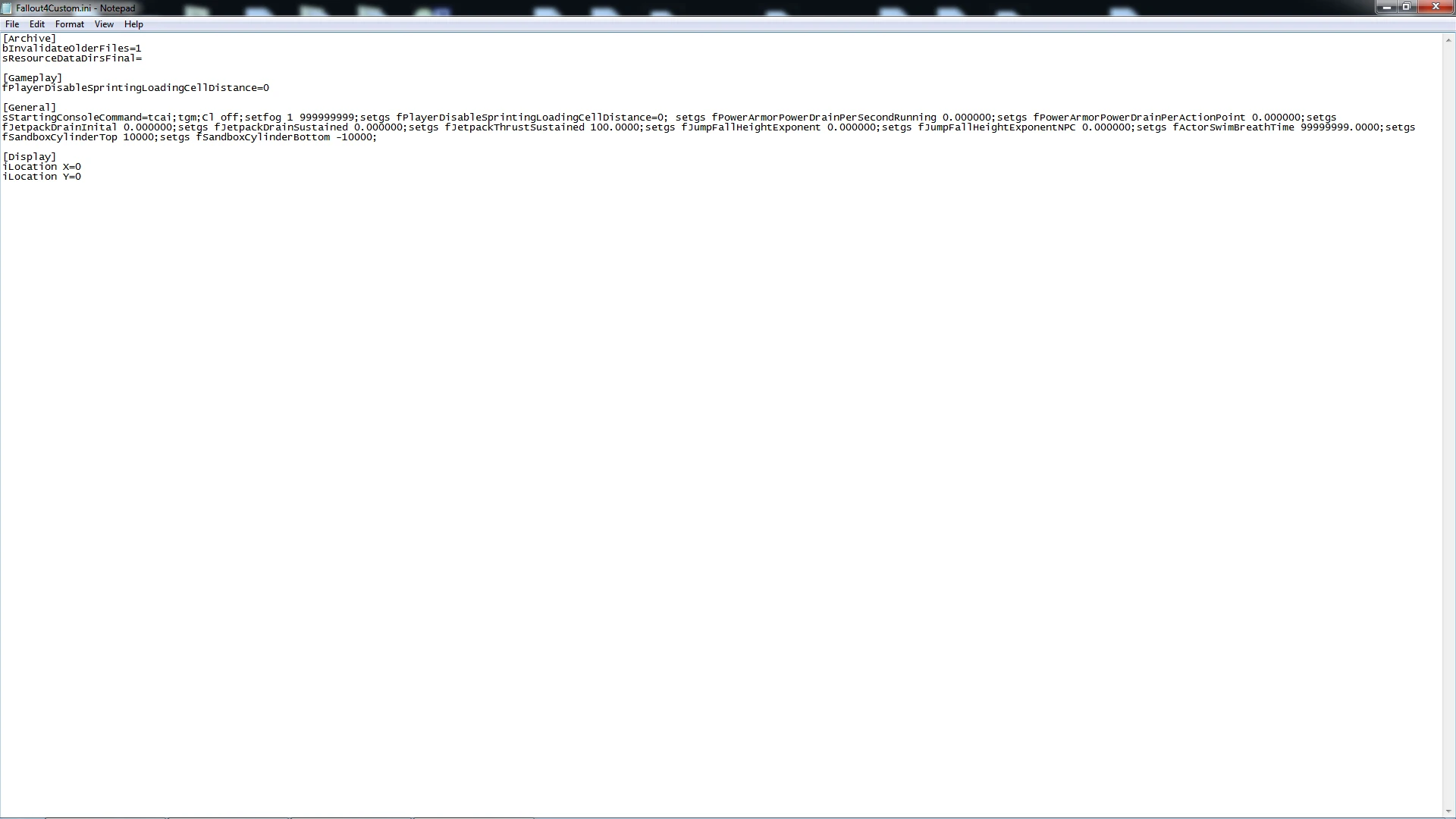
sStartingConsoleCommand(Equals =)
Update 16/10/2022 Nexus is now removing this entry (event-stripped) from this page but it is visible in the screenshot above.
cl off;
Default is cl rim 0. 02
Disables character lighting. (Light/glowing effect around NPCs faces
Useful Combinations - Fallout4Custom.ini is a collection of common game setting tweaks packaged into a Fallout4Custom.ini file, with three versions: Basic, Full, and Builders and Mod Authors. It includes essential edits for mod compatibility and optional tweaks like a sprint bug fix. Designed for customization, it's a popular utility with 844 endorsements.
✨ Key Features
📊 Pros & Cons
✅ Pros
- Community-approved with 844 endorsements and over 11k downloads, so it's a trusted utility.
- Three versions let you pick exactly what you need, from minimal to full control.
- Safe to install and remove anytime without harming save games.
⚠️ Cons
- The description mentions a console command entry that Nexus is stripping from the page, so you might miss that option unless you check the screenshot.
- The mod is essentially a text file, so you'll need to manually edit it with notepad to customize—no in-game UI.
- Since it's an INI tweak, there's a risk of conflicts if you use other mods that modify the same settings, though the description says it's harmless if duplicates exist.
For Fallout 4 modders who want a convenient way to apply common INI tweaks without digging through default files. Perfect for those who like to customize their game settings manually. Skip if you prefer all-in-one mod managers or don't want to edit text files.
💡 Beginner Tips
- Place the Fallout4Custom.ini in your Documents/My Games/Fallout4 folder, not the game's root directory.
- Start with the Basic version if you're new to modding—it's all you need for most mods to work.
- Use notepad to edit the Full version, and keep a backup of your original INI files just in case.
📊 Mod Details
- Game
- Fallout 4 Mods
- Author
- Glass
- Version
- 5.2
- Downloads
- 11,729
- Endorsements
- 844
- Category
- Gameplay
- Created
- 2/23/2018
- Updated
- 12/16/2022
🔧 How to Install Fallout 4 Mods
Download from Nexus.
📖 Full step-by-step install guide for Fallout 4 →
Visit the official mod page for specific installation instructions for this mod.
🎮 Need cheat codes or console commands? Check ur gaming wiki for Fallout 4 commands, item IDs, and more.
Keep browsing — more Fallout 4 mods await