Take Cover
⚪ Last updated 2016⚠️ Install Order · 2 steps
Install in this order, then this mod last — most mods fail to load without their framework and dependencies in place.
Preview
🔍 Analysis
- 👍 2.5% endorsement rate — high engagement, a strong quality signal
- 🏆 #37 of 187 Gameplay mods in this game by downloads
📋 About This Mod
TAKE COVER
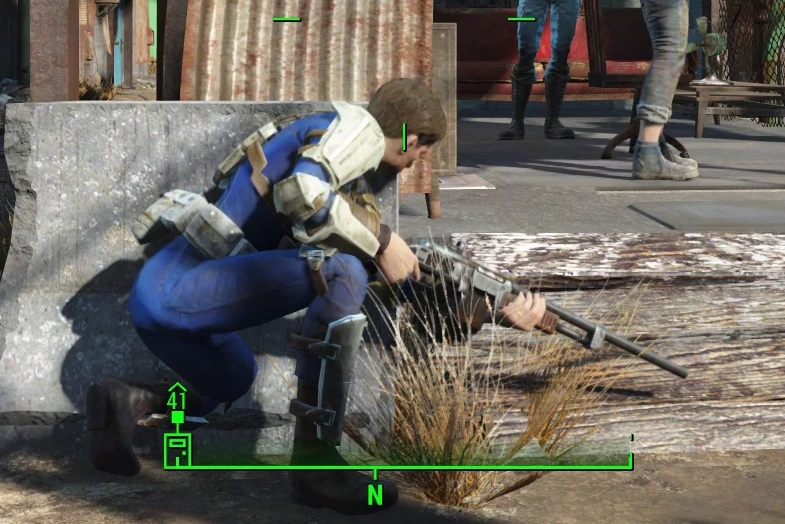
Bringing 3rd-person cover to Fallout 4!
(Pop out of cover by aiming down sights.)
★ About ★
Take cover behind objects and automatically lean out to shoot when you aim down sights! I've always found taking cover to be inadequate in Fallout 4. In first person, if you tried to utilize cover tactically, you'd be staring at a blank wall most of the time. In third person, all you can do is crouch behind some rock or furniture, occasionally walk out, and hope enemy bullets don't hit you.
This mod hopes to give you a true cover mechanic.
Integrating third-person cover hasn't been a trivial task at all. Thank you for your patience and support!
★ How to Use ★
OPTION 1. AUTOMATIC/INTEGRATED MODE ☢ With your weapon drawn, sprint into a wall to take cover behind it. ☢ Double tap the forwards movement key to enter cover.
OPTION 2. HOTKEY MODE ☢ Activate assigned hotkey to enter cover mode.
Both automatic mode and hotkey activation can be used interchangeably.
(Sprint into a wall to take cover behind it.)
★ Details ★
HOW TO CHOOSE YOUR COVER You have two cover options - a standing cover, and a crouching cover for low objects. When entering cover, ☢ Point down (crosshair below eye level) to enter a crouching cover. ☢ Point up (crosshair above eye level) to enter a standing cover.
HOW TO EXIT COVER ☢ Move backwards to exit cover. The activator also can be used to exit cover (default) or configured to swap between standing and crouching covers.
HOW TO VAULT OVER LOW OBJECTS In crouching cover only,
Take Cover adds a third-person cover system to Fallout 4, letting you hide behind objects and automatically lean out to shoot when aiming. The v1.1 BETA introduces a dynamic camera with shoulder switching and a double-tap forward key mechanic. With over 16,000 endorsements, it's a popular gameplay enhancement for players seeking tactical combat options.
✨ Key Features
📊 Pros & Cons
✅ Pros
- Huge community trust with 16,297 endorsements and over 650k downloads.
- Adds a fresh tactical layer to combat, making firefights more dynamic.
- The v1.1 BETA's dynamic camera and shoulder switching improve aiming flexibility.
⚠️ Cons
- Last updated in 2016, so likely outdated and may conflict with newer game patches or DLC.
- BETA status of v1.1 means potential bugs or instability.
For Fallout 4 players who want more tactical, cover-based combat without leaving third-person view. If you enjoy Gears of War-style shooting and want to spice up gunfights, this is for you. Skip if you prefer first-person only or don't want to fiddle with potential mod conflicts.
💡 Beginner Tips
- Since it's a gameplay mod, make sure to test it in a save before committing to a playthrough.
- Check the mod's comments section on Nexus for user-reported compatibility with other mods.
- If you use a mod manager, install it manually or via manager and ensure it loads after other gameplay overhauls.
📊 Mod Details
- Game
- Fallout 4 Mods
- Author
- registrator2000
- Version
- 1.3.beta
- Downloads
- 650,190
- Endorsements
- 16,297
- Category
- Gameplay
- Created
- 3/17/2016
- Updated
- 6/26/2016
🧩 Commonly Used Together
Users add these mods to the same collections — a real compatibility signal, not an AI guess.
🔧 How to Install Fallout 4 Mods
Download from Nexus.
📖 Full step-by-step install guide for Fallout 4 →
Visit the official mod page for specific installation instructions for this mod.
🎮 Need cheat codes or console commands? Check ur gaming wiki for Fallout 4 commands, item IDs, and more.
Keep browsing — more Fallout 4 mods await