Lowered Weapons
⚪ Last updated 2015⚠️ Install Order · 2 steps
Install in this order, then this mod last — most mods fail to load without their framework and dependencies in place.
Preview
🔍 Analysis
- 👍 3.1% endorsement rate — high engagement, a strong quality signal
- 🏆 #1 of 73 Animation mods in this game by downloads
📋 About This Mod
6I07ZUxFwbM WGoKzMBIQng
n55v_HMlOQk 7d4yfoLvTo0 uvLsrpYHXbQ
Description:
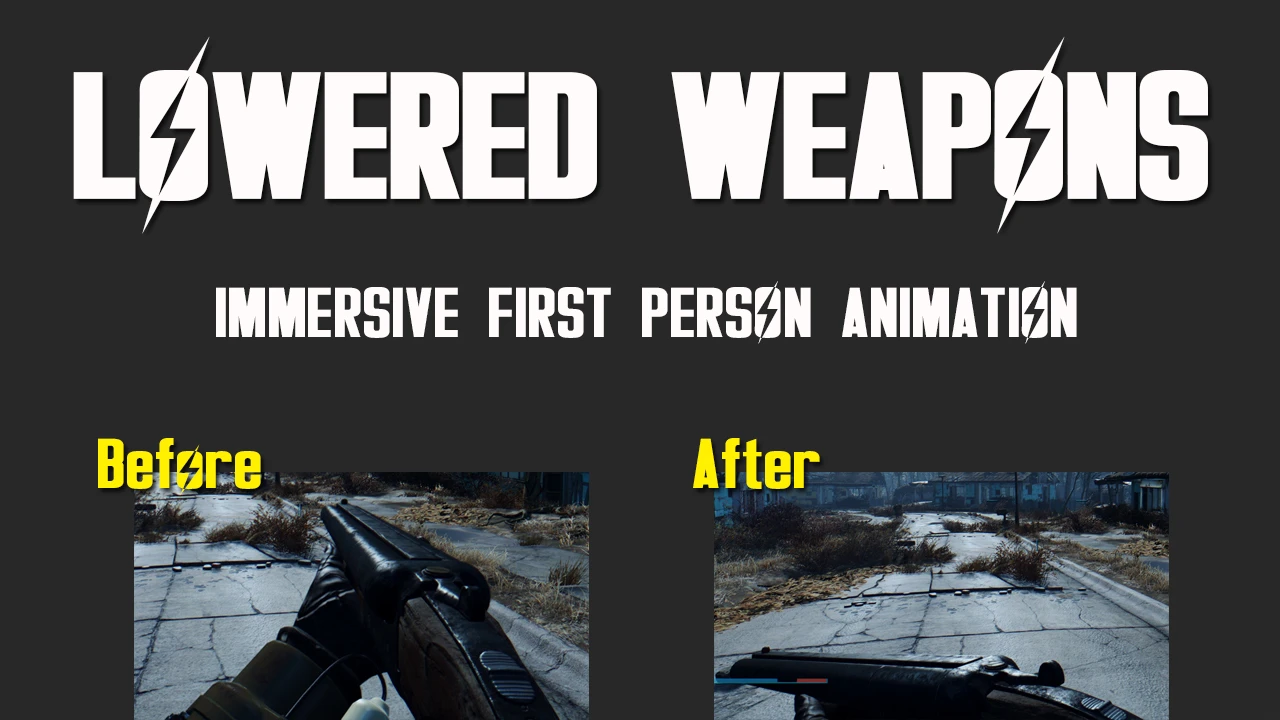
I hate how your character is always pointing his gun foward 100% of the time in First Person, it's not immersive. Now your character will have their guns downed when not firing it. It's a simple animation sweep, for now...
Feel free to comment any suggeestions/bugs
Guys Please, don't ask for a delay or a button for lowering weapons, not possible yet.
I'm trying to improve the mod without CK and i have to confess, it is really hard! But i can do everything you want in minutes after the CK release :)
- ------------------------------------------------
- Plans:
- []Add a delay before lowering your weapon after shooting.
- []Add a Button to manual lower your weapon
- []Stay with your weapon up 100% of the time during combat
- ------------------------------------------------
- Changelog:
- []1. 1
I Suggest you to disable the aim zoom for a better experience! You don't have cyborg eyes to zoom while using the Iron Sights.
Open fallout4.ini and add this after everything:
f1rdPersonAimFOV=XX. 0000 f3rdPersonAimFOV=XX. 0000
Where XX is your current FOV.
-------------------------------------------------
MANUAL INSTALLATION
1) - Extract the meshes folder to the fallout 4 data folder: ..\steamapps\common\Fallout 4\Data
2) To have the game read loose files you need to change a line in the Fallout4.ini (You don't need to do this step if you already done so with another animation mod) - Located here: ...\Documents\My Games\Fallout4 - Find this line: sResourceDataDirsFinal=STRINGS\ - add "MESHES\" to the end of the line, something like this: sResourceDataDirsFinal=STRINGS\, MESHES\
i suggest you to change "fallout4.ini" to Read Only as the games refreshes this file often.
Lowered Weapons is a simple animation mod for Fallout 4 that makes your character lower their gun when not firing, improving immersion. With 141,100 endorsements and 4.5 million downloads, it's a highly popular quality-of-life tweak for players who dislike the always-aimed stance.
✨ Key Features
📊 Pros & Cons
✅ Pros
- Massive community approval (141,100 endorsements) — this is a must-have for many
- Huge download count (4.5M) proves it's stable and widely used
- Does exactly what it says: no bloat, just a better first-person stance
⚠️ Cons
- Last updated in 2015 — may not be compatible with newer Fallout 4 updates or DLC
- Only affects first person; third-person stance remains unchanged
For Fallout 4 players who hate the always-aimed gun in first person and want a more natural, immersive feel. Perfect for roleplayers and anyone who values visual polish. Skip if you're fine with the default stance or want more animation options.
💡 Beginner Tips
- Since it's an animation mod, make sure to place it in your load order after any mods that alter first-person animations to avoid conflicts.
- If you're using a mod manager, just download and activate; if manual, drop the files into your Data folder and enable in the launcher.
- Check the mod's comments section for any user-reported compatibility patches if you have other animation mods installed.
📊 Mod Details
- Game
- Fallout 4 Mods
- Author
- lesma666
- Version
- 1.1
- Downloads
- 4,544,861
- Endorsements
- 141,100
- Category
- Animation
- Created
- 11/14/2015
- Updated
- 11/14/2015
🔗 Required By 2 Mods
These mods list this mod as a dependency.
🧩 Commonly Used Together
Users add these mods to the same collections — a real compatibility signal, not an AI guess.
🔧 How to Install Fallout 4 Mods
Download from Nexus.
📖 Full step-by-step install guide for Fallout 4 →
Visit the official mod page for specific installation instructions for this mod.
🎮 Need cheat codes or console commands? Check ur gaming wiki for Fallout 4 commands, item IDs, and more.
Keep browsing — more Fallout 4 mods await