Proper Flyers and Posters
⚪ Last updated 2024⚠️ Install Order · 2 steps
Install in this order, then this mod last — most mods fail to load without their framework and dependencies in place.
Preview
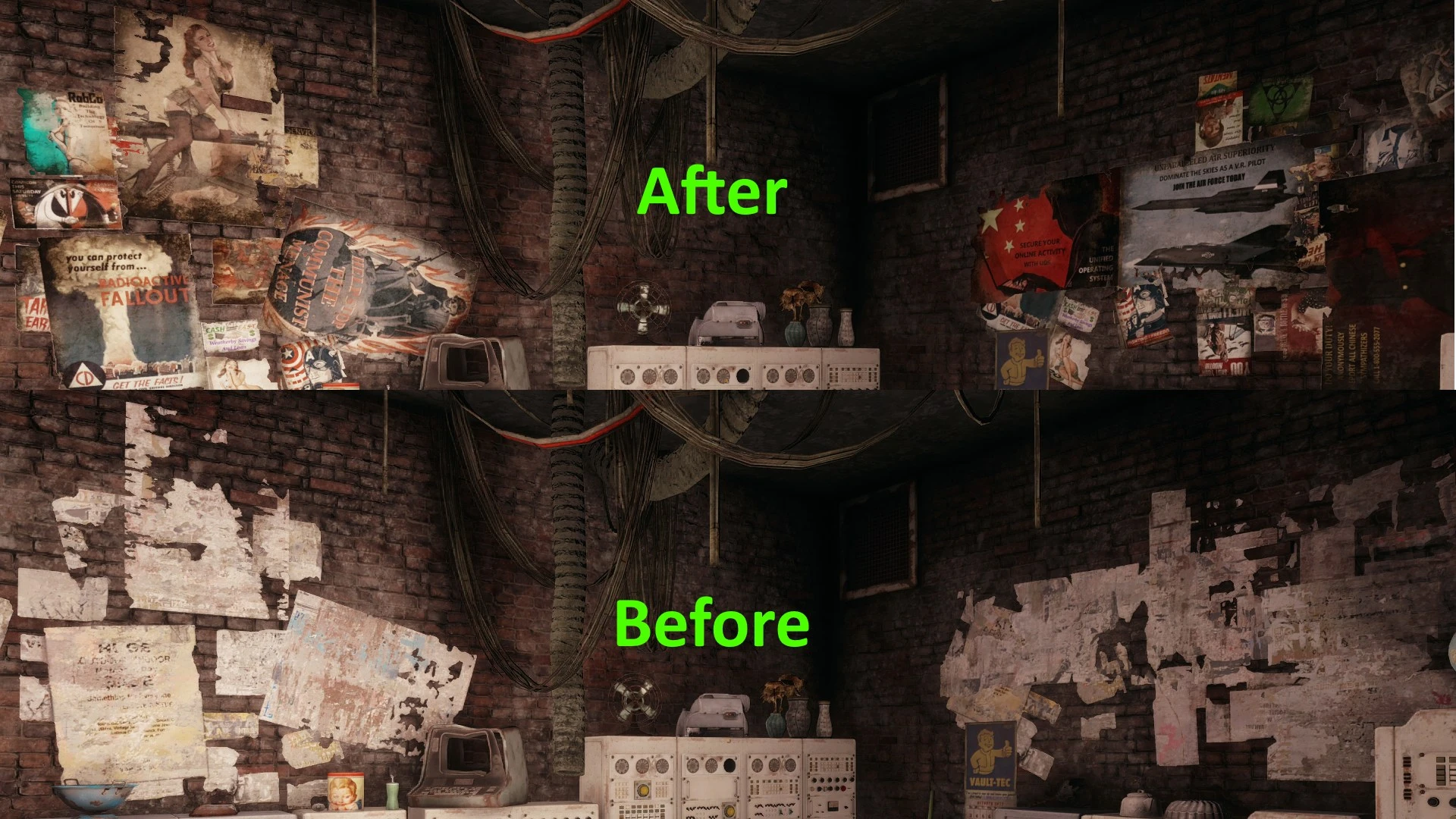
🔍 Analysis
- 👍 1.9% endorsement rate — high engagement, a strong quality signal
- 🏆 #58 of 271 Models and Textures mods in this game by downloads
📋 About This Mod
Proper Flyers and Posters
This mod retextures the flyers and posters located on buildings and note boards. It replaces them with a variety of images including....
-
[]Advertisements
- [
-
[]Missing People Post-its
- [
-
[]And Other Similar Images
Available in 4K and 2K textures.
By default the game mixes and matches these flyers and posters so you frequently see them in different combinations. It also mixes in some of the of the other large advertisements from other texture files.
Performance
I've tested both 4k and 2k variants and have not noticed any decrease in performance. If you are using a 4gb card or greater I recommend the 4k textures by default. Any card under 4gb should use the 2k version.
Installation
Unzip and drop into the "Data" folder----> Steam/steamapps/common/Fallout 4/Data
Known Issues
- [
For the same reason as listed in the above "Result" section, it's just the game mixing them up. I did place the posters/flyers in the orientation they are most frequently found in. Ii's also reasonable that after 200 years some of the posters and flyers might've lost a few of their supports.
- Why do I occasionally find some posters/flyers flickering?
This is an vanilla bug and no fault of the mod.
Any of the lore friendly versions of this mod can be uploaded to Xbox. I do not know their policy on racey pinups, so please do not upload those versions of the mod.
Proper Flyers and Posters by mindkiller316 retextures the flyers and posters found on buildings and note boards in the game. With nearly 9,000 endorsements and over 478,000 downloads, it's a popular visual improvement mod for players who want more detailed and realistic in-game signage. Last updated in June 2024, it remains a relevant choice for texture enhancement.
✨ Key Features
📊 Pros & Cons
✅ Pros
- Massive community trust – 8,896 endorsements and nearly half a million downloads.
- Simple visual upgrade that makes the world feel more lived-in without changing gameplay.
- Recent update (June 2024) means it's likely compatible with current game versions.
⚠️ Cons
- Purely cosmetic – if you're after gameplay tweaks, this won't add anything new.
For players who appreciate environmental detail and want to refresh the look of in-game signage without altering gameplay. Ideal for those who enjoy texture overhauls and want a quick, low-risk visual improvement. Skip if you're looking for new content or gameplay mechanics – this is purely cosmetic.
💡 Beginner Tips
- Since this is a texture mod, make sure to place the files in the correct game directory or use a mod manager to avoid conflicts.
- If you're using other texture mods, check load order – this mod should be loaded after any mods that affect the same textures.
- Consider using a mod manager like Vortex or Mod Organizer 2 to easily enable/disable and manage this mod alongside others.
📊 Mod Details
- Game
- Fallout 4 Mods
- Author
- mindkiller316
- Version
- 2.1
- Downloads
- 478,604
- Endorsements
- 8,896
- Category
- Models and Textures
- Created
- 1/21/2017
- Updated
- 6/29/2024
🧩 Commonly Used Together
Users add these mods to the same collections — a real compatibility signal, not an AI guess.
🔧 How to Install Fallout 4 Mods
Download from Nexus.
📖 Full step-by-step install guide for Fallout 4 →
Visit the official mod page for specific installation instructions for this mod.
🎮 Need cheat codes or console commands? Check ur gaming wiki for Fallout 4 commands, item IDs, and more.
Keep browsing — more Fallout 4 mods await