Private Military Company - Brotherhood of Steel Armor Replacer
⚪ Last updated 2021⚠️ Install Order · 3 steps
Install in this order, then this mod last — most mods fail to load without their framework and dependencies in place.
Preview
🔍 Analysis
- 👍 0.9% endorsement rate
- 🏆 #14 of 24 Factions mods in this game by downloads
📋 About This Mod
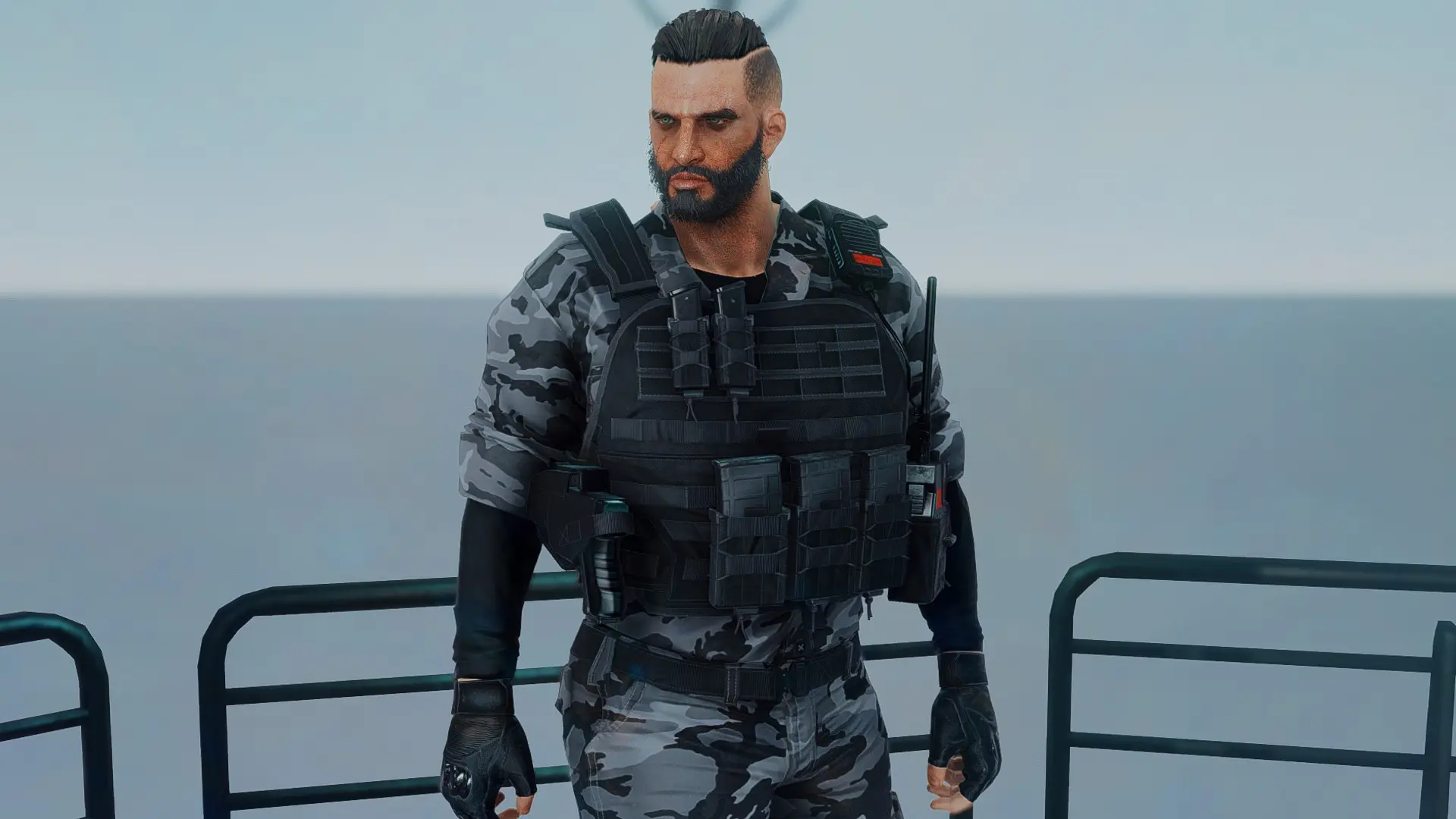
This mod replaces vanilla Brotherhood of Steel armors with the BDU and plate carrier from EvTital's Private Military Company armor mod. This mod overwrites Nexus_PMC.esp
Brotherhood of Steel NPC's will spawn with the following items:
- PMC Outfit
- FAST Helmet (Field Scribes, Science Scribes, and Engineers will have a 50% chance of spawning with the FAST Helmet)
- PMC Gloves
Finally, there are several texture edits available to replace the blank patch from the original mod with a Brotherhood of Steel custom patch.
Installation
1. Download and install: Private Military Company v3. 0 by EvTital: https://www.nexusmods.com/fallout4/mods/41332
2. Make sure all required esp's are activated and all assets are in your Fallout 4 data folder
3. Install this mod. Select the replacers you want.
4. Make sure your mod manager overwrites the original esp. You must allow your mod manager to overwrite any files for the replacer to work
5. Load a save before meeting the Brotherhood of Steel for the first time. Preferably before meeting Paladin Danse, Scribe Haylen, and Knight Rhys at the Cambridge Police Station
Manual Installation
-
[]Drag and drop the Brotherhood of Steel logo patch that you want into Data/Textures/Tital/PMC/Custom. Make sure you overwrite the file
[
]Drag and drop the esp you want into Fallout 4/Data. Make sure you overwrite Nexus_PMC.espUpdating From a Previous Version and Some Troubleshooting Tips
1. If the Private Military Company mod has received an update, uninstall and reinstall that mod
2. Uninstall the previous version of this mod and reinstall the new version
3. Load a previous save before meeting the Brotherhood of Steel. Ideally, load a previous save before meeting Paladin Danse, Scribe Haylen, and Knight Rhys at the Cambridge Police Station. Alternatively, you can individually update a single NPC by opening the console, clicking on the NPC, and using the "Resurrect" console command. You will have to do this one-by-one for each NPC.
If the NPC/Companion isn't equipping their replaced armor after the resurrect command, open the console, select them, then enter the "openactorcontainer 1" console command. You can use this console command to view their inventory and force them to equip their replaced armor
4. Try placing the Nexus_PMC.esp plugin lower in your load order
UninstallationSimply uninstall with your mod manager, but remember: the golden rule of modding is not to uninstall anything mid-game. This mod makes data changes that may be irreversible, so you may have
This mod replaces Brotherhood of Steel armors in Fallout 4 with the outfit from EvTital's Private Military Company armor mod. It's a simple cosmetic swap for players who want a more modern military look for the Brotherhood. With 2,477 endorsements and 271,064 downloads, it's a popular choice, last updated in July 2021.
✨ Key Features
📊 Pros & Cons
✅ Pros
- Huge download count (271k) shows it's a go-to for many players.
- Simple visual overhaul—no gameplay changes, just a fresh look for the Brotherhood.
- Still relevant despite the 2021 update; the modding community keeps it alive.
⚠️ Cons
- Requires the original Private Military Company armor mod as a dependency—not included.
- Last updated in 2021, so it may not be compatible with the latest game patches or DLC.
- Only affects Brotherhood armor; if you want other faction overhauls, this won't cover them.
For Fallout 4 players who want the Brotherhood of Steel to look like a modern private military force instead of the classic power armor aesthetic. If you're into lore-friendly or tactical-style overhauls, this is a quick win. Skip if you're looking for gameplay changes or if you don't use the Brotherhood faction.
💡 Beginner Tips
- Make sure you have the original Private Military Company armor mod installed first, or the replacement won't work.
- Use a mod manager like Vortex or Mod Organizer 2 to avoid overwriting files manually.
- Load this mod after the base armor mod in your load order to ensure the replacer takes effect.
📊 Mod Details
- Game
- Fallout 4 Mods
- Author
- cyanide4suicide
- Version
- 5.0
- Downloads
- 271,064
- Endorsements
- 2,477
- Category
- Factions
- Created
- 5/3/2019
- Updated
- 7/1/2021
🔧 How to Install Fallout 4 Mods
Download from Nexus.
📖 Full step-by-step install guide for Fallout 4 →
Visit the official mod page for specific installation instructions for this mod.
🎮 Need cheat codes or console commands? Check ur gaming wiki for Fallout 4 commands, item IDs, and more.
Keep browsing — more Fallout 4 mods await