PIP-Pad
⚪ Last updated 2020⚠️ Install Order · 2 steps
Install in this order, then this mod last — most mods fail to load without their framework and dependencies in place.
Preview
🔍 Analysis
- 👍 1.8% endorsement rate — high engagement, a strong quality signal
- 🏆 #1 of 6 Pip-Boy mods in this game by downloads
📋 About This Mod
IT DOES NOT WORK WITH MODS THAT ALTER THE PIP-BOY. This does include but not limited to mods like:
-
[]Unequip Pipboy
[
]Hide Pip-Boy[]Pipboy Zero
[]PipboyRemover
[]Fallout 3 Holotape
READ UPDATES HERE.
DO NOT INSTALL BEFORE EXITING VAULT 111
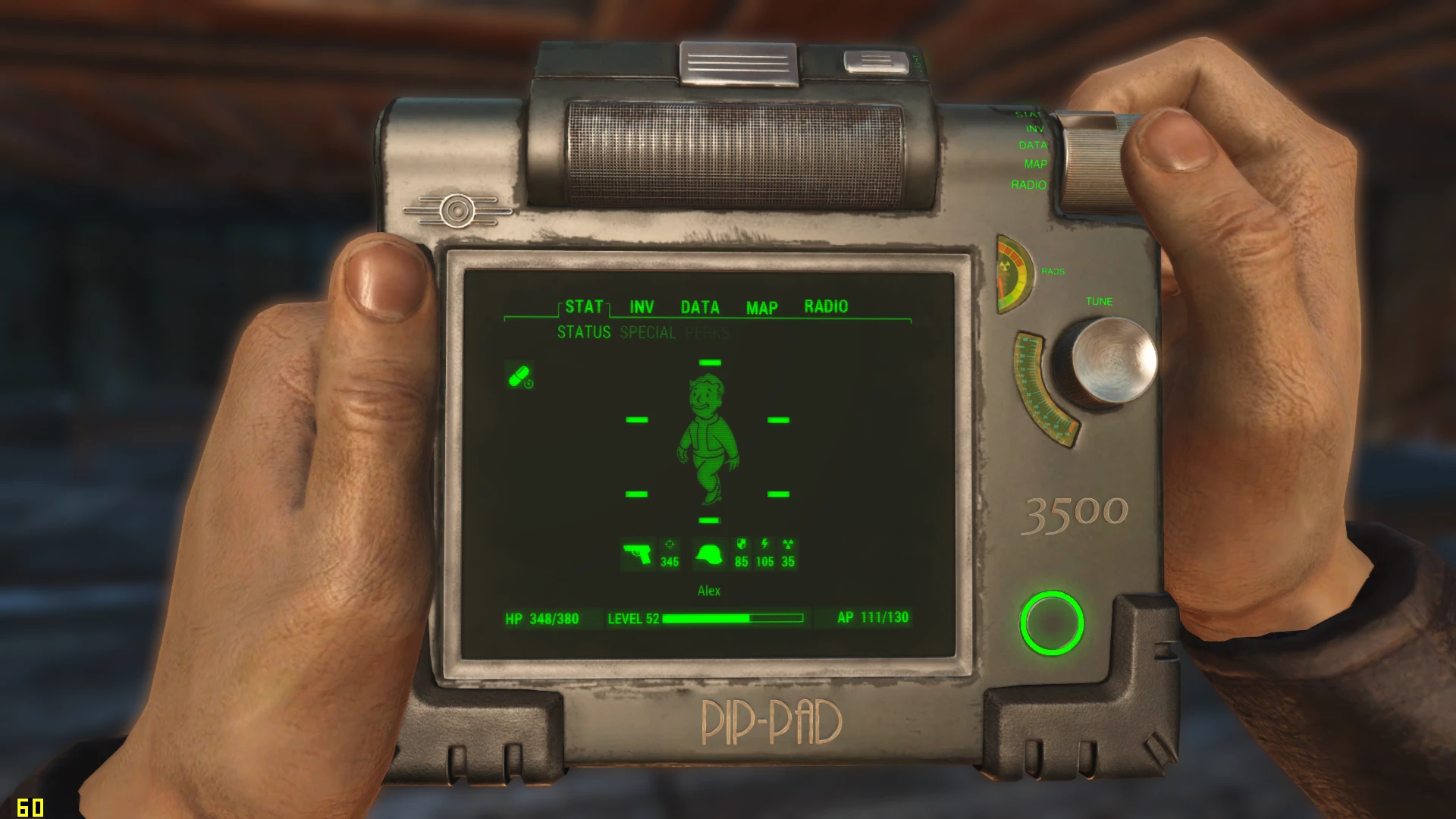
Are you tired of carrying that heavy Pip-Boy around your arm? No? Ah well then... This is awkward... BUT if you are, boy do I have news for you! This is the completely new PIP-Pad! It's a handheld Pip-boy ready for anything you throw its way!
So, jokes aside, the PIP in the name stands for Personal Information Processor. This is not something we made up. The PIP-pad is an actual thing in the fallout universe and therefore we picked the name. You can read more about the lore here.
Read PCGAMER's article about the PIP-Pad here.
Read Jon Lacelle's Article on The 75 Best Fallout 4 Mods To Improve Your Gaming Experience here.
-
[] Nuka Cola - By LittleChronic
[] Tron-Boy - By UlithiumDragon
[] Colored - By DIBZ420
[]Rustic - By Kcim2000
[] Mahogany - By TheMightyWaffle156
[] Vanilla - By DocShaftoe
[] Blacklight Edition - By Foggypath
- Institute - By Mach1991
Install using the mod manager of your choice. All compatibility patches are available in the installer.
Manual installation instruction.
Requirements:
- Mod Configuration Menu
1) Copy files 'Data\PIP-Pad.esp' and 'Data\PIP-Pad - Textures.ba2' files from archive to game Data folder.
2) In archive's Data catalogue choose one of 'PIP-Pad - Main XXX.ba2', where XXX is number 180, 220 or 255. These numbers represent zoom level when you click RMB in the pipboy menu. You can see example pictures in archive's catalog 'fomod\images'.
3) Copy chosen 'PIP-Pad - Main XXX.ba2' to game Data folder.
4) Rename 'PIP-Pad - Main XXX.ba2' to just 'PIP-Pad - Main.ba2'. It's a
-
[] Nuka Cola - By LittleChronic
PIP-Pad is a Pip-Boy replacement mod for Fallout 4, offering a tablet-style interface. With over 30,000 endorsements and 1.7 million downloads, it's a highly popular choice for players seeking a fresh look. Last updated in 2020, it remains a staple in the community.
✨ Key Features
📊 Pros & Cons
✅ Pros
- Huge community trust – 30k endorsements and 1.7M downloads speak for themselves.
- Gives your wrist a break – swaps the clunky Pip-Boy for a sleek tablet.
- Still a go-to choice years after its last update, which says a lot about its quality.
⚠️ Cons
- No update since 2020 – might have compatibility issues with newer game patches or DLC.
- Description doesn't mention any customization options – you get what you see.
- No install instructions provided – you'll need to figure out the setup yourself.
For Fallout 4 players who want a fresh, modern take on the Pip-Boy without overhauling the whole UI. If you're tired of the bulky wrist device and want something sleeker, this is for you. Skip if you're looking for gameplay changes – this is purely cosmetic.
💡 Beginner Tips
- Since it's a simple replacer, just drop the files into your Data folder or use a mod manager like Vortex.
- Make sure to check if you have any other Pip-Boy mods that might conflict – load order matters.
- If you're on PC, consider using a mod manager to easily enable/disable it for troubleshooting.
📊 Mod Details
- Game
- Fallout 4 Mods
- Author
- PimpCrew
- Version
- 0.7b
- Downloads
- 1,728,233
- Endorsements
- 30,489
- Category
- Pip-Boy
- Created
- 2/11/2017
- Updated
- 4/26/2020
🔗 Required By 1 Mod
These mods list this mod as a dependency.
🧩 Commonly Used Together
Users add these mods to the same collections — a real compatibility signal, not an AI guess.
🔧 How to Install Fallout 4 Mods
Download from Nexus.
📖 Full step-by-step install guide for Fallout 4 →
Visit the official mod page for specific installation instructions for this mod.
🎮 Need cheat codes or console commands? Check ur gaming wiki for Fallout 4 commands, item IDs, and more.
Keep browsing — more Fallout 4 mods await