Hide Pip-Boy
⚪ Last updated 2015⚠️ Install Order · 2 steps
Install in this order, then this mod last — most mods fail to load without their framework and dependencies in place.
Preview
🔍 Analysis
- 👍 3.2% endorsement rate — high engagement, a strong quality signal
- 🏆 #6 of 6 Pip-Boy mods in this game by downloads
📋 About This Mod
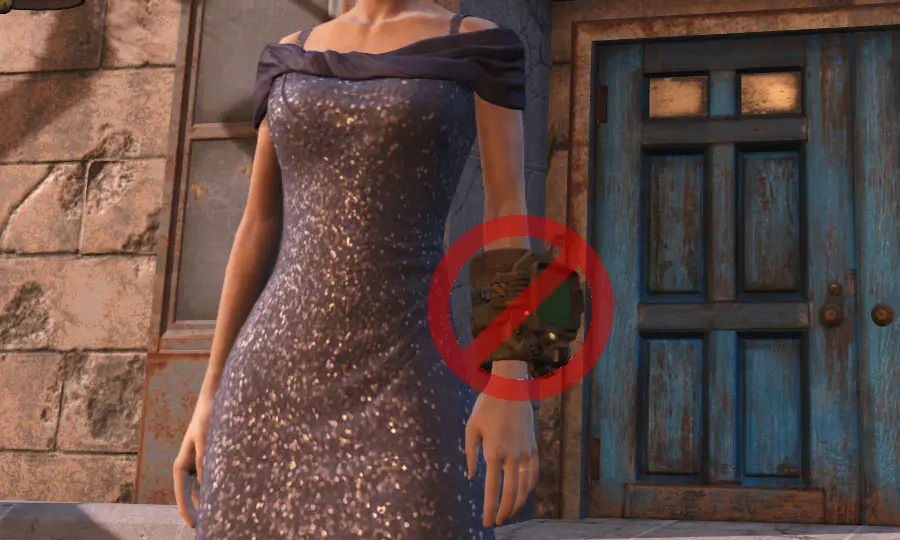
This mod hides the Pip-Boy in 3rd person view. It is still visible when opening the menu with Tab. The bug with certain clothing has now been fixed thanks to ty_cho.
The mod is now also an *.esp instead of a mesh replace. It was created with FO4Edit (the one that should not corrupt saves).
A simple utility mod for Fallout 4 that hides the Pip-Boy from view when playing in third person. With over 6,400 endorsements and 200,000 downloads, it's a popular quality-of-life tweak for players who find the wrist device visually distracting. Last updated in 2015, it remains a stable, lightweight addition.
✨ Key Features
📊 Pros & Cons
✅ Pros
- Huge community trust with 6,498 endorsements and 201,889 downloads
- Does exactly what it says—no bloat, just hides the Pip-Boy in 3rd person
- Stable and simple, no complex settings to fiddle with
⚠️ Cons
- Last updated in 2015—might not be tested with the latest Fallout 4 patches or DLC
- Only affects third person; first person view remains unchanged
- No detailed description or install instructions provided by the author
For Fallout 4 players who prefer third-person gameplay and find the Pip-Boy model intrusive or immersion-breaking. Also great for screenshot enthusiasts who want clean shots without the wrist device. Skip if you play mostly in first person or want any gameplay changes—this is purely cosmetic.
💡 Beginner Tips
- Since it's a simple mod, just drop the files into your Data folder or use a mod manager like Nexus Mod Manager for easy installation.
- If you're using other Pip-Boy retexture or animation mods, test load order to ensure this mod doesn't conflict—place it after those mods.
- Remember to enable mods in your Fallout 4 launcher settings if you're installing manually.
📊 Mod Details
- Game
- Fallout 4 Mods
- Author
- p3king
- Version
- 0.5
- Downloads
- 201,889
- Endorsements
- 6,498
- Category
- Pip-Boy
- Created
- 11/16/2015
- Updated
- 12/24/2015
🔧 How to Install Fallout 4 Mods
Download from Nexus.
📖 Full step-by-step install guide for Fallout 4 →
Visit the official mod page for specific installation instructions for this mod.
🎮 Need cheat codes or console commands? Check ur gaming wiki for Fallout 4 commands, item IDs, and more.
Keep browsing — more Fallout 4 mods await