Minutemen Bandana
⚪ Last updated 2015⚠️ Install Order · 2 steps
Install in this order, then this mod last — most mods fail to load without their framework and dependencies in place.
Preview
🔍 Analysis
- 👍 3.3% endorsement rate — high engagement, a strong quality signal
- 🏆 #265 of 320 Models and Textures mods in this game by downloads
📋 About This Mod
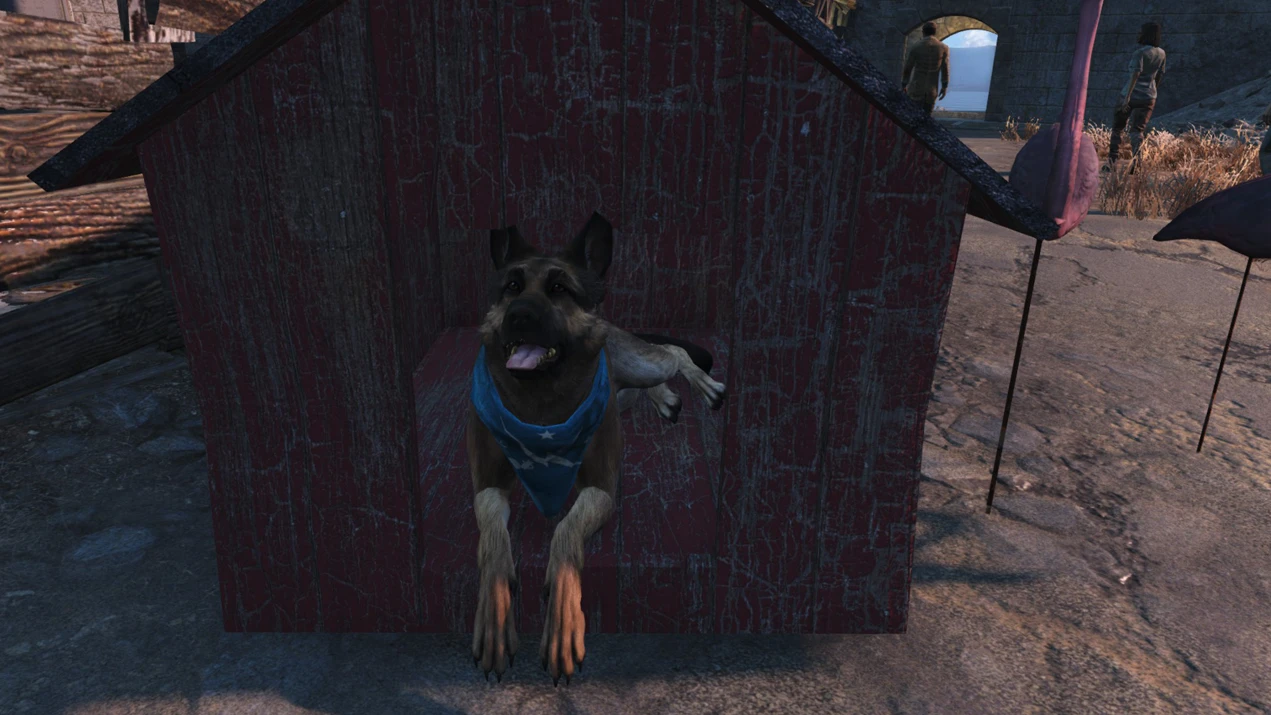
Simple recolor to turn Dogmeat into a proud honorary Minuteman. UPDATE: As requested, I added a file with a darker retexture to more closely resemble the Minutemen Flag.
If you're anything like me, you love your fellow Minutemen. It kind of bummed me that there's no bandana with the logo, similar to the Minutemen flag, so I made my own reskin. Took me longer then expected at I couldn't just simply recolor it, but hat to add a new texture and shading as well, but I'm happy with the end result. It's my first recolor so I'm sorry it's not up to any standarts.
Replaces the Blue Bandana. Simply download and unzip the file, then add it to your data/textures folder. As it's just a recolor it shouldn't mess with your game and only clash with other mods that replace the blue bandana. If you still experience any problems let me know and I'll see what I can do.
A simple texture recolor that gives Dogmeat a Minuteman bandana, turning him into an honorary member of the faction. For Fallout 4 players who want a small cosmetic touch for their canine companion. With nearly 2,000 endorsements, it's a popular, lightweight addition.
✨ Key Features
📊 Pros & Cons
✅ Pros
- Community favorite with 1,944 endorsements and 58k downloads.
- Lightweight cosmetic mod that doesn't affect gameplay.
- Adds a fun roleplay touch for Minuteman playthroughs.
⚠️ Cons
- Only changes Dogmeat's appearance—no new mechanics or quests.
- Last updated in 2015, so may not be compatible with newer game patches.
- No screenshots or detailed install instructions provided by the author.
For Fallout 4 players who want a quick cosmetic tweak to make Dogmeat look like a proper Minuteman. Great for roleplayers and screenshot enthusiasts. Skip if you're looking for gameplay changes or more substantial content.
💡 Beginner Tips
- Place the texture file in your Fallout 4 Data folder, or use a mod manager like Nexus Mod Manager for easier installation.
- If you're using other Dogmeat texture mods, load this one after them to ensure the bandana shows up.
- Check the mod's comments section for any user-reported compatibility notes with other mods.
📊 Mod Details
- Game
- Fallout 4 Mods
- Author
- VaultScout
- Version
- N/A
- Downloads
- 58,468
- Endorsements
- 1,944
- Category
- Models and Textures
- Created
- 11/20/2015
- Updated
- 12/5/2015
🧩 Commonly Used Together
Users add these mods to the same collections — a real compatibility signal, not an AI guess.
🔧 How to Install Fallout 4 Mods
Download from Nexus.
📖 Full step-by-step install guide for Fallout 4 →
Visit the official mod page for specific installation instructions for this mod.
🎮 Need cheat codes or console commands? Check ur gaming wiki for Fallout 4 commands, item IDs, and more.
Keep browsing — more Fallout 4 mods await