Black and White Pipboy
⚪ Last updated 2016⚠️ Install Order · 2 steps
Install in this order, then this mod last — most mods fail to load without their framework and dependencies in place.
Preview
🔍 Analysis
- 👍 7.0% endorsement rate — high engagement, a strong quality signal
- 🏆 #134 of 320 Models and Textures mods in this game by downloads
📋 About This Mod
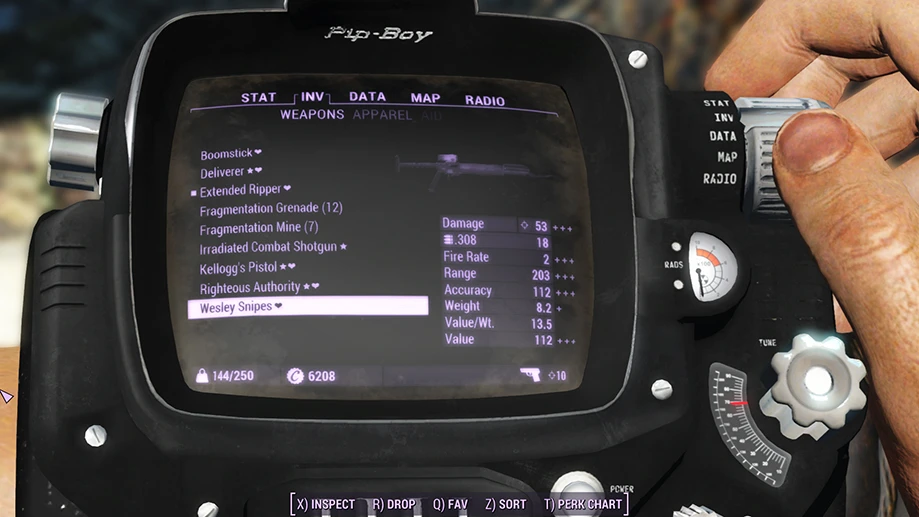
2. 0 is up! Shiny chrome hardware. This is a complete texture overhaul with a black shell, and white details like labels, buttons, and screws. There is also a little added wear and tear subtly added to the surface. Also edits the inner surface (seen in the opening sequence), radiation meter, and radio dial, which many Pip-boy mods currently on the Nexus neglect. Not just a random photoshop filter slapped on the outer shell! Now includes a matching holotape skin under Optional Files.
Version 1. 1 also includes a black screen in 3rd person to match. Version 1. 2 features a greatly improved specular map, chrome hardware, and a further tweaking of the screen to hopefully fix the green tint it gets at night. 1. 3 has newly generated subtler normals and optimized speculars for increased performance. Version 1. 4 fixes the green 3rd person screen bug! Thanks to SentientMachine's Remove Pip-Boy Screen Glow mod. Please endorse and give Kudos to SM for allowing me to include this fix. If you just need a hotfix, simply download and endorse that mod.
INSTALLATION:
Now compatilble with NMM, just click the button
MANUAL INSTALLATION:
1. My Documents / MyGames / fallout4 / Fallout4. INI ( Configuration Settings ) ---> Search and Edit Line
sResourceDataDirsFinal=STRINGS
Change it to:
sResourceDataDirsFinal=STRINGS\, TEXTURES\, MUSIC\, SOUND\, INTERFACE\, MESHES\, PROGRAMS\, MATERIALS\, LODSETTINGS\, VIS\, MISC\, SCRIPTS\, SHADERSFX\
2. Extract the content of the Data Folder to Steam\SteamApps\common\Fallout 4\Data
My Settings for Pipboy UI Color
You can change it manually in FalloutPrefs.ini fPipboyEffectColorB=1. 0000 fPipboyEffectColorG=0. 7500 fPipboyEffectColorR=0. 8500
Perfect for the late night adventurer, the thief, the raider, etc.
My Fallout 4 Mods
Move (Get Out the Way) No Aggro Impact Landing (Power Armor) No Combat Boundaries Realistic Death Physics – No Animations Search and Destroy – Extended Combat Range and Stealth Searches
Player Settlements
Colored Workshop Lights Craftable Cats Stackable Brick Walls and Foundations
Models and Textures
Black and White Pipboy Black Sea Captain's Hat with variants Colorful Mirelurks Denim and Leather for Kate Gold-Rimmed Patrolman Glasses with variants Green Ghouls Imm
A total Pip-Boy overhaul for Fallout 4, featuring a battered black shell, white details, chrome hardware, and improved specular maps for a classy look. Popular with 6,028 endorsements and 85,860 downloads, last updated in 2016.
✨ Key Features
📊 Pros & Cons
✅ Pros
- Huge community trust with 6,028 endorsements and 85,860 downloads
- Gives your Pip-Boy a unique, classy look that stands out from the default
- Improved specular maps make it look more realistic and shiny
⚠️ Cons
- Last updated in 2016 — may not be optimized for the latest Fallout 4 patches or DLC
- Only changes the Pip-Boy's appearance; no gameplay or UI changes
- No screenshots or installation details provided, so you're going in blind
For Fallout 4 players who want a stylish Pip-Boy reskin without messing with gameplay. If you're tired of the default green and want something sleeker, this is for you. Skip if you're looking for functional changes or if you prefer lore-friendly vanilla looks.
💡 Beginner Tips
- Since it's a texture/model replacer, just drop the files into your Data folder or use a mod manager like Nexus Mod Manager.
- Make sure you have Archive Invalidation enabled (or use a mod manager that does it automatically) to see the changes in-game.
- If you're using other Pip-Boy mods, check load order to avoid conflicts — this one should overwrite or be overwritten depending on your preference.
📊 Mod Details
- Game
- Fallout 4 Mods
- Author
- mm137
- Version
- 2.0
- Downloads
- 85,860
- Endorsements
- 6,028
- Category
- Models and Textures
- Created
- 11/13/2015
- Updated
- 5/28/2016
🧩 Commonly Used Together
Users add these mods to the same collections — a real compatibility signal, not an AI guess.
🔧 How to Install Fallout 4 Mods
Download from Nexus.
📖 Full step-by-step install guide for Fallout 4 →
Visit the official mod page for specific installation instructions for this mod.
🎮 Need cheat codes or console commands? Check ur gaming wiki for Fallout 4 commands, item IDs, and more.
Keep browsing — more Fallout 4 mods await