Minimalistic Crosshair HUD Interface - UPDATE for Fallout 1.7.15
⚪ Last updated 2016⚠️ Install Order · 2 steps
Install in this order, then this mod last — most mods fail to load without their framework and dependencies in place.
Preview
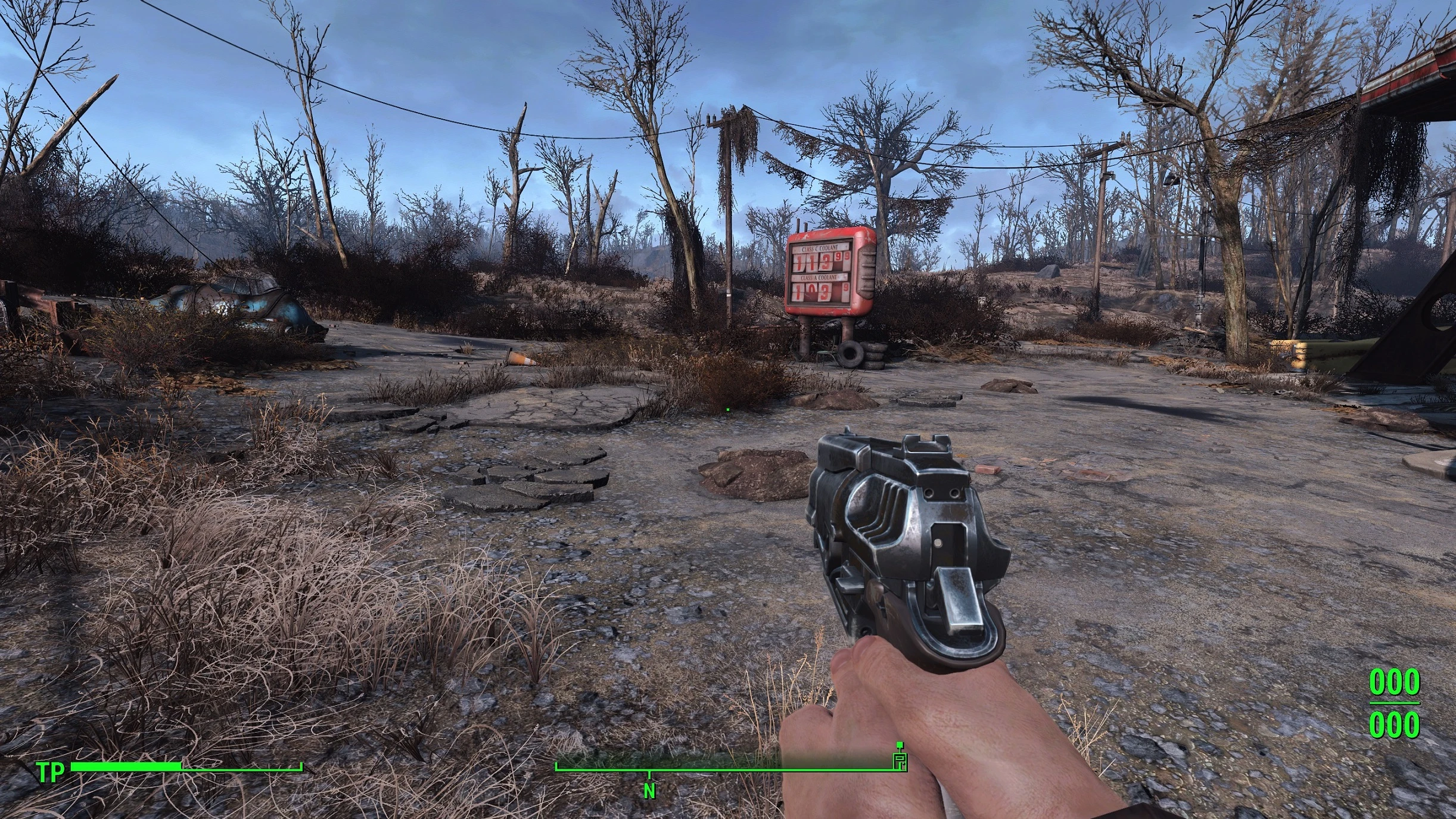
🔍 Analysis
- 👍 4.5% endorsement rate — high engagement, a strong quality signal
- 🏆 #54 of 86 User Interface mods in this game by downloads
📋 About This Mod
Lostis Minimalistic Crosshair HUD-Interface V4. 0. 1715
- Crosshair for Aiming, normal hold weapon and without weapon are still the same
- Crosshair is a small DOT
- Crosshair will not change its shape depending on what you target, its still the same.
------ONLY A DOT, NOTHING MORE !!!------
UPDATE 4. 0. 1715: Update for Fallout Version 1. 7. 15
Check my other Crosshair mods, not beeing static if you want: DOT instead of Crosshair My SweetFX Preset improved and now @ NEXUSMODS: Realistic Lights Shadows and Color Overhaul
Installation:
ONLY WORKS with no other mod changing the hudmenu.swf
Set bEnableFileSelection to 1 in Fallout4Prefs.ini (C:\Users\USERNAME\Documents\My Games\Fallout4 and C:\Program Files (x86)\Steam\steamapps\common\Fallout 4\Fallout4)
bEnableFileSelection=1
Extract archive to C:\Program Files (x86)\Steam\steamapps\common\Fallout 4\ (SAVE YOUR hudmenu.swf to reactivate your old mod if this is not the mod you want to have)
Uninstllation: delete C:\Program Files (x86)\Steam\steamapps\common\Fallout 4\hudmenu.swf (and rename your saved hudmenu.swf if there is one)
Minimalistic Crosshair HUD Interface replaces the default crosshair with a small, constant dot that stays subtle in all situations. It's a simple UI tweak for Fallout 4 players who want a less intrusive aiming reticle. With 454 endorsements and over 10k downloads, it's a proven lightweight mod.
✨ Key Features
📊 Pros & Cons
✅ Pros
- Community-approved with 454 endorsements and over 10k downloads.
- Does exactly what it says: removes the big crosshair without removing the crosshair entirely.
- Lightweight UI tweak that won't affect performance.
⚠️ Cons
- Last updated in 2016, so it may not be compatible with the latest Fallout 4 patches or DLC.
- Only changes the crosshair—no other HUD elements are touched, so if you want a full UI overhaul, look elsewhere.
- The dot might be too small for some players, even with the more visible version.
For Fallout 4 players who want a cleaner, less distracting crosshair while still having a aiming reference. It's perfect for immersive playthroughs or screenshot enthusiasts. Skip if you prefer a traditional crosshair or want a full HUD overhaul.
💡 Beginner Tips
- If you're using a mod manager like Nexus Mod Manager or Vortex, install the mod through the manager to avoid manual file placement issues.
- After installing, check your in-game settings to ensure the crosshair is enabled; the mod only changes its appearance, not its visibility.
- If you find the dot too small, try the V 2.1_B version for a more visible dot.
📊 Mod Details
- Game
- Fallout 4 Mods
- Author
- Lostvampire
- Version
- 4.0.1715
- Downloads
- 10,041
- Endorsements
- 454
- Category
- User Interface
- Created
- 12/1/2015
- Updated
- 9/13/2016
🔧 How to Install Fallout 4 Mods
Download from Nexus.
📖 Full step-by-step install guide for Fallout 4 →
Visit the official mod page for specific installation instructions for this mod.
🎮 Need cheat codes or console commands? Check ur gaming wiki for Fallout 4 commands, item IDs, and more.
Keep browsing — more Fallout 4 mods await