keyNuker and keyRing - Hidden keys
⚪ Last updated 2017⚠️ Install Order · 2 steps
Install in this order, then this mod last — most mods fail to load without their framework and dependencies in place.
Preview
🔍 Analysis
- 👍 4.1% endorsement rate — high engagement, a strong quality signal
- 🏆 #62 of 110 User Interface mods in this game by downloads
📋 About This Mod
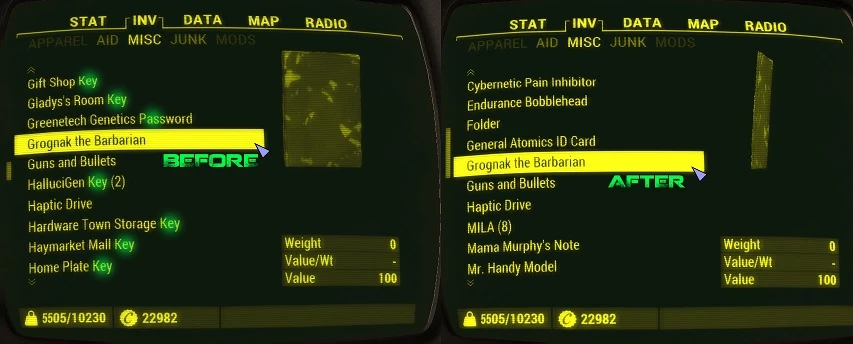
keyNuker - Hide keys (and passwords) in keyRing Keys (and passwords (and cards)) will no longer be shown in the inventory, instead they'll be hidden under Keyring. You can find Keyring at the bottom of the MISC tab. Modular structure allows use of this mod with any other string replacement mods, and/or languages.
Neanka was maintaining the mod, and now Old Nick has taken the mantle over! Many thanks for keeping the mod alive. For all your UI needs, from HUD to Inventory, check this out: DEF_UI. You won't be disappointed with the work Neanka put into that, and the on-going support it receives! DEF_UI includes keyNuker in its base, so you won't need keyNuker if you have it.
Features -A MISC tab that is not cluttered with keys
Installation -Simply click Download with Manager button -Enable/Disable the mod as you like -For manual install, refer to the ReadMe file
Troubleshooting -Cannot see the changes? Make sure the .esp(s) is (are) enabled. If problem persists, make sure the .esp(s) are loaded last. -Problem persists? Make sure keyNuker's "PipboyMenu.swf" is used, without it the mod is useless
Need Help? / Want to help me? If you need help, do not hesitate to comment. I will do my best to help you in any way I can. If you want to help me, I am always open to suggestions, criticism, and would appreciate bug reports, and reports for the stuff I may have missed. If you are playing Dying Light, be sure to check my Dying Light mods.
Videos featuring keyNuker - from you people! uwHDRLqNK8UDq9iQ0SiNAE
Change Log v0. 120 -Added "Cards" as an option; it adds cards to the Keyring, and also removes their weight -Fixed some compatibility stuff
v0. 103 Compatibility round-up -Was using an older file for PipWare UI HUD; fixed -Added compatibility for UXO, DEF_TOLS_PT, and Value/Weight
v0. 100 -Added Keyring. keyNuker now hides the keys under Keyring! -Compatibility updates (PipWare UI v0. 7. 3 & DEF_INV v0. 9. 0)
v0. 030 -Added localization for DE/FR/RU/PTBR/IT/ES/PL. Keys that you see in the world should be in your language now. -DEF_INV compatibility
v0. 020 -Made "HUDMenu.swf" optional -Doubled the character limit before the "..." k
This UI mod cleans up Skyrim's MISC inventory tab by hiding keys, passwords, and cards, displaying them only in a new Keyring interface. With 16,658 endorsements and 410,861 downloads, it's a popular quality-of-life improvement for players tired of clutter. Last updated in 2017, it remains a staple for inventory management.
✨ Key Features
📊 Pros & Cons
✅ Pros
- Massive community approval – 16,658 endorsements and over 410k downloads show this mod is a must-have for many.
- Declutters your MISC tab so you can actually find the junk you need without scrolling past 50 keys.
- Simple, focused purpose – does one thing and does it well, no bloat or extra features to fiddle with.
⚠️ Cons
- Last updated in 2017 – might have compatibility issues with newer Skyrim versions or other UI mods, so test carefully.
- Only affects keys, passwords, and cards – if you wanted to hide other MISC items like notes or quest items, this won't help.
For Skyrim players who are tired of a cluttered inventory and want a cleaner MISC tab without losing access to important items. Perfect for hoarders and completionists who carry every key they find. Skip if you prefer seeing all your items at a glance or use other inventory overhauls that already handle this.
💡 Beginner Tips
- If you use a mod manager like Vortex or Mod Organizer 2, install this mod through it to keep your load order clean and avoid manual file placement issues.
- After installing, check your MISC tab – keys should disappear, and a new Keyring item or menu should appear. If not, make sure the mod is enabled and load order is correct.
- Since the mod is from 2017, test it with your current Skyrim version (Special Edition or Anniversary) – if you see issues, look for patches or alternatives.
📊 Mod Details
- Game
- Fallout 4 Mods
- Author
- lyravega and Neanka and Old Nick
- Version
- v0.123
- Downloads
- 410,861
- Endorsements
- 16,658
- Category
- User Interface
- Created
- 12/9/2015
- Updated
- 12/30/2017
🔧 How to Install Fallout 4 Mods
Download from Nexus.
📖 Full step-by-step install guide for Fallout 4 →
Visit the official mod page for specific installation instructions for this mod.
🎮 Need cheat codes or console commands? Check ur gaming wiki for Fallout 4 commands, item IDs, and more.
Keep browsing — more Fallout 4 mods await