HiPoly Faces
⚪ Last updated 2020⚠️ Install Order · 2 steps
Install in this order, then this mod last — most mods fail to load without their framework and dependencies in place.
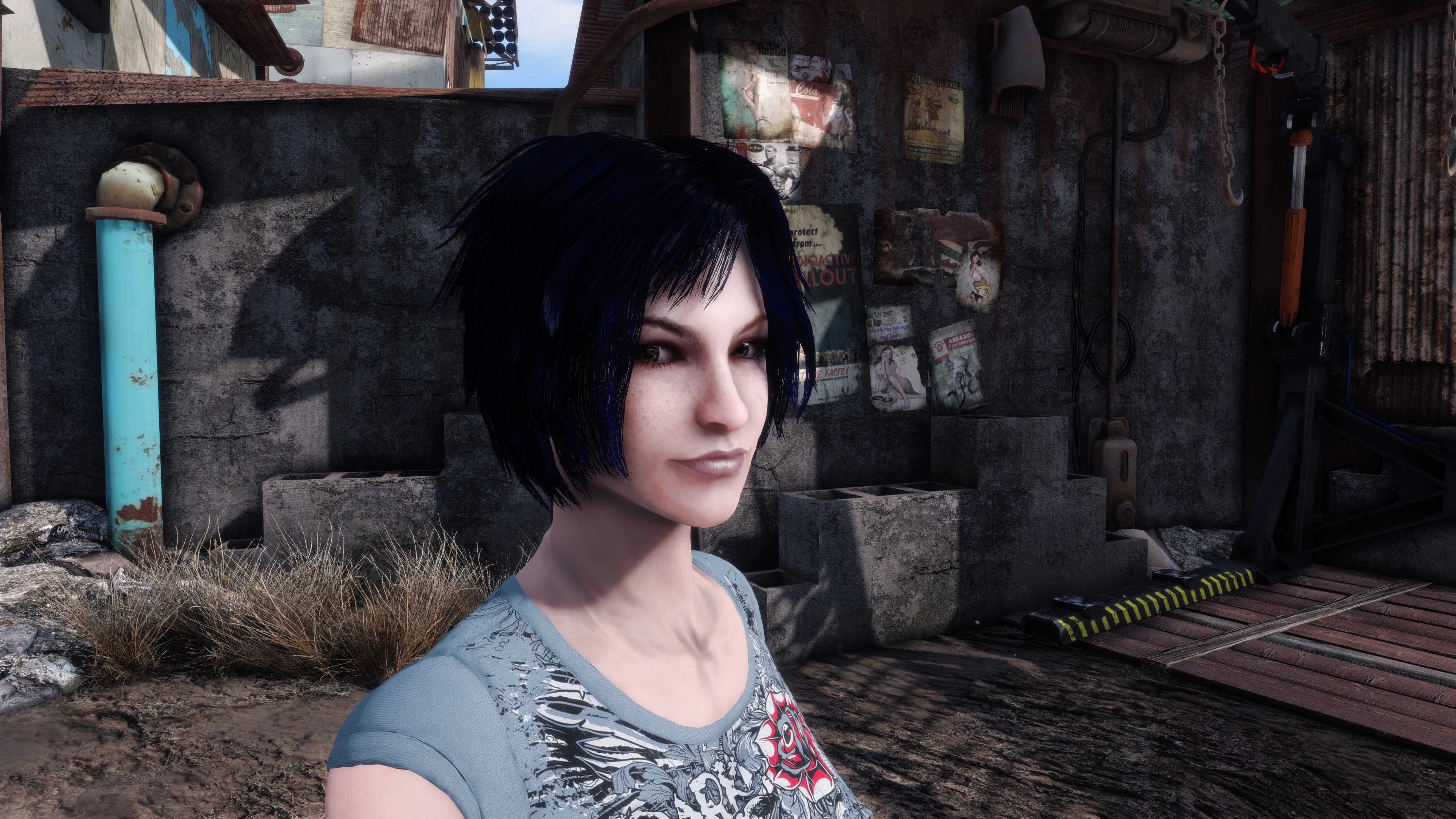
Preview
🔍 Analysis
- 👍 1.8% endorsement rate — high engagement, a strong quality signal
- 🏆 #46 of 271 Models and Textures mods in this game by downloads
📋 About This Mod
THIS MOD IS NOW OBSOLETE. Use HiPoly Faces REDUX instead.
Are you bothered by the somewhat pointy noses and boxy chins/neck that come with the vanilla faces? Then this mod is for you. Brand new high polygon face mesh sets, with fully functioning morphs for player characters. READ the description fully to see how to install and use it.
Disclaimer about screenshots: The screenshots were taken with older versions of the mod and do not really show the improvements and end results well enough, try it in-game and see the difference first hand.
Polygon count has been kept to a reasonable level, so there shouldn't be any performance issues, even on weaker systems. Optional file included for companions to use the new head meshes (default appearance only, UFO4P fixes included). Use FO4Edit in case you want additional changes.
Required mods:
Recommended mods (use one):
Real HD Face Textures 2k
How TO ENABLE; using BAT '.txt' files (Recommended):
-Install via NMM or manual, like any other mod. If you are worried about load order space, use the light ESP, it behaves like an ESL and won't take up any spaces in your load order. The optional companion plugins are light ESPs by default.
-Download the 'xBAT files' main file and extract it in the Fallout 4 folder, manually (the .txt files should be in the same folder as the Fallout4.exe).
-Once in-game, open the console and select the character that you want to enable the HiPoly Face on (can be Player or particular NPCs; see below) and then type 'BAT HiPolyFace_female' or BAT HiPolyFace_male' for female or male characters respectively and hit 'Enter'.
You may use this method to enable HiPoly Faces on any character in the game, provided they (NPCs) are flagged with 'Is CharGen Face Preset' in their record. When in doubt, use the methods mentioned below for NPCs.
How TO DISABLE; using BAT '.txt' files:
Follow the same method as above, but instead, use the command(s) 'BAT RevertFace_female' or BAT RevertFace_male' for female or male characters respectively and hit 'Enter'. This will revert the character back to the default, low-poly head mesh.
How TO; using LooksMenu (for player characters, Alternate Method):
-For New Games, just re-select any of the default presets (before customizing) and the new meshes will load, provided the default presets are not overridden by another mod.
-For existing saves, a bit of manual preset editing will be required, since F4 LooksMenu doesn't seem to have a function similar to Skyrim's 'Face Part' slider yet.
HiPoly Faces by SQr17 replaces the default face meshes for player characters and companions with high-polygon versions, offering smoother geometry and fully functioning morphs. With over 11,000 endorsements and 610,000 downloads, it's a popular cosmetic upgrade for players seeking more detailed character models.
✨ Key Features
📊 Pros & Cons
✅ Pros
- Huge community trust with 11,234 endorsements and over 610k downloads.
- Improves face detail without breaking morphs—customization stays intact.
- Works for both player characters and companions, so your whole party looks better.
⚠️ Cons
- Last updated in December 2020—might not be compatible with the latest game patches.
- Cosmetic only—if you want gameplay changes, this isn't it.
For players who want more detailed, smoother faces on their character and companions without sacrificing morph sliders. If you're into character creation and want a visual upgrade, this is a solid pick. Skip if you're looking for gameplay tweaks—this is purely cosmetic.
💡 Beginner Tips
- Since it's a mesh replacer, make sure to place it after other face mods in your load order to avoid conflicts.
- If you use a mod manager, preview the meshes in-game to see the difference before committing.
- Check the mod's comments section for any reported issues with the latest game version, as it hasn't been updated since 2020.
📊 Mod Details
- Game
- Fallout 4 Mods
- Author
- SQr17
- Version
- 1.00
- Downloads
- 610,912
- Endorsements
- 11,234
- Category
- Models and Textures
- Created
- 6/13/2018
- Updated
- 12/7/2020
🧩 Commonly Used Together
Users add these mods to the same collections — a real compatibility signal, not an AI guess.
🔧 How to Install Fallout 4 Mods
Download from Nexus.
📖 Full step-by-step install guide for Fallout 4 →
Visit the official mod page for specific installation instructions for this mod.
🎮 Need cheat codes or console commands? Check ur gaming wiki for Fallout 4 commands, item IDs, and more.
Keep browsing — more Fallout 4 mods await