E3PC - Enhanced 3rd Person Camera
⚪ Last updated 2019⚠️ Install Order · 2 steps
Install in this order, then this mod last — most mods fail to load without their framework and dependencies in place.
Preview
🔍 Analysis
- 👍 1.2% endorsement rate — high engagement, a strong quality signal
- 🏆 #77 of 110 User Interface mods in this game by downloads
📋 About This Mod
Introduction
This is a mod that will allow you to define the horizontal, vertical and zoom of your camera whilst in and out of combat. It will also change your camera in combat depending on your weapon set and stance to allow for a unique third person experience. I hope you enjoy this mod! :)
Enhanced 3rd Person Camera
I've reworked my famous E3PC from Skyrim to fit into the Fallout 4 updated papyrus scripts and framework whilst using the ease of MCM. So it has been fully redone from scratch with extensive testing and a new way to update the camera seamlessly without causing stuttering or affecting animations, and a live editing mode to get that perfect angle before fighting off raiders and ghouls.
Do note this mod does require you to have bApplyCameraNodeAnimations=0 under the section in either Fallout4.ini / Fallout4Custom.ini under %UserProfile%\Documents\My Games\Fallout4 .(You can copy paste that path to find the config file) For more information please see the stickied comment under the comments section.
The MCM menu is split into several sections which are details below:
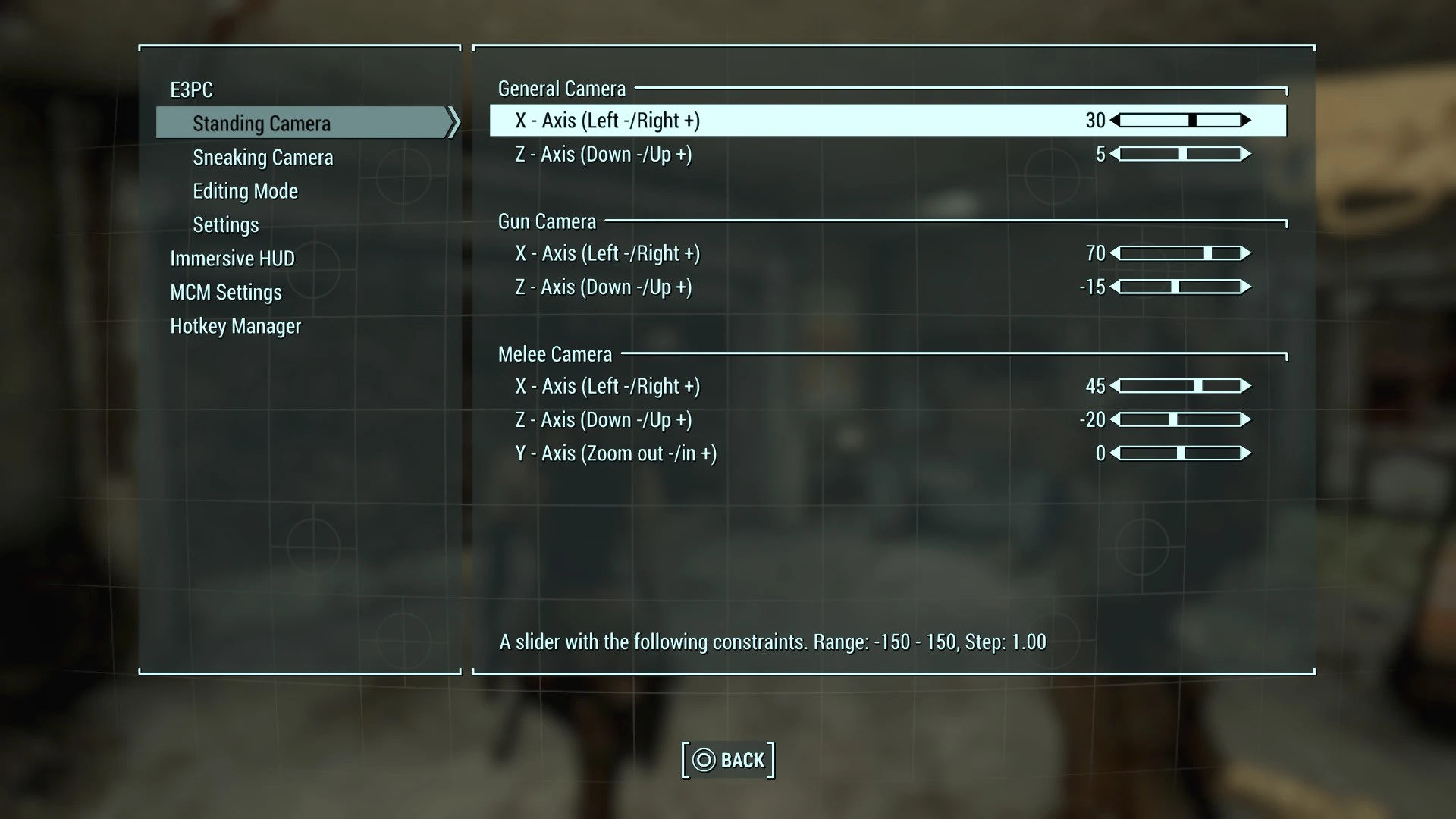
Standing Camera
There are 3 sections under this page to help define which values you are wanting to edit:
General Camera
Allows you to define which settings you are wanting for the standing weapons sheathed.
Allows you to define which settings you are wanting for the standing gun-weapon drawn.
Melee Combat
Allows you to define which settings you are wanting for the standing melee-weapon drawn.
Sneaking Camera
There are 3 sections under this page to help define which values you are wanting to edit:
General Camera
Allows you to define which settings you are wanting for the sneaking weapons sheathed.
Allows you to define which settings you are wanting for the sneaking gun-weapon drawn.
Melee Combat
Allows you to define which settings you are wanting for the sneaking melee-weapon drawn.
Editing Mode
In this section you can set the key binding associated to anything that edit's the camera whilst playing the game. The settings you see are my default key's but you will need to bind them yourself once the mod is activated.
Settings
Lastly, In this section you can:
[*]Enable/Disable the mod - When enabled it will update every X seconds, based on the script update interval for camera changes whilst doing normal game play and by the editing mode update interval whislt in the editing mode, but will ONLY be
E3PC - Enhanced 3rd Person Camera lets you customize camera positioning in and out of combat, with stance and weapon-dependent settings. It includes a shoulder swapping toggle and a real-time camera editor for a more immersive experience. Popular with over 3,000 endorsements.
✨ Key Features
📊 Pros & Cons
✅ Pros
- Community favorite with 3,095 endorsements and over 261k downloads
- Deep customization for a personalized third-person view
- Real-time editor means you see changes instantly
⚠️ Cons
- Last updated in 2019 — may not work with the latest game version
- Requires manual configuration to get the desired camera angles
For players who want full control over their third-person camera, especially those who use different weapons and stances. If you're tired of the default camera and want a more immersive feel, this is for you. Skip if you prefer vanilla camera or play mostly in first-person.
💡 Beginner Tips
- Use the real-time editor to tweak camera angles while in-game for immediate feedback.
- Experiment with different stances and weapons to see how the camera adjusts.
- Check the mod's comments section for user presets and troubleshooting.
📊 Mod Details
- Game
- Fallout 4 Mods
- Author
- Keegars
- Version
- 1.2
- Downloads
- 261,717
- Endorsements
- 3,095
- Category
- User Interface
- Created
- 3/15/2019
- Updated
- 3/16/2019
🔧 How to Install Fallout 4 Mods
Download from Nexus.
📖 Full step-by-step install guide for Fallout 4 →
Visit the official mod page for specific installation instructions for this mod.
🎮 Need cheat codes or console commands? Check ur gaming wiki for Fallout 4 commands, item IDs, and more.
Keep browsing — more Fallout 4 mods await