Companion Status HUD
⚪ Last updated 2016⚠️ Install Order · 2 steps
Install in this order, then this mod last — most mods fail to load without their framework and dependencies in place.
Preview
🔍 Analysis
- 👍 2.1% endorsement rate — high engagement, a strong quality signal
- 🏆 #41 of 187 Gameplay mods in this game by downloads
📋 About This Mod
Companion Status
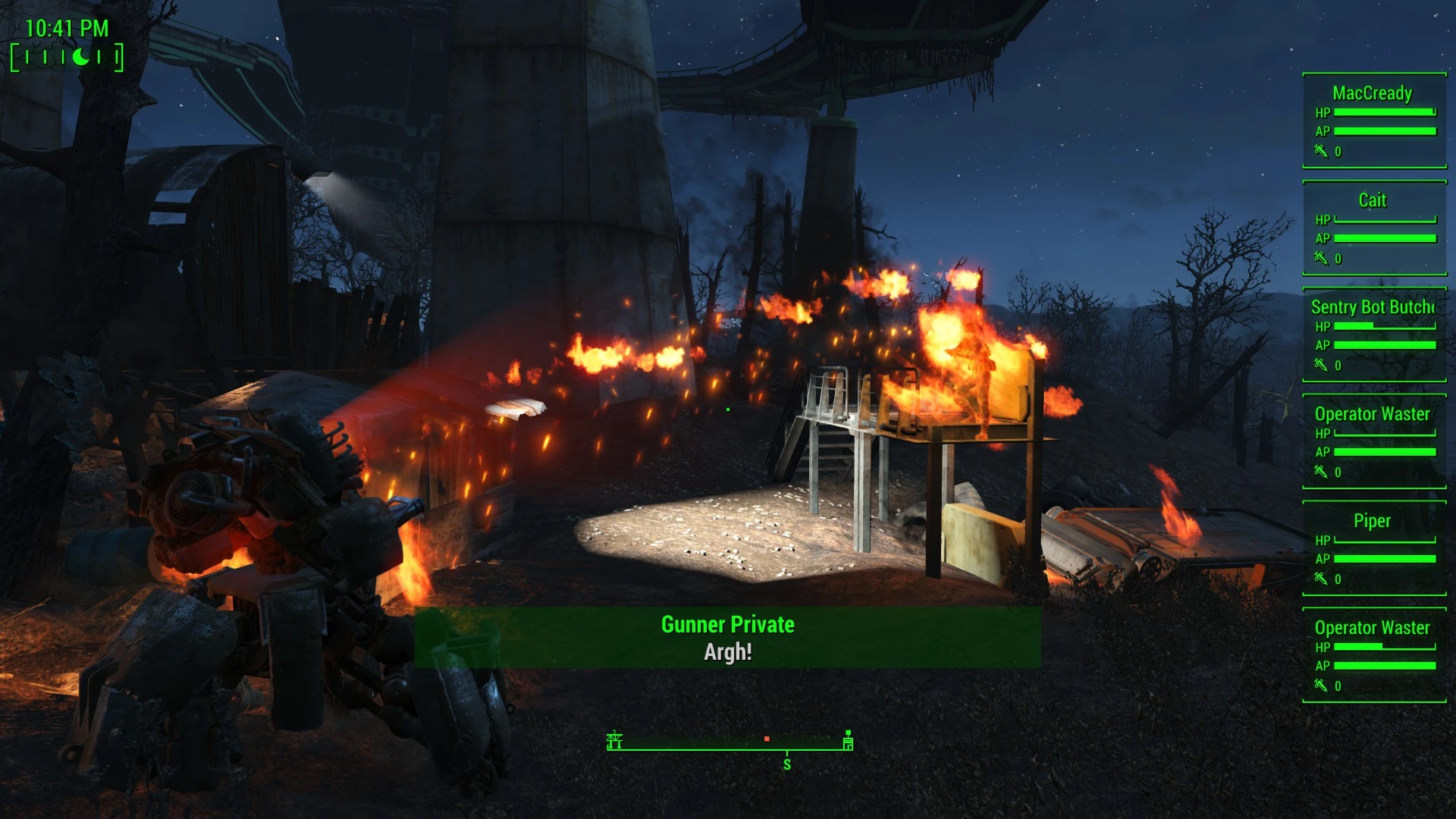
Your companions' health and AP on your HUD.
★ THE STORY ★
You finish a tough fight. Phew. It's quiet. Too quiet. You turn and see your companion grovelling about on the floor. Thanks for nothing, Piper - you mutter for the fifteen-thousandth time this week.
In vanilla, there's absolutely no way to know how much health your companion has left. Their HP bar doesn't show when you point at them, and they're not selectable in VATS either. You have no idea if your companion is just fine or right about to go down face flat on the very next hit.
★ THE DETAILS ★
This mod adds a HUD widget that displays your companions' health and stats. Up to ten companions can be monitored.
Stats will be displayed when companions enter combat, and will automatically fade out once your companion is at full health and out of combat.
You can now have an improved situational awareness of your team's fighting strength. If they're low on health, call them back or reposition them. Provide support where needed. Know the status and fighting strength of your team at all times.
★ REQUIREMENTS ★
This mod requires HUDFramework.
★ COMPATIBILITY ★
Automatically compatible with all follower systems, vanilla or mod-added, present or future.
All that's required is for followers to have the Treat as Player Follower flag correctly set on their AI packages. This is set by default on the FollowPlayer package template, so a mod would have to be doing things in a very different way indeed in order to not have it set.
Fully compatible with:
-
[]Vanilla follower system
[
]Temporary quest followers[]Everybody's Best Friend
[]Unlimited Companion Framework
★ HOW DO I... ★
Q. Position the HUD widget?
A: Enter the console command .
Or the command to move the widget relative to its current position.
Q. Scale the HUD widget?
A: Enter the console command .
Q. Set the opacity of the HUD widget?
A: Enter the console command .
Companion Status HUD adds a widget to display your companions' health and stats, supporting up to ten companions. It's a lightweight, popular gameplay mod for Fallout 4 with over 12,000 endorsements, though it hasn't been updated since 2016.
✨ Key Features
📊 Pros & Cons
✅ Pros
- Huge community trust with 12,610 endorsements and over 600k downloads.
- Simple, focused feature that does exactly what it says.
- Lightweight addition that doesn't overhaul the UI.
⚠️ Cons
- Last updated in 2016 — may have compatibility issues with current game patches.
- Only tracks health and stats; no advanced options like gear or affinity.
For Fallout 4 players who want a quick glance at companion vitals without digging into menus. Ideal for those who frequently travel with multiple followers. Skip if you need deep companion management or modern UI polish.
💡 Beginner Tips
- Place the mod file in your Fallout 4 Data folder and enable it in the launcher.
- If you use a mod manager, install via NMM or Vortex for easier management.
- Check the mod's comments section for any reported issues with the latest game version.
📊 Mod Details
- Game
- Fallout 4 Mods
- Author
- registrator2000
- Version
- 1.0
- Downloads
- 602,925
- Endorsements
- 12,610
- Category
- Gameplay
- Created
- 12/15/2016
- Updated
- 12/15/2016
🔗 Required By 1 Mod
These mods list this mod as a dependency.
🧩 Commonly Used Together
Users add these mods to the same collections — a real compatibility signal, not an AI guess.
🔧 How to Install Fallout 4 Mods
Download from Nexus.
📖 Full step-by-step install guide for Fallout 4 →
Visit the official mod page for specific installation instructions for this mod.
🎮 Need cheat codes or console commands? Check ur gaming wiki for Fallout 4 commands, item IDs, and more.
Keep browsing — more Fallout 4 mods await