Bullet Time - Slow Time
⚪ Last updated 2017⚠️ Install Order · 2 steps
Install in this order, then this mod last — most mods fail to load without their framework and dependencies in place.
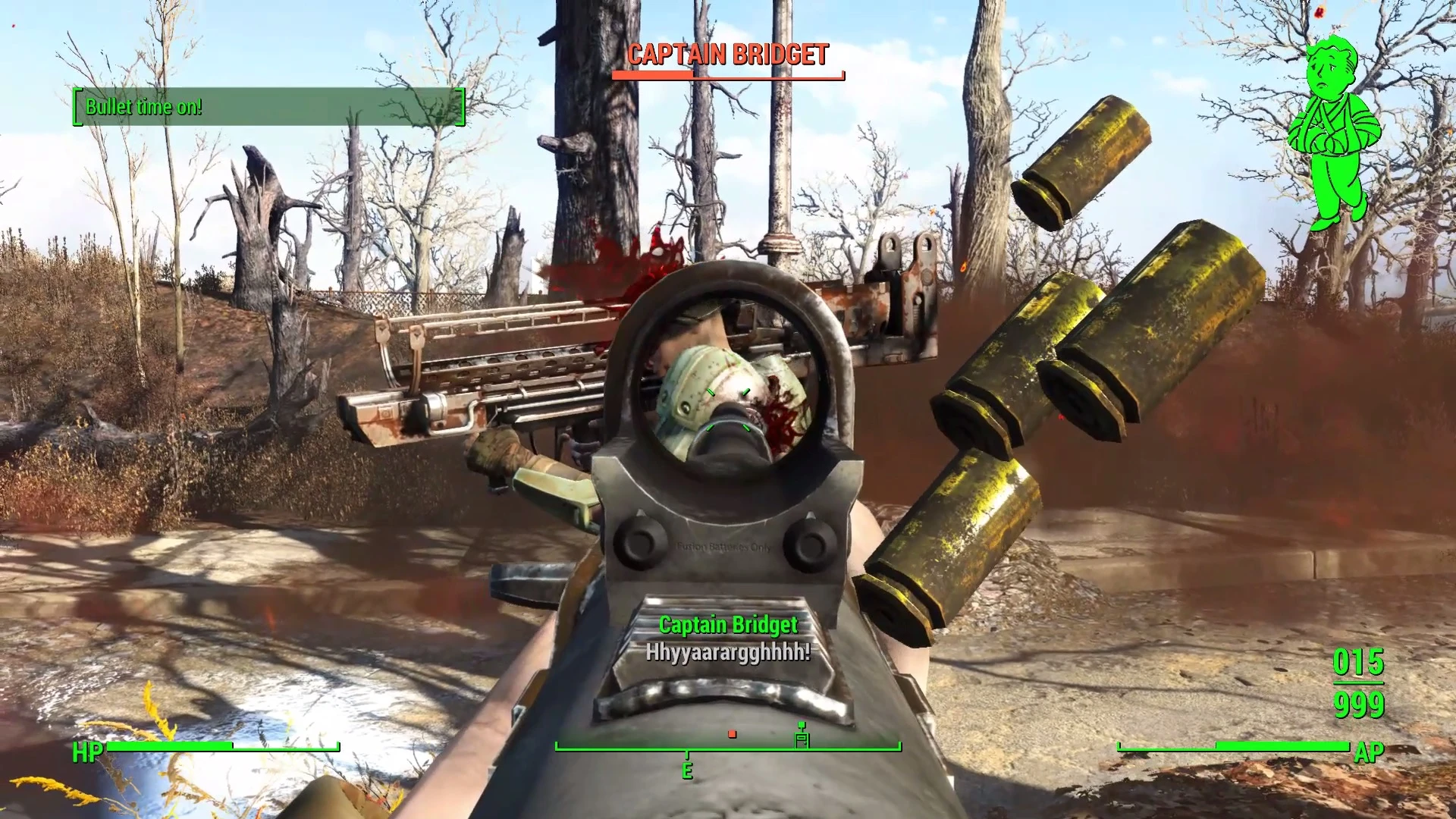
Preview
🔍 Analysis
- 👍 2.6% endorsement rate — high engagement, a strong quality signal
- 🏆 #19 of 187 Gameplay mods in this game by downloads
📋 About This Mod
Slow Time
The first fully-featured bullet-time mod for Fallout 4!
Features:
-
[]Hotkey activation - one button toggle for both on and off.
[
]Bullet-time, real-time. The toggle turns bullet time on and off immediately - no lag or delayed effects![]Real-time AP drain while bullet time is active.
[]Fully configurable. Set time-dilation factor, AP cost, and visual FX in-game.
All aspects are configurable to suit your play style. Increase, decrease or turn AP drain off completely. Or change the time-dilation factor. Choose if you want a visual effect (like with Jet) or no overlay at all. All settings are configurable from within the game - no need to swap out plugins! Works with gamepads.
---Why bullet-time?
Bullet time is a great alternative to VATS. While VATS takes control away from you and keeps you rooted in a spot, bullet-time lets you retain full control over your mobility and aim. And instead of blaming a miss in VATS on a set of chances on the screen, well.. now you can blame your aim. Just look at what you can do!
Usage
When you go in-game, assign the Bullet Time object in your Aid Inventory to a hotkey of your choice. That hotkey will toggle bullet-time.
To configure Bullet Time, select the Bullet Time Configuration item to open the configuration menu.
Installation
Use a mod manager, or, for a manual installation, copy the contents of the mod folder into your game's Data directory.
When you load your game, you'll receive two items - the Bullet Time toggle and Bullet Time Configuration. They will appear in the Aid menu of your Pip-Boy.
If you're having problems, ensure mods in general are enabled for your game! Here's a guide.
In particular, ensure that you have "sResourceDataDirsFinal=" in your ini file and nothing else beyond the equals sign.
Other Platforms
Bullet Time for Xbox One (just uploaded!)
Video Review by Mudcups
2vaoJLGka-4
More Video Reviews
Thanks to Vatiwah, Tyrannicon, Gopher and KottabosGames for featuring Bullet Time!Alongside other great mods, Bullet Time is showcased at 9:30, 4:07 and 0:00 respectively.KottabosGames covers Bullet Time for the
🤖 AI-enhanced — based on mod dataBullet Time - Slow Time is a fully-featured bullet-time mod for Fallout 4, offering a hotkey-activated slow-motion effect as an alternative to VATS. It includes configurable AP cost and time dilation, with over 27,000 endorsements and 1 million downloads, though it hasn't been updated since 2017.
✨ Key Features
Hotkey activation with a one-button toggle for both on and offConfigurable AP cost for using bullet timeConfigurable time dilation settingsFully-featured bullet-time mechanic as a VATS alternative📊 Pros & Cons
✅ Pros
- Huge community trust: 27,098 endorsements and 1.0M downloads
- One-button toggle makes it easy to use in the heat of combat
- Configurable AP cost and time dilation let you tailor the experience
⚠️ Cons
- Last updated in 2017 — may have compatibility issues with current game versions and DLC
- No mention of compatibility with other gameplay mods or DLC
- Requires manual configuration for AP cost and time settings, which might be overwhelming for some
🎯 Is This For You?
For Fallout 4 players who want a VATS alternative with more control and a cinematic feel. Perfect for those who enjoy slow-motion combat but want to customize the cost and effect. Skip if you prefer vanilla VATS or want a mod with recent updates.📦 Install:Easy· Under 5 minutes💡 Beginner Tips
- Assign the hotkey in the mod's configuration menu (if available) or via the game's hotkey settings to avoid conflicts.
- Test the AP cost settings in a safe area to balance gameplay before using in combat.
- Check the mod's forum page for user patches or compatibility notes with other popular gameplay mods.
📊 Mod Details
- Game
- Fallout 4 Mods
- Author
- registrator2000
- Version
- 1.3
- Downloads
- 1,024,490
- Endorsements
- 27,098
- Category
- Gameplay
- Created
- 2/2/2016
- Updated
- 9/14/2017
🔧 How to Install Fallout 4 Mods
Download from Nexus.
📖 Full step-by-step install guide for Fallout 4 →
Visit the official mod page for specific installation instructions for this mod.
🎮 Need cheat codes or console commands? Check ur gaming wiki for Fallout 4 commands, item IDs, and more.
Keep browsing — more Fallout 4 mods await