Brightness Bug Fix
⚪ Last updated 2017⚠️ Install Order · 2 steps
Install in this order, then this mod last — most mods fail to load without their framework and dependencies in place.
Preview
🔍 Analysis
- 👍 4.0% endorsement rate — high engagement, a strong quality signal
- 🏆 #13 of 55 Bug Fixes mods in this game by downloads
📋 About This Mod
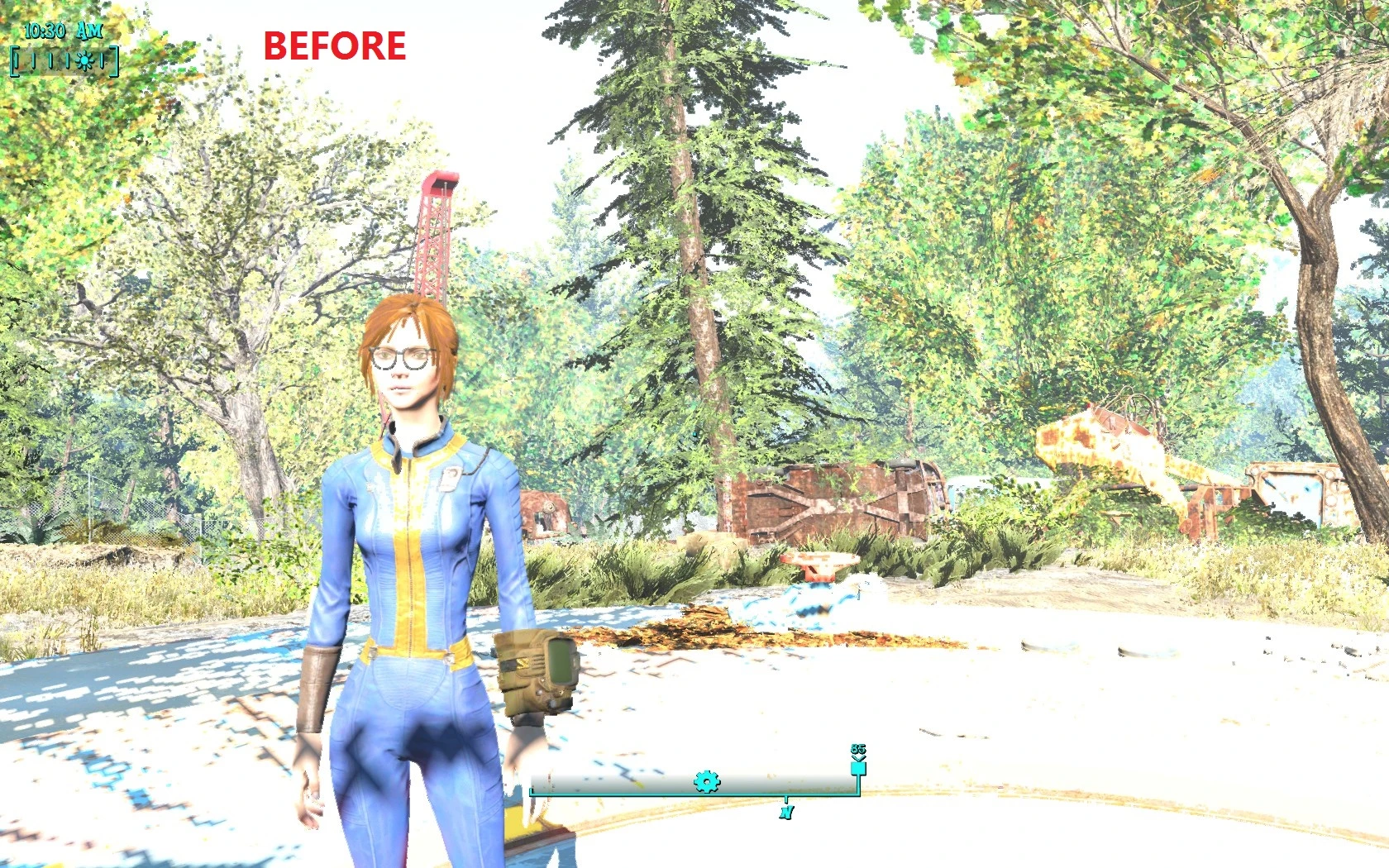
What it does: it cuts brightness level by 2/3 so your eyes won't bleed if your game got bugged with excessive brightness after fallout 1. 8+ update. How to install: activate the plugin, load the game, open the game console, type "help brfix 4" to find the exact imad entry, then type "imod xx000f80" (replace xx with the number you've got in the previous step). effect will persist through the saves. Uninstallation: use "rimod" instead of "imod", then save the game. do that BEFORE disabling the plugin or you're screwed. probably. Bugs: made by bethesda. Compatibility: everything. Made with: fo4edit 3. 2
A compact bug fix mod that addresses the excessive brightness introduced in patch 1.8. With 484 endorsements and over 12,000 downloads, it's a community-approved solution for players experiencing overly bright visuals. Simple and effective, it restores proper lighting without extra features.
✨ Key Features
📊 Pros & Cons
✅ Pros
- Community-approved fix (484 endorsements) for a common visual issue
- Over 12,000 downloads shows it's widely used and trusted
- Simple, focused solution—does exactly what it says
⚠️ Cons
- Only addresses brightness from patch 1.8; may not help with other lighting issues
- Last updated in 2017, so it might not be compatible with newer game versions
- Potential conflicts with other mods that alter lighting or post-processing
For players who noticed the game got too bright after patch 1.8 and want a quick, no-frills fix. Skip if you're looking for broader lighting overhauls or if you play on a version newer than 1.8.
💡 Beginner Tips
- If you're using a mod manager, just download and activate; otherwise, drop the files into your game's Data folder.
- Check your game version—this fix targets patch 1.8 specifically, so it may not work on later patches.
- If you have other lighting mods, try disabling them first to see if the brightness issue persists.
📊 Mod Details
- Game
- Fallout 4 Mods
- Author
- engie cat
- Version
- v2
- Downloads
- 12,252
- Endorsements
- 484
- Category
- Bug Fixes
- Created
- 2/15/2017
- Updated
- 2/15/2017
🔧 How to Install Fallout 4 Mods
Download from Nexus.
📖 Full step-by-step install guide for Fallout 4 →
Visit the official mod page for specific installation instructions for this mod.
🎮 Need cheat codes or console commands? Check ur gaming wiki for Fallout 4 commands, item IDs, and more.
Keep browsing — more Fallout 4 mods await