4estGimp - M8r98a4f2's Complex Item Sorter Enhancements
🟠 Updated over a year ago⚠️ Install Order · 3 steps
Install in this order, then this mod last — most mods fail to load without their framework and dependencies in place.
Preview
🔍 Analysis
- 👍 0.4% endorsement rate
- 🏆 #15 of 141 Patches mods in this game by downloads
📋 About This Mod
Intended for a No-AWKCR build
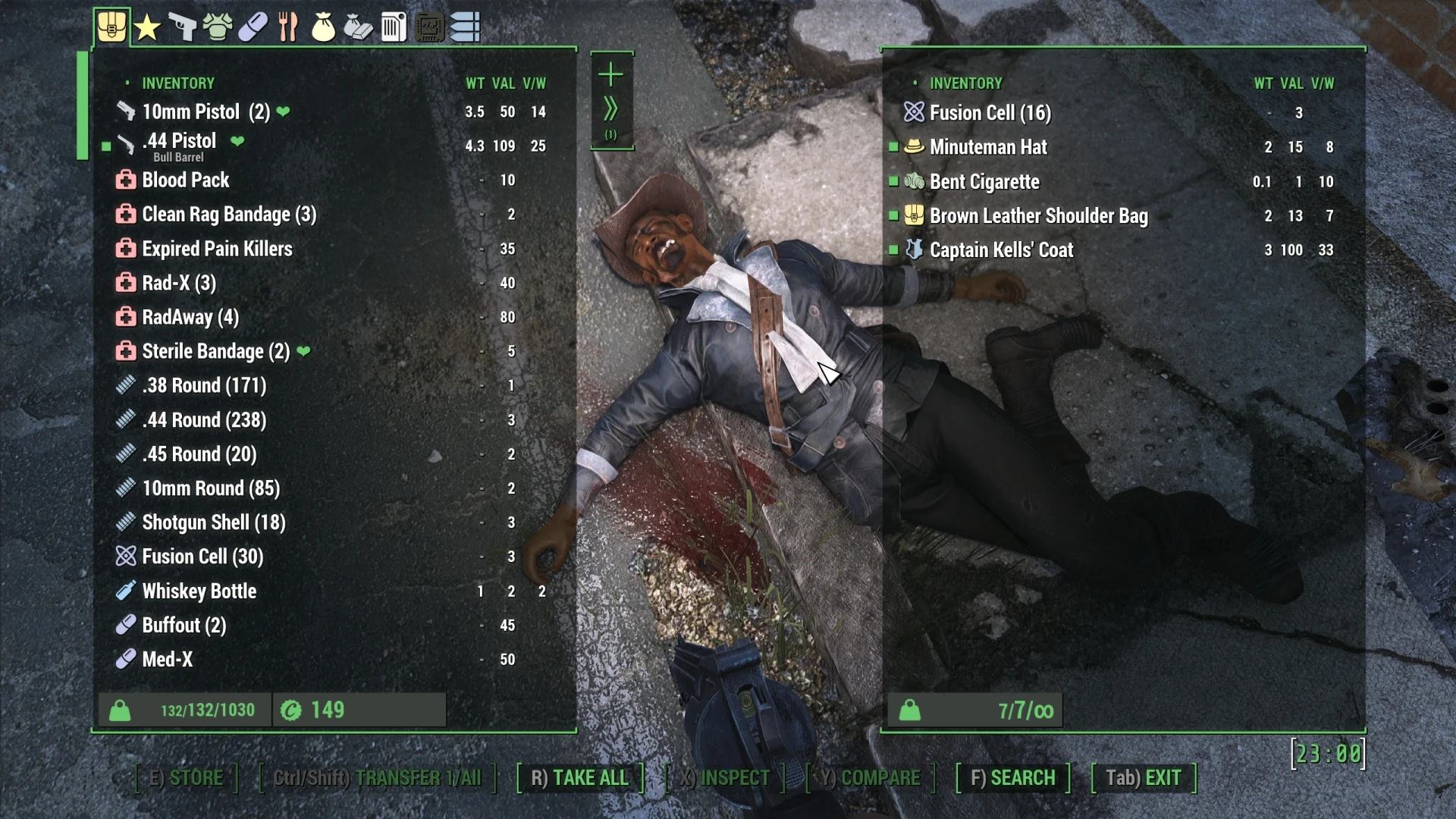
This mod is a collection of Quality of Life additions for M8r98a4f2's Complex Item Sorter. It expands Icons, Item Sorting, and Rule-sets. The Mod Manager download includes the 3 main Complex Sorter .ini files and 3 Inventory Sorting .xml files. It works great alone or along with my other FallUI mods.
Features:
Backpack/Pack rules expaned to UpperPack/Pack/LowerPack to cover multiple mods with packs and holsters
Item Sorting categories and Icons have been adjusted and expanded.
Armor:
-
[]Super Mutant tag put back to the “smut” icon and but kept sorted in the “nonhuman” category.
[]Robot armor tagged.
[]Biosuit tagging added.
[]Underarmor sorting brought back.
[]Fullarmor sorting brought back.
[]Custom armors set to shield2 icon
[]Combat Armor changed from soldier icon to star2 icon
[]Synth Armor icon added and used
[]Vault Suits changed from la_outwear icon to vault icon
[]Mining helmet sorting fixed (Unofficial Fallout 4 Patch users).
[]Jetpacks tagged with the PA torso Icon
[]Power Armor now tags Vanilla PA by Type and Custom mods by body part. Just make a simple PA mod.ini like this example from T-49. It referenced the mod's INNR. A separate INNR file maybe required. See my PA mod's and check their files for full examples. Check the Articles of this for a soon to be added article on how to create an .ini which rearranges and tags
Weapon Sorting and Icons expanded
-
[]Bayonet
[
]Ripper[]1 Handed Melee
[]2 Handed Melee
[]Musket Rifle
[]Institute Rifle
[]Institute Shotgun (regular shotgun icon)
[]Laser Shotgun
[]Grenade Launchers set to Use Rocket Launcher Icon (It's closer than a pistol icon)
Ammo
-
[]Flamer Fuel = Fire icon
[
]Molotov and Incendiary Grenades = Fire icon[]Missiles and grenade launcher grenade = Rocket icon
[]Some energy weapons and batteries now set to lightning2 icon
[]MiniNuke set to the radiation2 icon
It's almost guaranteed there are a few more things I've forgotten to list. Plus, my other mods (released and yet to be released) tie into these same systems with their own instance naming rules and unique items.
**********************************************************************************
2022. 03. 19Enhancements II Installation instructions:
Download the PDF instruction file for full details and photos.
In addition to using M8r's new icon libraries and updated FallUI
-
[]Flamer Fuel = Fire icon
-
[]Bayonet
This patch enhances M8r98a4f2's Complex Item Sorter with expanded icons, item sorting, and rule-sets, tailored for No-AWKCR builds. It includes three main Complex Sorter .ini files in the Mod Manager download. With 3,607 endorsements and 1.0M downloads, it's a popular QoL addition for Fallout 4 modders.
✨ Key Features
📊 Pros & Cons
✅ Pros
- Huge community trust (3,607 endorsements, 1.0M downloads) — this is a proven mod
- Expands the already-powerful Complex Item Sorter with more icons and sorting rules
- Tailored for No-AWKCR builds, so it fits a specific modding setup without bloat
⚠️ Cons
- Requires M8r98a4f2's Complex Item Sorter as a base — not standalone
- No-AWKCR restriction means it won't work for players using AWKCR
For Fallout 4 modders who use M8r98a4f2's Complex Item Sorter and want a more polished sorting experience. Perfect if you're running a No-AWKCR load order and want extra icons and rules without extra bloat. Skip if you don't use Complex Item Sorter or if you rely on AWKCR.
💡 Beginner Tips
- Make sure you have M8r98a4f2's Complex Item Sorter installed first, then load this mod after it in your mod manager.
- Since this is a No-AWKCR mod, double-check your load order for any AWKCR dependencies — they'll conflict.
- Use the Mod Manager download option to get the .ini files automatically placed; manual install is riskier.
📊 Mod Details
- Game
- Fallout 4 Mods
- Author
- 4estGimp
- Version
- 2.8.1
- Downloads
- 1,015,658
- Endorsements
- 3,607
- Category
- Patches
- Created
- 4/10/2021
- Updated
- 7/4/2025
🔧 How to Install Fallout 4 Mods
Download from Nexus.
📖 Full step-by-step install guide for Fallout 4 →
Visit the official mod page for specific installation instructions for this mod.
🎮 Need cheat codes or console commands? Check ur gaming wiki for Fallout 4 commands, item IDs, and more.
Keep browsing — more Fallout 4 mods await