Wrye Flash
⚪ Last updated 2018⚠️ Install Order · 2 steps
Install in this order, then this mod last — most mods fail to load without their framework and dependencies in place.
Preview
🔍 Analysis
- 👍 4.9% endorsement rate — high engagement, a strong quality signal
- 🏆 #17 of 62 Utilities mods in this game by downloads
📋 About This Mod
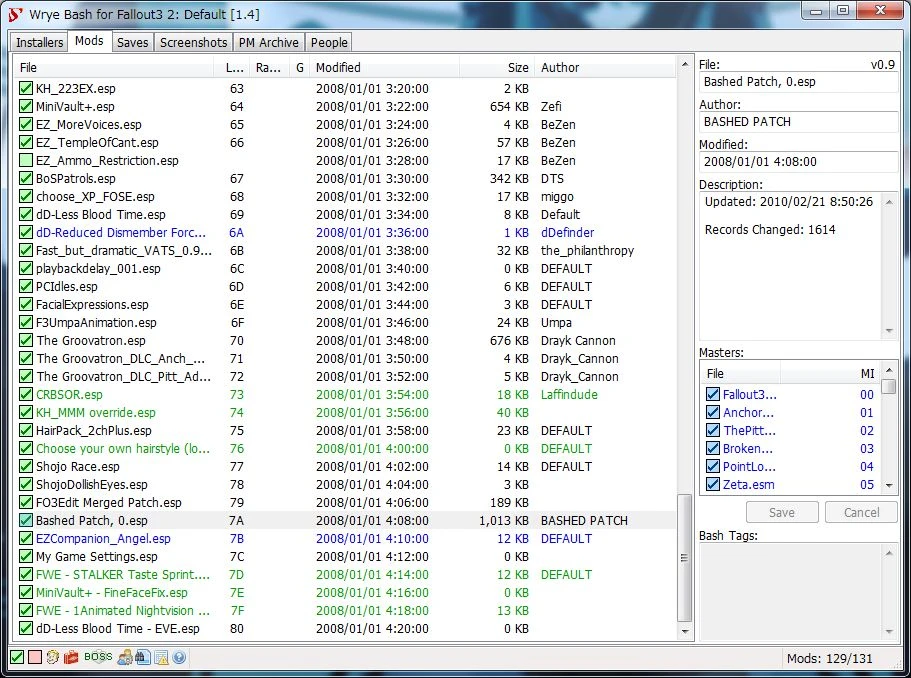
Wrye Flash is a powerful mod management utility adapted to Fallout 3 by Valda from the TES IV: Oblivion and TES V: Skyrim versions.
Its features include:
-
[]A mod installation and conflict manager
[
]A plugin load order manager[]Increased mod compatibility
[]Lifting of the 255 plugin limit through automatic merging of compatible mods
[].ini and settings files tweak management
[]Screenshot management
- Many, many more features
Wrye Bash can appear daunting at first. To help make it more manageable, the documentation has been split into a few readmes that are targeted towards different usage requirements.
The General Readme covers only the most commonly used features, so that the average user can start using Wrye Bash without being overwhelmed. Information on the less commonly used features and more technical details of the features covered in this readme may be found in the Advanced Readme. Information on some of the syntaxes and file formats that Wrye Bash uses are found in the Technical Readme.
Wrye Flash for Fallout 3 is currently as Valda left it. On occasion, when reported, minor changes are made to the record definitions. Other then that this version is not maintained. Compatibility for Fallout 3 will be added to the Oblivion and Skyrim version in the future.
Documentation:
This documentation is for the Oblivion version but some still applies since this version of Wrye Flash is based off of Wrye Bash for Oblivion. Some of this will not apply until this version is integrated into the Oblivion and Skyrim version. So please do not post asking why the documentation mentions a feature that is not available in Wrye Flash.
Old Wrye Bash Documentation: This only covers Wyre Bash up until version 271.
General Readme
Advanced Readme
Technical Readme
Instalation:
Installation from Nexus
1. Click download manually from the files tab
2. Unzip the Wrye Flash NV 7zip archive
3. You will see 2 folders, Data and Mopy
4. Copy Data and Mopy to your FalloutNV folder where the FalloutNV.exe is located. Overwrite the files if needed.
Additional Installation Notes
First, if you're using Windows XP, Wrye Flash needs the MSVC++ 2005 SP1 Redistributable with ATL Security Update installed, the x86 version. This is required for the custom 7z executable that Wrye Bash uses to run. Later versions of Windows already have this installed.
This is a Python version, so install the dependencies manually until there is in automatic installer.
Note that the 32-bit versions are required even
Wrye Flash is an alternative port of Wrye Bash for Fallout 3, offering utilities for mod management. With 3,772 endorsements and 76,451 downloads, it's a well-established tool, though it hasn't been updated since 2018.
✨ Key Features
📊 Pros & Cons
✅ Pros
- Proven track record with 3,772 endorsements and 76k downloads
- Brings Wrye Bash's robust mod management to Fallout 3
- Active community despite last update in 2018
⚠️ Cons
- Last updated in 2018 — may not support newer mods or game patches
- Alternative to Wrye Bash might lack some features or have quirks
For Fallout 3 modders who want a powerful mod management tool similar to Wrye Bash. If you're already familiar with Wrye Bash, this will feel right at home. Skip if you prefer simpler mod managers or need frequent updates.
💡 Beginner Tips
- Check the mod's forum or comments for compatibility with your game version.
- Consider using a mod manager like FOMM or Vortex alongside for easier installs.
- Read the included documentation or online guides to understand its features.
📊 Mod Details
- Game
- Fallout 3 Mods
- Author
- valda
- Version
- 31.9
- Downloads
- 76,451
- Endorsements
- 3,772
- Category
- Utilities
- Created
- 2/20/2010
- Updated
- 7/5/2018
🔧 How to Install Fallout 3 Mods
Download from Nexus.
📖 Full step-by-step install guide for Fallout 3 →
Visit the official mod page for specific installation instructions for this mod.
🎮 Need cheat codes or console commands? Check ur gaming wiki for Fallout 3 commands, item IDs, and more.
Keep browsing — more Fallout 3 mods await