ArchiveInvalidation Invalidated
⚪ Last updated 2009⚠️ Install Order · 2 steps
Install in this order, then this mod last — most mods fail to load without their framework and dependencies in place.
Preview
🔍 Analysis
- 👍 2.7% endorsement rate — high engagement, a strong quality signal
- 🏆 #1 of 62 Utilities mods in this game by downloads
📋 About This Mod
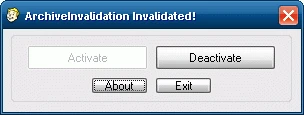
This little program will allow you to totally eliminate the need of ArchiveInvalidation.txt! But how does it work? It works by adding a dummy texture BSA to the start of the BSA load list, this stops Fallout 3\'s ArchiveInvalidation from running on its main texture BSA allowing any texture replacements you have to work automatically without the need to do anything ever again. Important Notes -Once you\'ve \"Activated\" ArchiveInvalidation Invalidated! you do not need to keep it running to receive its effects or activate it again when adding/removing textures ect. -ArchiveInvalidation Invalidated! will set bInvalidateOlderFiles to 1, on some computers setting bInvalidateOlderFiles to 1 in Fallout 3\'s ini will cause the game to crash on startup, at the moment it is unknown why this happens and there is no solution yet, unfortunatly you\'ll have to do without ANY modified original content since bInvalidateOlderFiles needs to be set to 1 to use any. If you are using Windows Vista make sure you DO NOT play Fallout 3 from your Program Files folder, this has been known to cause strange problems (if UAC is on/incorrect permissions), install Fallout 3 somewhere else. -This will work with all versions of Fallout 3. -ArchiveInvalidation Invalidated! will set bLoadFaceGenHeadEGTFiles to 1 as well which allows new NPC\'s added by a mod to have their proper body/face color as they where set in G. E. C. K. -ArchiveInvalidation Invalidated! can be run from anywhere, it will read your Fallout 3 path from the registry and if it cannot find it/path is incorrect it will ask you to choose your Fallout 3 folder. -ArchiveInvalidation Invalidated! will delete your ArchiveInvalidation.txt upon activation, keeping ArchiveInvalidation.txt while ArchiveInvalidation Invalidated! is active can cause issues. There are 2 version to chose from: Program Version (recommended) - very easy to use program, allowing you to easily activate/deactivate ArchiveInvalidation Invalidated! Manual Version - Contains easy to follow instructions on how to setup ArchiveInvalidation Invalidated! and the dummy texture BSA. Version History v1. 0. 6 (02/04/2009) -Fixed typo. -Fixed ArchiveInvalidation Invalidated! exiting instead of asking you to find your Fallout 3 folder if it couldn\'t be detected in the registry. -ArchiveInvalidation Invalidated! will now ask you to point it to your FALLOUT. INI if it can\'t find it (seems to only affect some Vista users). v1. 0. 5 (02/02/2009) -Fixed detection if Fallout 3 is installed to your program files folder on Vista, it didn\'t detect both possible paths. -Improved activate/deactivate detection again. -Once again ArchiveInvalidation Invalidated! will delete your ArchiveInvalidation.txt for the sake of reducing potential problems. v1. 0. 4 (14/01/2009) -Fixed ArchiveInvalidation Invalidated! not working correctly if it couldn\'t find your Fallout 3 folder a
ArchiveInvalidation Invalidated is a utility mod for Oblivion that automates the ArchiveInvalidation process, eliminating the need to manually edit ArchiveInvalidation.txt. It has 84,457 endorsements and 3.2 million downloads, making it a staple for modded Oblivion setups. Last updated in 2009, it remains a classic tool for the game's modding community.
✨ Key Features
📊 Pros & Cons
✅ Pros
- Massive community approval—84,457 endorsements and 3.2 million downloads show this is a must-have for Oblivion modders.
- Saves you from the tedious, error-prone manual editing of ArchiveInvalidation.txt—just run it and forget it.
- Lightweight and straightforward; no complex setup, just drop it in and let it do its thing.
⚠️ Cons
- Last updated in 2009—if you're on a newer Oblivion version or using certain mods, you might hit compatibility snags.
- No detailed documentation provided, so if you're new to Oblivion modding, you'll need to figure out how to use it from other sources.
- It's a niche utility—if you never touch ArchiveInvalidation, this mod is pointless for you.
For Oblivion modders who are tired of manually managing ArchiveInvalidation.txt and want a one-click solution. It's essential for anyone running a heavily modded game. Skip if you play vanilla or rarely mod Oblivion.
💡 Beginner Tips
- Make sure you have Oblivion's official patch installed before using this mod, as it relies on the game's ArchiveInvalidation system.
- Run the tool after installing new mods that add custom meshes or textures to ensure they show up correctly.
- If you're using a mod manager like OBMM or Wrye Bash, check if they have built-in ArchiveInvalidation support—this mod might be redundant.
📊 Mod Details
- Game
- Fallout 3 Mods
- Author
- Quarn
- Version
- 1.0.6
- Downloads
- 3,159,801
- Endorsements
- 84,457
- Category
- Utilities
- Created
- 12/2/2008
- Updated
- 4/2/2009
🧩 Commonly Used Together
Users add these mods to the same collections — a real compatibility signal, not an AI guess.
🔧 How to Install Fallout 3 Mods
Download from Nexus.
📖 Full step-by-step install guide for Fallout 3 →
Visit the official mod page for specific installation instructions for this mod.
🎮 Need cheat codes or console commands? Check ur gaming wiki for Fallout 3 commands, item IDs, and more.
Keep browsing — more Fallout 3 mods await