The Maintenance Shed
⚪ Last updated 2010⚠️ Install Order · 2 steps
Install in this order, then this mod last — most mods fail to load without their framework and dependencies in place.
Preview
🔍 Analysis
- 👍 6.9% endorsement rate — high engagement, a strong quality signal
- 🏆 #100 of 132 Buildings mods in this game by downloads
📋 About This Mod
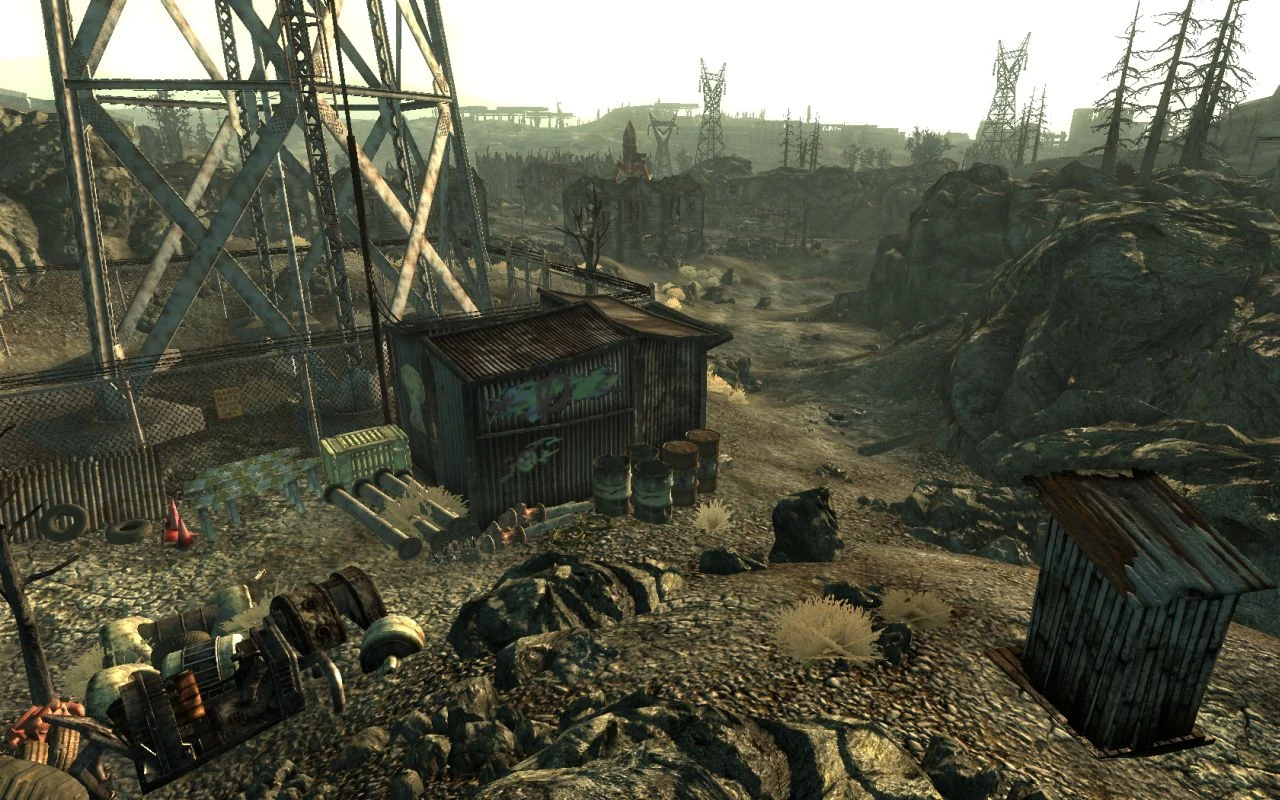
The Maintenance Shed Version: 1. 3 Released: 02/08/2010 By: Ssenkrad =+=+=+=+=+=+=+=+=+=+=+=+=+=+= This mod places a small Maintenance Shed next to the Springvale Water Tower, sort of a base of operations for the beginning character. It has the following features: A \"Makeshift Bed\" (a piece of cardboard on the floor you can sleep on). Sleeping on the \"Makeshift Bed\" will leave your character \"Well Rested\". 14 unique containers to stash your loot in. The containers are unique so that they will not be affected by any mods that modify vanilla containers. A functional Garbage Can. When you activate the Garbage Can, you will get a menu. Select \"Open the Garbage Can\" to open it. Select \"Empty the Garbage Can\" to empty it. You\'ll get a confirmation menu so that you can cancel this choice if it was selected by accident. Select \"Recover the Last Disposed Items\" to replace the most recently \"emptied\" items back into the Garbage Can. Select \"Do Nothing\" to... uh, do nothing. (The first time the Garbage Can is emptied, the contents are moved to a remote container. The next time the Garbage Can is emptied, the contents of the remote container are deleted (gone forever), then the contents of the Garbage Can are moved to the now empty remote container. Thus, you can only recover the most recently \"emptied\" items. Keep this in mind when emptying the Garbage Can.) A campfire outside. Activate the fire pit to ignite the campfire. Activate it again to extinguish the campfire. You can sit on the log next to the campfire, too. So warm up some beany-weenies, and chill out with Dogmeat under the stars for a while... A Workbench, for all your crafting needs. A map marker labeled \"Maintenance Shed\" you can use to fast travel there. =+=+=+=+=+=+=+=+=+=+=+=+=+=+= To update from version 1. 0: ############################ VERY CRITICAL INFORMATION!!! ############################ 1. REMOVE (>>EVERYTHING<<) from (>>ALL<<) THE CONTAINERS in the Maintenance Shed, and whatever items you have placed around the interior for decoration. This is (>>REQUIRED<<) so that you don\'t loose anything. 2. Go outside, save your game and exit Fallout3. 3. Copy the MaintenanceShed.esp file from this archive to your Fallout3\\Data folder. Choose to overwrite/replace the old MaintenaceShed.esp file with this new one. 4. Confirm that the mod is activated, and is loading in the desired order in your mod manager. 5. Start Fallout3, and load your last save. 6. Go back inside the Maintenance Shed, and place your items in the new containers. To update from version 1. 1: 1. Copy the MaintenanceShed.esp file from this archive to your Fallout3\\Data folder. Choose to overwrite/replace the old MaintenaceShed.esp file with this new one. 2. Confirm that the mod is activated, and is loading in the desired order in your mod manager. Install: Copy the MaintenanceShed.esp file from this archive to your Fallout3\\Data folder. Activate the mod.
The Maintenance Shed adds a small base of operations next to the Springvale Water Tower in Fallout 3, giving early-game characters a convenient spot to store loot and rest. With 455 endorsements and over 6,600 downloads, it's a well-received, simple addition for players who want a handy early foothold.
✨ Key Features
📊 Pros & Cons
✅ Pros
- Community-approved (455 endorsements) and popular with over 6,600 downloads
- Gives new players a safe spot to stash gear and regroup near the starting area
- Simple, no-frills addition that doesn't clutter the wasteland
⚠️ Cons
- Last updated in 2010 — may have compatibility issues with modern mod setups or DLC
- Small scope means it won't add much for veterans looking for substantial content
For Fallout 3 players who want a convenient early-game hideout near Springvale without overhauling the world. If you're a completionist or roleplayer who likes having a dedicated base from the start, this is a neat little addition. Skip if you're looking for major building or gameplay changes.
💡 Beginner Tips
- Place the mod's .esp file in your Fallout 3 Data folder and activate it via the launcher or mod manager.
- If you use FOSE or other mods, load order usually doesn't matter for simple building additions, but keep it near the bottom to avoid conflicts.
- Visit the shed after leaving Vault 101 to see if it fits your playstyle; it's a quick trip from the water tower.
📊 Mod Details
- Game
- Fallout 3 Mods
- Author
- Ssenkrad
- Version
- 1.3
- Downloads
- 6,632
- Endorsements
- 455
- Category
- Buildings
- Created
- 6/17/2009
- Updated
- 2/8/2010
🔧 How to Install Fallout 3 Mods
Download from Nexus.
📖 Full step-by-step install guide for Fallout 3 →
Visit the official mod page for specific installation instructions for this mod.
🎮 Need cheat codes or console commands? Check ur gaming wiki for Fallout 3 commands, item IDs, and more.
Keep browsing — more Fallout 3 mods await