Pipboy Item Descriptions Mod
⚪ Last updated 2009⚠️ Install Order · 2 steps
Install in this order, then this mod last — most mods fail to load without their framework and dependencies in place.
Preview
🔍 Analysis
- 👍 4.1% endorsement rate — high engagement, a strong quality signal
- 🏆 #60 of 82 User Interface mods in this game by downloads
📋 About This Mod
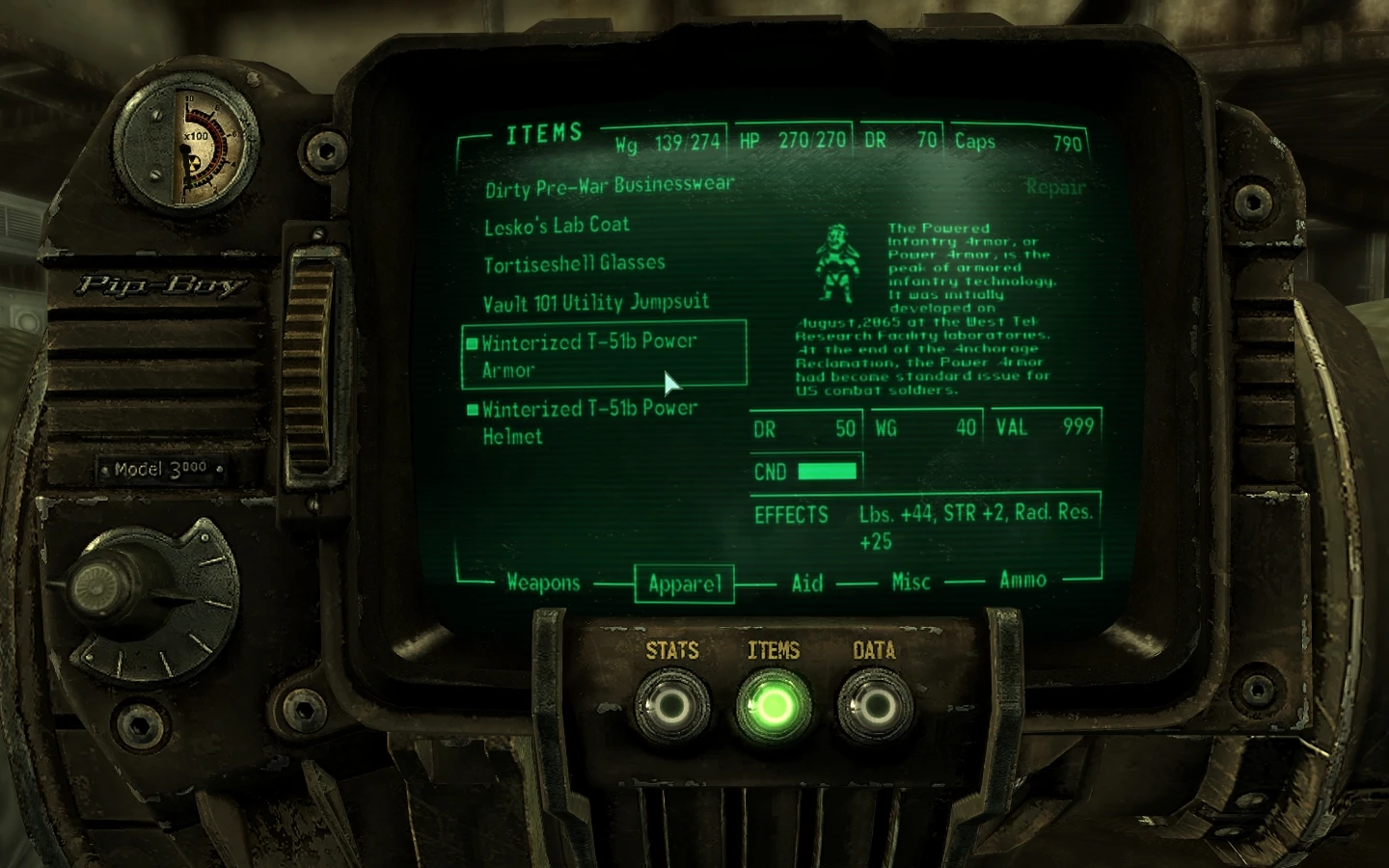
This is a mod intended to add descriptions to the various Pipboy item images in Fallout 3. This mod was created with Pipboy Descriptions Generator created by Harmattan aka DonQuiche. This mod was also heavily inspired by Fallout 3 Item Descriptions mod by Mikael Grizzly. Unlike Mikael Grizzly\'s mod, these pipboy images are smaller and the text uses the JH_Fallout font from Van Buren (also included in this package). The text is also to the right and wraps around beneath the image. This mod was created with the MTUI UI mod in mind but it may work with other UI mods. This is a work in progress and is not 100% complete, so bear with me. Enjoy! Install: Copy and paste the \"Textures\" folder to your \"Bethesda Softworks\\Fallout3\\Data\\\" directory. If the textures do not appear in-game, you may need to install the JH_Fallout font. It can be installed by right-clicking JH_Fallout and selecting install or by copying and pasting JH_Fallout to C:\\Windows\\Fonts. Uninstall: Delete from your Data folder. Changelog: v0. 9 - initial version v0. 9. 1 - Fixed the Mesmatron description, added and fixed more apparel and item descriptions. v0. 9. 2 - Added and fixed more item and apparel descriptions. v1. 0 - Added all the slaver and raider apparel, all images appear to be complete now. v1. 1 - Added the Classic YK42B Pulse Rifle by DaiShi. It now fits in with the other images :) v1. 2 - Fixed the description for the Food Sanitizer. v1. 3 - Added the YK40 Pulse Pistol by MadCat221. Fixed some descriptions. Changed icons and text size. v1. 4 - Fixed description for the Sledgehammer. v1. 5 - Added weapons, items & apparel for the Operation: Anchorage DLC. v1. 6 - Fixed the image for the Missile Launcher. Increased the image size and decreased the font size. v1. 7 - Corrected Operation:Anchorage DLC descriptions to fit the DLC file structure. DLC items now display properly. v1. 8 - Added description for Pre-War Books, fixed description for Chinese Stealth Suit. v1. 9 - Added more to the description for the Power Armors. v1. 9. 1 - Added more to the description for the Power Armor Helmet. Forgot to make the changes to the helmet when I did the armor. v1. 9. 2 - Added a description for the Vault 77 Vaultboy Puppet by Ryu Doppler. Increased text size. v1. 9. 3 - Made a slight correction to the description for the Pool Cue and reverted the changes made to text size. v1. 9. 4 - Added descriptions for weapons and apparel from The Pitt DLC. Items will be completed by the next update. v1. 9. 5 - Added descriptions for weapons, items and apparel from Broken Steel DLC. Bugs/issues: Only works with English versions of Fallout 3 but you can change the Pipboy descriptions yourself with Pipboy Description Generator. http://www.fallout3nexus.com/downloads/file.php?id=2703 To Do List: Add descriptions for modded weapons and schematics, as I come across and start to use them. I won\'t be taking requests for modded weapons. Any other fixes that may need to be m
This Fallout 3 UI mod adds descriptive text to the Pipboy item images, helping players identify items at a glance. With 389 endorsements and nearly 10k downloads, it's a small but appreciated quality-of-life tweak for the game's interface.
✨ Key Features
📊 Pros & Cons
✅ Pros
- Community-approved with 389 endorsements and nearly 10k downloads.
- Simple quality-of-life improvement for identifying items in the Pipboy.
- Lightweight UI mod that doesn't alter gameplay.
⚠️ Cons
- Last updated in 2009 — may have compatibility issues with modern setups or mods.
- Limited scope: only adds descriptions to item images, not a major overhaul.
For Fallout 3 players who want a bit more clarity in the Pipboy menu without changing the game's feel. If you're a UI purist or just starting out, this is a handy little addition. Skip if you're looking for a full interface overhaul or gameplay changes.
💡 Beginner Tips
- Since it's an older mod, make sure your Fallout 3 is fully patched to the latest version to avoid conflicts.
- If you use a mod manager like FOMM, install it through that to keep your load order clean.
- Check the mod's file structure after download—if it's just a .esp, drop it into your Data folder and activate it in the launcher.
📊 Mod Details
- Game
- Fallout 3 Mods
- Author
- weedking
- Version
- 1.9.5
- Downloads
- 9,590
- Endorsements
- 389
- Category
- User Interface
- Created
- 1/11/2009
- Updated
- 5/7/2009
🔧 How to Install Fallout 3 Mods
Download from Nexus.
📖 Full step-by-step install guide for Fallout 3 →
Visit the official mod page for specific installation instructions for this mod.
🎮 Need cheat codes or console commands? Check ur gaming wiki for Fallout 3 commands, item IDs, and more.
Keep browsing — more Fallout 3 mods await