Optimizer Textures
⚪ Last updated 2012⚠️ Install Order · 2 steps
Install in this order, then this mod last — most mods fail to load without their framework and dependencies in place.
Preview
🔍 Analysis
- 👍 5.6% endorsement rate — high engagement, a strong quality signal
- 🏆 #43 of 62 Utilities mods in this game by downloads
📋 About This Mod
Textures Check, Fix, Compress, Improves perfomace game. Games: Skyrim, Fallout 3 & NV, Stalker, Oblivion, Morrowind, Mount & Blade and others. Official download with latest version: \"Optimizer Textures\" in Skyrim Nexus ===================================================== Features: -----------------------------------------------------
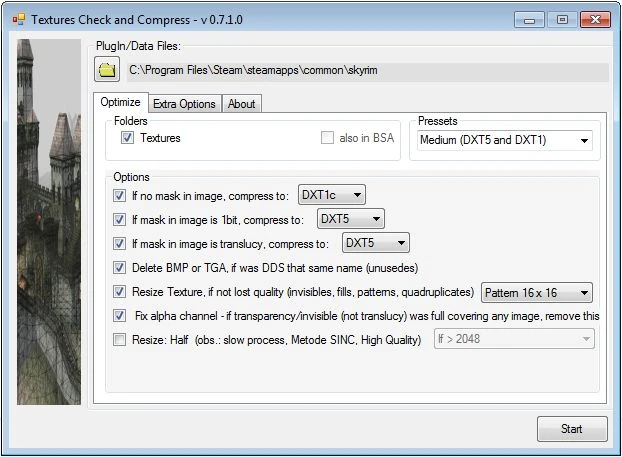
- [] Compress BMP, TGA, DDS (unoptimized) to DXT5 and DXT1 [] Make mipmaps to improve performance [] Delete unnecessary files (identical BMP=TGA=DDS, thumbs.db, pspbrwse.jbf, ...) [] Fixes: Alpha Channel, Wrong Size (Ex: 100x30 => 128x32) [] Resizes: Patterns (16x16 or 4x4), Optionally resize textures [] Optimizer BSA (Compact, Merge internal Files) [] Automatic backup changed files
- [] decreases some stuttering [] fixes crash/CTD caused by bursting of VRAM [] free hard drive space / reduces the size of the MOD
- [] Extract \"Optimizer_Textures_xxx.rar\" to a folder [] Run \"Ordenador.exe\" [] Click in button \"plugin/data files\" to point the Folder of Game or DATA. [] (Optional) First Tab (optimize), choose one presets [] Press \"start\" ... Go for a coffee, or two ... [] Done! ;)
Optimizer Textures is a utility that checks, fixes, and compresses game textures to improve performance. It supports Skyrim, Fallout 3 & NV, STALKER, Oblivion, Morrowind, and others. With 928 endorsements and 16,486 downloads, it's a trusted tool for optimizing texture files, though it hasn't been updated since 2012.
✨ Key Features
📊 Pros & Cons
✅ Pros
- Community-approved with 928 endorsements and 16k downloads—plenty of users trust it.
- Works across multiple Bethesda and STALKER games, so it's versatile for modders.
- Simple utility purpose: compress textures to boost FPS without visual loss.
⚠️ Cons
- Last updated in 2012—likely outdated for modern game versions and may not handle newer texture formats.
- No detailed instructions or feature list provided, so you'll have to figure out the workflow yourself.
- Potential risk of texture corruption if used incorrectly—always back up your textures first.
For modders and players who want to squeeze extra performance by compressing texture files across multiple games. Ideal for those running older hardware or heavily modded setups. Skip if you're on the latest game versions or prefer modern tools with active updates.
💡 Beginner Tips
- Before compressing, make a backup of your original textures—this tool modifies files directly.
- Test on a single game first to see if the performance gain is worth it for your setup.
- Since it's from 2012, check if your game version is compatible; newer games may have different texture formats.
📊 Mod Details
- Game
- Fallout 3 Mods
- Author
- AdPipino
- Version
- 0.8.3
- Downloads
- 16,486
- Endorsements
- 928
- Category
- Utilities
- Created
- 5/2/2012
- Updated
- 6/23/2012
🔧 How to Install Fallout 3 Mods
Download from Nexus.
📖 Full step-by-step install guide for Fallout 3 →
Visit the official mod page for specific installation instructions for this mod.
🎮 Need cheat codes or console commands? Check ur gaming wiki for Fallout 3 commands, item IDs, and more.
Keep browsing — more Fallout 3 mods await