Minimalistic Crosshairs
⚪ Last updated 2013⚠️ Install Order · 2 steps
Install in this order, then this mod last — most mods fail to load without their framework and dependencies in place.
Preview
🔍 Analysis
- 👍 3.9% endorsement rate — high engagement, a strong quality signal
- 🏆 #34 of 82 User Interface mods in this game by downloads
📋 About This Mod
Author: 6IX
Version: 1. 2
Date: 05/10/2013
Category: User Interfaces
Forum Page: http://forums.nexusmods.com/index.php?showtopic=1121180
Webpage(Mod): http://www.nexusmods.com/fallout3/mods/19516/?
Description
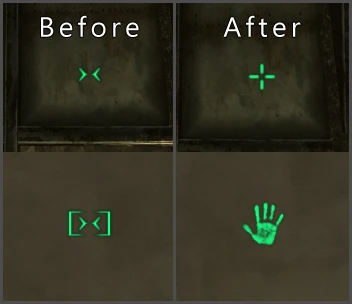
Change aiming and interaction crosshair for a more Intuitive and pleasant to eye experience.
I never liked the default crosshair, it's just too ugly, bland, unintuitive. I decided to make this after using the mod Alternate Crosshair by lionhaert, this is heavily inspired by that.
Contact
Use the comments, or send me a PM here on the Nexus.
Manual Installation
Extract the file using 7-Zip or WinRAR, (or your favorite compression tool). Once extracted, copy the data folder to your Fallout 3 directory, and merge.
Default paths
C:/Program Files/Bethesda Softworks/Fallout 3
C:/Program Files/Steam/steamapps/Common/Fallout 3
Manual Uninstallation
Delete all the files you copied of your Fallout 3 directory.
My Other Mods
Nuka-Cola Hi-Res Retexture
Realistic Megaton Shack
Skill Books Hi-Res Retexture
Legal and Licensing
All the contents in this mod are free for private use only. Please do not re-upload or re-distribute any part of it.
Final Notes
That's all folks. Enjoy!
Minimalistic Crosshairs replaces the default aiming and interaction crosshairs with cleaner, more intuitive designs for a more pleasant visual experience. This UI tweak is ideal for players who find the vanilla crosshairs distracting or clunky. With 890 endorsements and over 22,000 downloads, it's a proven favorite among the community.
✨ Key Features
📊 Pros & Cons
✅ Pros
- Community favorite with 890 endorsements and over 22k downloads
- Simple, clean aesthetic that reduces visual clutter
- Works for both combat and interaction, so it's a one-stop fix
⚠️ Cons
- Last updated in 2013, so it may not be compatible with current game versions
- Only changes crosshairs—no other UI elements are touched
For players who want a cleaner, less obtrusive crosshair without overhauling the entire UI. If you're tired of the default chunky crosshair and want something more minimal, this is a quick fix. Skip if you're looking for a full UI overhaul or need compatibility with the latest game patches.
💡 Beginner Tips
- Since the mod is old, check if your game version has changed the UI system—if so, you may need to manually adjust the files.
- If you use a mod manager, install it through that to keep track of it easily.
- Test the crosshair in both combat and interaction scenarios to see if it fits your playstyle.
📊 Mod Details
- Game
- Fallout 3 Mods
- Author
- 6IX
- Version
- 1.2
- Downloads
- 22,810
- Endorsements
- 890
- Category
- User Interface
- Created
- 10/5/2013
- Updated
- 10/25/2013
🔧 How to Install Fallout 3 Mods
Download from Nexus.
📖 Full step-by-step install guide for Fallout 3 →
Visit the official mod page for specific installation instructions for this mod.
🎮 Need cheat codes or console commands? Check ur gaming wiki for Fallout 3 commands, item IDs, and more.
Keep browsing — more Fallout 3 mods await