HUD interface revelation style
⚪ Last updated 2010⚠️ Install Order · 2 steps
Install in this order, then this mod last — most mods fail to load without their framework and dependencies in place.
Preview
🔍 Analysis
- 👍 2.5% endorsement rate — high engagement, a strong quality signal
- 🏆 #56 of 82 User Interface mods in this game by downloads
📋 About This Mod
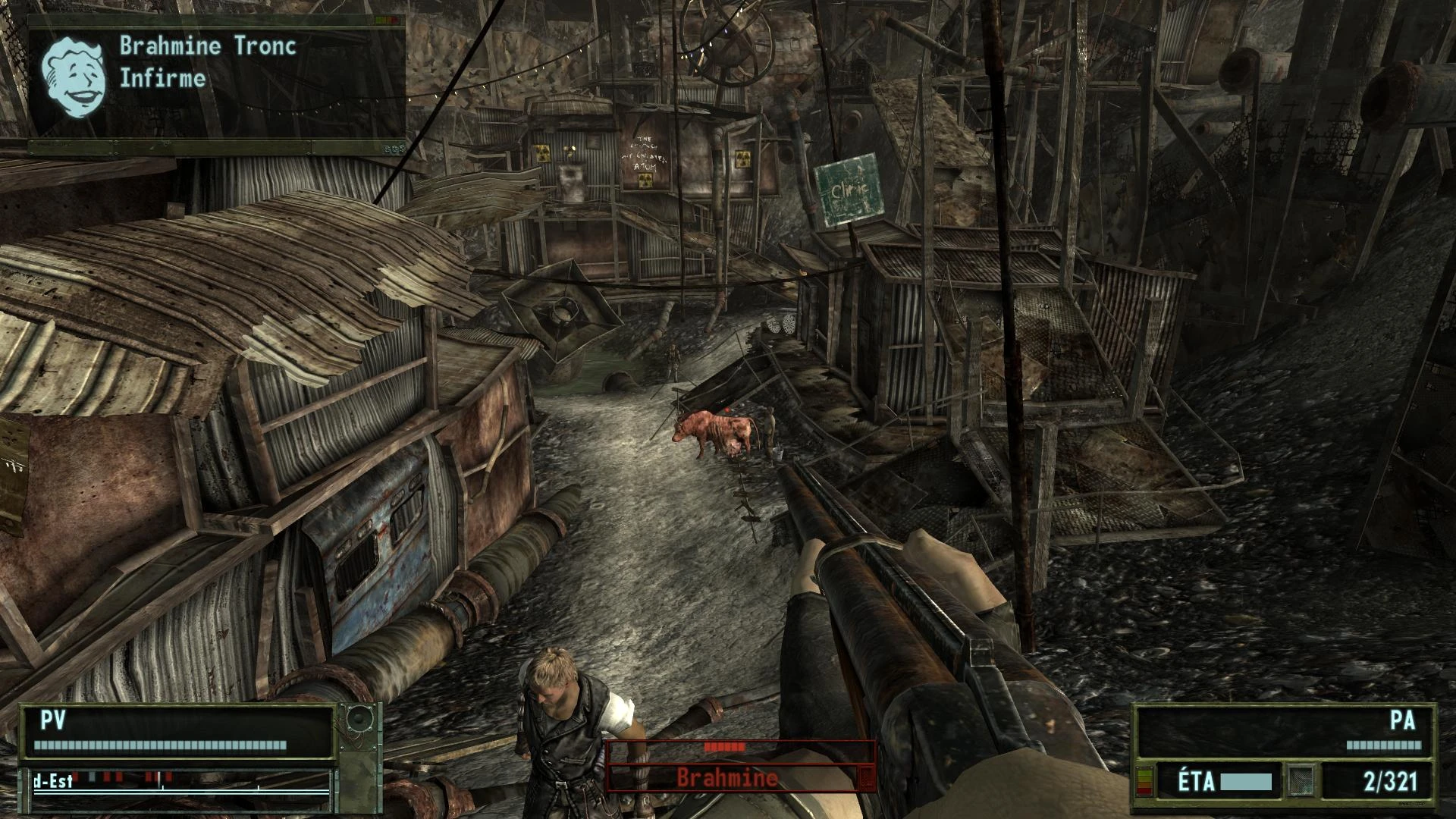
_______________________________________________________________________________________ English => ===================== Description: This mod change the HUD of the game with a new texture in the style of Interface Mod - Revelation (I also use its textures). ===================== Warning: /!\\ In order to avoid coloration of the HUD, please select \"White\" in the game option /!\\ ===================== Effect: Watch the screenshots ;) There are 6 versions of the mods. 3 are in french, and the 3 other in English (but the translation just concern the compass, so English version can fit with any other version of the game, even French). The Full version change the HUD, the enemies\' life and name,and messages in the right-top corner. The normal version change the HUD,and messages in the right-top corner. The light version only change the HUD ==================== How to install: Just extract in the installation folder of Fallout 3. Also use greats mods like Achiveinvalidation Validated to make the game use that texture. =================== How to uninstall: Delete interfaceshared0.dds (... Data\\textures\\interface) and hud_tick_mark.dds (... Data\\textures\\interface\\HUD). ================== Credit: SGHi (for the texture) ================== Tools: Gimp with .dds plug-in Winrar _________________________________________________________________________________________________ Français => ===================== Description: Ce mod change l’hideux HUD du jeu de base par un jeu de texture venant du très bon mod interface revelation (d’ailleurs j’ai utilisé ses textures !) ===================== Avertissement: /!\\ Pour éviter une coloration de la texture, vous devez impérativement mettre le HUD en blanc dans les options du jeu. /!\\ ===================== Effet: Regardez les images ;) Il y a 6 versions du mod. 3 sont en français, et les 3 autre en anglais (mais la traduction concerne uniquement la boussole, donc la version anglaise peut coller à n\'importe quelle version, même à la française. Le version Full change le HUD, la vie et le nom des ennemies, et les messages en haut à droit.e La version normale change le HUD et les messages en haut à droite. La version ligh change uniquement le HUD. ==================== Installation: Décompressez juste le mod dans le répertoire d’installation de Fallout 3. Pour faire utiliser par le jeu cette texture vous pouvez utiliser de très bon mods comme Achiveinvalidation Validated si ce n’est déjà fait. =================== Désinstallation: Suppimez interfaceshared0.dds (... Data\\textures\\interface) et hud_tick_mark.dds (... Data\\textures\\interface\\HUD). ================== Credit: SGHi (pour les textures) ================== Outils: Gimp avec le plug-in .dds Winrar
A compact UI overhaul that swaps the default HUD textures for a Revelation-style interface. With 260 endorsements and 10,262 downloads, it's a niche but appreciated cosmetic tweak for players wanting a fresh look. Last updated in 2010, so it's an old mod with potential compatibility concerns.
✨ Key Features
📊 Pros & Cons
✅ Pros
- Community-approved with 260 endorsements and over 10k downloads
- Gives your HUD a fresh, Revelation-inspired look without overhauling the whole UI
- Simple drop-in texture replacement—no complex setup
⚠️ Cons
- Last updated in 2010—may be incompatible with current game versions
- Only changes the HUD texture; don't expect any functional improvements
For players who want a quick visual refresh of their HUD with a Revelation-style aesthetic. If you're a UI tinkerer who enjoys cosmetic tweaks, this is a neat find. Skip if you need modern compatibility or functional UI changes.
💡 Beginner Tips
- Since it's a texture replacement, back up your original HUD files before overwriting.
- Check if the mod's file structure matches your game version—old mods often need manual placement.
- If the game has a mod manager, try using it to avoid file conflicts.
📊 Mod Details
- Game
- Fallout 3 Mods
- Author
- Vuzi
- Version
- 0.1
- Downloads
- 10,262
- Endorsements
- 260
- Category
- User Interface
- Created
- 10/24/2010
- Updated
- 10/24/2010
🔧 How to Install Fallout 3 Mods
Download from Nexus.
📖 Full step-by-step install guide for Fallout 3 →
Visit the official mod page for specific installation instructions for this mod.
🎮 Need cheat codes or console commands? Check ur gaming wiki for Fallout 3 commands, item IDs, and more.
Keep browsing — more Fallout 3 mods await