Helmet POV
⚪ Last updated 2010⚠️ Install Order · 2 steps
Install in this order, then this mod last — most mods fail to load without their framework and dependencies in place.
Preview
🔍 Analysis
- 👍 4.1% endorsement rate — high engagement, a strong quality signal
- 🏆 #18 of 82 User Interface mods in this game by downloads
📋 About This Mod
==========================================================================
Requirements
==========================================================================
FOSE, tested with version v1. 2 b2 and later
@ http://fose.silverlock.org/
==========================================================================
What this mod does
==========================================================================
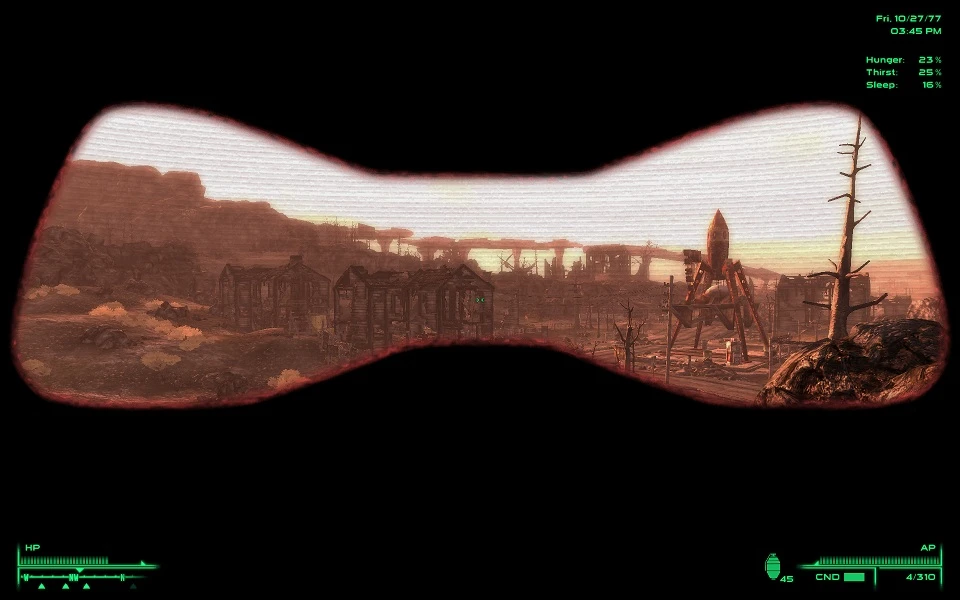
Allows the user to configure their POV when wearing
helmets/masks/hats/eyewear.
Included features are:
- 3 selectable overlay images
- 6 colors, 2 strenghts each, freely mixable
- Special vision modes (toggle with M key):
o Night vision
o Heat vision (detects living beings)
o EM vision (detects robots, energy weapons, mines etc)
- Gas mask breathing sound
- Simulated head movement by adjusting the overlay position
- Visible item condition (stain, cracks)
This is an alpha version, mainly intended for testing so I receive some
feedback.
==========================================================================
Upgrading
==========================================================================
1. Deactivate the old plugin and save your game without it.
2. Extract the contents of the archive to your Data/ directory and
overwrite any previously installed files.
3. Activate the plugin again.
==========================================================================
Installation
==========================================================================
IMPORTANT: If you are upgrading from version 0. 1, follow the steps in
the upgrading section instead!
1. Before installation, make sure to keep a clean save game in case it
doesn\'t work as it should.
2. Extract the contents of the archive to your Data/ directory and
and activate the plugin.
The next step depends on whether you already have an existing
hud_main_menu.xml in your Data/menus/main/ folder or not.
If the file exists:
3a. Open your Data/menus/main/hud_main_menu.xml in a text editor and add
the line
Helmet POV is a configurable user interface mod for Skyrim that adds first-person perspective effects when wearing helmets. With 1,807 endorsements and 43,905 downloads, it's a popular choice for immersion-focused players. Last updated in 2010, it may be outdated for current game versions.
✨ Key Features
📊 Pros & Cons
✅ Pros
- Community favorite with 1,807 endorsements and 43,905 downloads
- Simple concept that adds immersion without overhauling gameplay
- Configurable settings let you tweak the effect to your liking
⚠️ Cons
- Last updated in 2010 — likely incompatible with current Skyrim versions
- May require manual configuration or compatibility patches
For immersion enthusiasts who want to see the inside of their helmet while playing. If you're on an older Skyrim version and love roleplaying, this is a neat touch. Skip if you're on the latest version or want more than a visual tweak.
💡 Beginner Tips
- Check if the mod is compatible with your Skyrim version before installing
- Look for community patches or updates that fix compatibility for newer versions
- Test the POV effect with different helmets to find the best config
📊 Mod Details
- Game
- Fallout 3 Mods
- Author
- schlangster
- Version
- 0.2
- Downloads
- 43,905
- Endorsements
- 1,807
- Category
- User Interface
- Created
- 3/1/2010
- Updated
- 3/12/2010
🧩 Commonly Used Together
Users add these mods to the same collections — a real compatibility signal, not an AI guess.
🔧 How to Install Fallout 3 Mods
Download from Nexus.
📖 Full step-by-step install guide for Fallout 3 →
Visit the official mod page for specific installation instructions for this mod.
🎮 Need cheat codes or console commands? Check ur gaming wiki for Fallout 3 commands, item IDs, and more.
Keep browsing — more Fallout 3 mods await